
Is your “Add to Cart” button missing even though your inventory is in stock? That is often a sign that your Amazon pricing health is holding the listing back and not a stock issue.
Many sellers cut prices just to stay competitive, but that approach can hurt margins without solving the real problem. Strong pricing is not about being the cheapest; it is about staying within Amazon’s acceptable range while still remaining competitive.
When pricing is off, the impact shows up quickly through lost Buy Box, suppressed listings, and inconsistent sales. These issues do not always happen at once, but once they start, they can be difficult to reverse.
In this guide, our Amazon agency breaks down what Amazon pricing health means and how it affects your ability to win the Buy Box. You will also learn practical ways to spot pricing issues and fix them before they start affecting your sales.
Table of Contents
Improve Your Amazon Pricing Health Fast
Get expert help to keep your listings competitive and active.
What Is the Amazon Pricing Health?
Amazon pricing health refers to how well your product pricing aligns with Amazon’s rules, competitive benchmarks, and customer expectations. It plays a direct role in whether your offer is eligible to win the Featured Offer, which is where most sales happen on the platform.
Amazon uses pricing signals to monitor your listings in real time and determine if your price fits within acceptable ranges. If your price is too high, too low, or inconsistent with external marketplaces, your listing can be flagged, made ineligible for the Featured Offer, or even suppressed until the issue is fixed.
Pricing health matters because shoppers care about price more than most factors when buying online, with 61% of global consumers ranking it as one of their top decision drivers. If your pricing is not competitive, you risk losing visibility and sales to competitors who better match what customers expect to pay.
Benefits of Improving the Amazon Pricing Health
Improving pricing health impacts your business in clear, measurable ways across visibility, conversions, and profitability. When your pricing is in a healthy range, Amazon rewards your listings with more exposure and stronger performance.
- More Buy Box wins, which drives your primary source of sales
- Better placement on product pages and in search results
- Higher conversion rates since pricing feels more competitive
- Stronger organic rankings driven by increased sales
- Improved customer trust, leading to more purchases and reviews
- Stable ad performance with fewer interruptions in campaign eligibility
- More consistent margins without constant pricing adjustments
How to Check Your Amazon Pricing Health
It is important to check your Amazon pricing health regularly so you can catch pricing issues early and avoid losing visibility or the Buy Box. This helps you monitor listings for errors, competitiveness, and eligibility before they impact your sales.
- Log in to your Seller Central account
- Click the menu icon in the top left corner
- Go to the “Pricing” tab
- Click “Pricing Health”
- Look for listings marked with warnings or errors
- Check which products are not eligible for the Buy Box
- Review any pricing issues and update your price or settings to fix them
Seen a New Seller Central Update? Let Us Know!
Amazon Seller Central constantly updates its interface. If you spot a change we missed, let us know using the form below!
Common Amazon Pricing Health Issues Sellers Face
There are many issues that can impact Amazon pricing health, and being aware of them helps you understand why your listings suddenly lose visibility or the Buy Box. Most of these problems happen because Amazon is constantly comparing your price against internal rules, competitors, and external marketplaces.
1. Price Limits Violations
Pricing falls outside your set range, such as when your offer price goes above your maximum or below your minimum, which can trigger warnings or even listing suppression. This often happens without sellers realizing their own price limits are being violated by manual updates or automation tools.
2. Pricing Conflicts Between Offer Types
Conflicts between different price types, such as sale price, business price, or standard offer price, can create inconsistencies that Amazon flags as pricing errors. These mismatches make your listing appear unreliable and can affect whether your offer stays active.
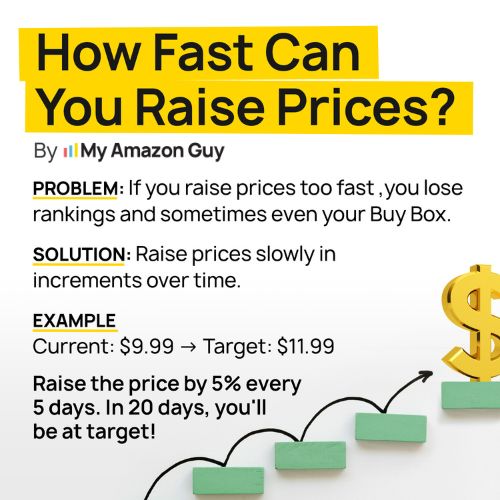
3. Sudden Price Changes
Sudden price increases or decreases can trigger fair pricing alerts if they don’t align with recent pricing history or expected market behavior. Amazon may interpret these changes as incorrect or risky, especially if the adjustment is too large.
4. External Price Differences
External pricing differences can cause issues when your product is priced higher on Amazon than on other websites selling the same item. Amazon may respond by lowering your visibility or removing your Buy Box eligibility to avoid showing customers a higher-priced option.
5. Automated Pricing Errors
Automated pricing tools can unintentionally push your price too high or too low based on competitor activity. If these changes violate your minimum or maximum settings, Amazon may deactivate your listing to prevent pricing mistakes.
6. Shipping Fee Issues
Shipping costs that appear too high compared to the product price can also trigger pricing health warnings. Amazon factors in the total cost to the customer, so unexpected shipping fees can negatively impact your pricing health score.
7. Post-Discount Pricing Fluctuations
Pricing inconsistencies after promotions or discounts can cause your listing to be flagged once prices return to normal. If your regular price looks too high compared to recent sale prices, Amazon may see it as a potential pricing issue.
Fix Your Amazon Pricing Issues Today
Struggling with pricing errors that hurt your visibility and sales?
Proven Strategies to Improve Amazon Pricing Health
Improving pricing health is not just about adjusting numbers on a listing; sellers need a system that keeps prices aligned with Amazon’s rules, competitor pricing, and customer expectations. The strategies below focus on practical actions you can apply to stay in control and keep your listings in good standing.
1. Monitor Your Pricing Health Dashboard Regularly
Check your Pricing Health dashboard on a consistent schedule to catch inactive listings, pricing errors, or items that are close to losing Featured Offer eligibility. Make it a habit to review flagged SKUs and act on them immediately so issues don’t pile up and impact your sales.
2. Align Prices with Competitive Benchmarks
Amazon compares your pricing to both internal data and external retailers to decide if your offer is competitive. Keep your total price (item price + shipping) at or below comparable offers outside Amazon to stay eligible for the Featured Offer.
3. Use Automated Pricing Tools Strategically
Tools like Automate Pricing can help you adjust prices based on rules you define, keeping you competitive without constant manual updates. Set clear guardrails so the system works within your margins instead of cutting into your profit unexpectedly.
4. Keep Minimum and Maximum Price Limits Updated
Amazon uses your set price ranges to determine if your listing is within acceptable limits. Review and adjust your minimum and maximum prices whenever costs change, so your listings don’t get deactivated for going out of bounds.
5. Use Coupons Instead of Lowering Base Price
Running promotions through coupons or discounts keeps your actual listing price stable while still offering value to customers. This helps protect your historical pricing data and prevents sudden drops that can trigger pricing health issues.
6. Maintain Consistent Pricing Across Variations and Bundles
Amazon checks whether your pricing makes sense across different pack sizes or variations of the same product. Ensure that bulk or multi-pack listings offer a logical per-unit discount so you avoid unit pricing violations.
7. Optimize Shipping Costs and Offer Free Shipping Where Possible
High or inconsistent shipping fees can hurt your pricing health, especially for FBM sellers. Whenever possible, include shipping costs in your product price and offer free shipping to stay aligned with Amazon’s expectations and improve your chances of winning the Featured Offer.
FAQs About Amazon Pricing Health
How does pricing health impact my ad performance?
When your pricing health is poor, your listings can become ineligible for ad placements, which stops your campaigns from running effectively. This reduces traffic to your listings and lowers the return on your ad spend.
Why does Amazon flag my pricing as unhealthy?
Amazon flags pricing when your price falls outside your set limits, is higher than competitive external prices, or creates a poor customer experience. These flags can lead to suppressed listings or loss of Featured Offer eligibility.
Do promotions help improve the Amazon pricing health?
Yes, using promotions like coupons or discounts can improve your perceived competitiveness without lowering your base price. This helps you stay within Amazon’s pricing expectations while still offering value to customers.
Pricing Is the Line Between Visibility and Lost Sales
Pricing is one of the biggest factors that determines whether your product shows up on Amazon or gets pushed out of sight. When your pricing health is aligned with Amazon’s expectations, your listing stays visible, wins the Buy Box more often, and drives consistent sales.
When pricing is off, everything else suffers, including visibility, ad performance, and organic rankings. That is why sellers need to treat pricing as a core part of their strategy and continuously monitor it to stay competitive without sacrificing margins.
Do you need help fixing pricing issues and improving your Buy Box performance? Contact our full-service Amazon agency and let our experts help you improve your Amazon pricing health.
Win More Buy Box Sales Now
Improve your pricing strategy to increase Buy Box wins and conversions.