


Are you aware that even if you send a lot of inventory to Amazon, you can’t just stockpile without limits? Going over your Amazon FBA storage limit can create extra fees and hurt your cash flow.
Selling on Amazon comes with many responsibilities, and inventory management is one of the biggest. Even though FBA handles fulfillment, sellers still need to plan their stock carefully to avoid running into storage restrictions.
One of the key numbers every FBA seller needs to track is the Amazon FBA storage limit. Yet many sellers ignore it and end up with overage fees or stranded inventory that slows down sales.
In this guide, our Amazon agency explains how the Amazon FBA storage limit works and how sellers can manage it effectively. We will also discuss common mistakes, key factors, and best practices to optimize inventory and avoid overage fees.
Table of Contents
Maximize Your FBA Capacity
Struggling with storage limits? Our team can help you optimize your FBA space and avoid overage fees.
What Is the Amazon FBA Storage Limit and How Does It Work?
The Amazon FBA storage limit is the maximum amount of inventory you can store in Amazon’s fulfillment centers, measured in cubic feet rather than unit count. These limits are updated monthly and depend on factors like your Inventory Performance Index (IPI) score, sales velocity, and the overall warehouse space available.
Approximately 82% of sellers use FBA, making understanding these limits critical for managing stock and avoiding overage fees. Sellers with high IPI scores or fast-moving products may have higher or even no limits, while new or lower-performing accounts face stricter monthly restrictions that can affect how much inventory they can send.
Key Factors That Affect Your Amazon FBA Storage Limit
An FBA seller’s storage limit isn’t fixed and can change each month depending on several factors. Amazon weighs all of these to decide whether your limit should increase or decrease.
- Inventory Performance Index Score
Measures inventory efficiency; high scores increase storage, low scores reduce it. - Sales Velocity and History
Fast-selling products and strong past sales can raise your limit. - Available Fulfillment Center Capacity
Limits adjust based on space available at Amazon’s warehouses. - Storage Type and Product Category
Separate limits exist for standard, oversize, apparel, and special categories. - Age of Seller Account
New accounts under 39 weeks often have no limits; older accounts have calculated limits. - Account Type (Individual vs. Professional)
Individual accounts have fixed limits; professional accounts have variable limits based on performance.
How to Find Your Current Amazon FBA Storage Limit
Checking your FBA storage limit is easier than many sellers realize, but not everyone knows where to find it. The process is quick and simple once you know the steps.
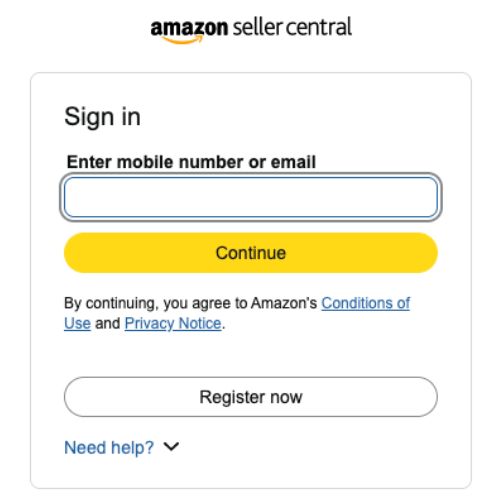
- Log in to your Amazon Seller Central account.
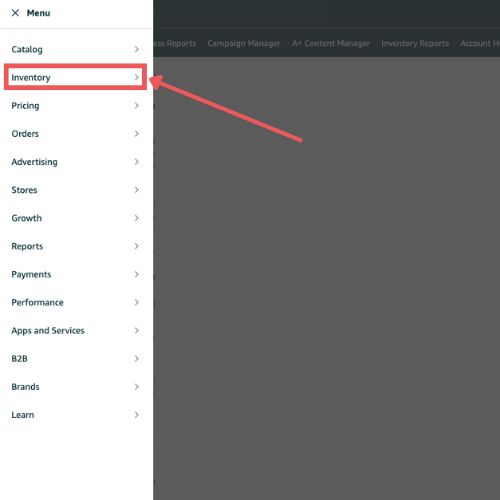
- Hover over the Inventory tab in the main menu.
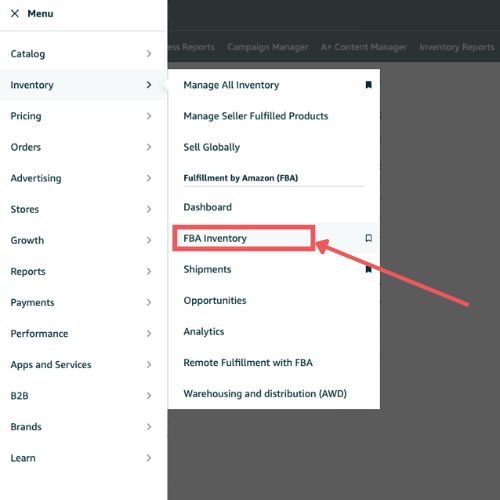
- Select FBA Inventory from the dropdown.
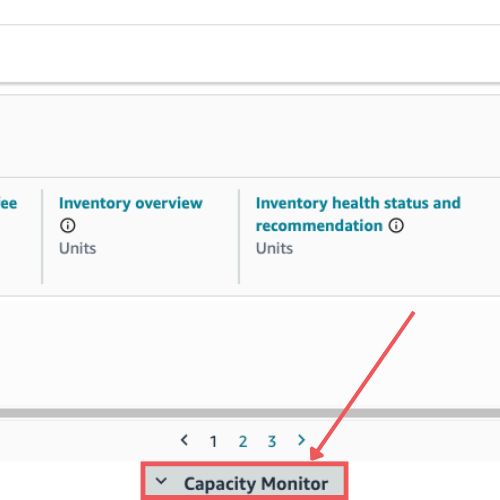
- Look for the Capacity Monitor box to see current usage and future limits.
Common Mistakes Sellers Make When Managing FBA Storage Limits
Mismanaging your FBA storage or going over your limit can create fees, restrict your shipments, and hurt your sales. That’s why it’s important to know the common mistakes so you can spot them early or avoid them altogether.
1. Ignoring the IPI Score
Many sellers don’t monitor their Inventory Performance Index, not realizing it directly impacts storage limits. A low IPI can trigger reduced capacity and make it harder to send in new inventory.
2. Overstocking Slow-Moving Products
Sending too many products that don’t sell quickly takes up valuable space. This can fill your limit and result in higher storage fees for inventory that sits idle.
3. Neglecting Stranded or Unsellable Inventory
Sellers often forget units with listing errors or items that haven’t sold in months. These products block storage for profitable stock and lower your IPI, reducing your limit next month.
4. Mismanaging Q4 or Seasonal Inventory
Waiting too long to send holiday stock or ignoring seasonal limits is a common misstep. By the time the inventory arrives, sellers can miss peak sales windows or exceed temporary capacity.
5. Failing to Monitor Capacity Limits Regularly
Some sellers assume their limit won’t change and rarely check the dashboard. This can lead to creating shipments that get blocked or having inventory stuck outside Amazon’s fulfillment centers.
6. Using FBA for Large or Low-Margin Items
Having oversized or low-margin products consumes lots of cubic feet without generating enough profit. Sellers who do this risk quickly hitting limits while tying up cash flow in slow-moving stock.
Clear Stranded Inventory Fast
Our experts resolve listing errors and stranded SKUs so your FBA space works for you.
Best Practices for Managing Amazon FBA Storage Limit
There are many strategies sellers can use to manage their FBA storage effectively. Following the right practices can help keep your inventory healthy and even increase your storage limit over time.
1. Improve IPI Score
Focus on maintaining a high Inventory Performance Index by keeping your inventory balanced and reducing excess stock. A strong IPI directly impacts your storage limits and ensures Amazon sees your account as efficient.
Regularly check your IPI and take action to correct issues that could lower your score. This prevents sudden reductions in storage capacity and keeps shipments flowing smoothly.
2. Boost Sell-Through Rate
Prioritize selling fast-moving products first to increase your turnover. Higher sell-through rates signal to Amazon that your inventory is managed efficiently.
Use promotions or discounts to move slow-selling items faster. Improving sell-through not only frees space but also strengthens your IPI over time.
3. Remove Aged Inventory
Identify items that haven’t sold in 90 days or more and remove them from FBA. Aged inventory occupies space without generating revenue, which can hurt your capacity.
By clearing out old stock, you make room for items that sell quickly and contribute to higher profits. Regular audits prevent overage fees and reduce wasted storage.
4. Use 3PL or AWD for Bulk Storage
Keep only 30-60 days of inventory in FBA and store extra stock in a third-party logistics (3PL) provider or Amazon Warehousing & Distribution. This prevents your FBA space from being blocked by products that move slowly.
Using external storage helps you scale without hitting FBA limits. It also frees up your cash flow while keeping your FBA inventory focused on fast-selling items.
5. Optimize Shipments
Cancel open or unused shipments that you don’t plan to send immediately. Open shipments count against your storage limit, which can block capacity for more important products.
Tracking inbound inventory carefully ensures you don’t accidentally overfill your FBA space. Proper shipment management also keeps your IPI strong and reduces operational headaches.
6. Clear Stranded Inventory Quickly
Fix listing errors or inactive SKUs as soon as they appear to turn stranded inventory into sellable stock. Stranded units take up space without contributing to sales, reducing your storage efficiency.
Regularly monitoring stranded inventory ensures your capacity is fully utilized for profitable items. Clearing these issues also protects your IPI and prevents future storage restrictions.

7. Smart Bidding in the Capacity Manager
When requesting extra storage, bid strategically rather than guessing. Amazon uses a lowest accepted bid system, so reviewing historical bids and setting your request slightly above the average ensures you secure space without overpaying.
Regularly monitor your bids and performance credits to avoid unnecessary fees. Proper bidding helps you access additional storage efficiently during peak seasons like Q4 without overspending.
8. Prioritize High-Margin and Fast-Selling Products
Focus your FBA space on items that sell quickly and generate higher profits. Low-margin or slow-moving products take up valuable cubic feet and can reduce overall efficiency.
By prioritizing top-performing products, you increase your sell-through rate and improve your IPI score. This strategy not only maximizes storage but also helps you maintain healthier inventory turnover.
FAQs About Amazon FBA Storage Limit
Can I increase my Amazon FBA storage limit?
Yes, you can request additional space using Amazon’s Capacity Manager, especially during peak seasons. Your eligibility and the amount you get depend on your IPI score, sales velocity, and available warehouse space.
What happens when I go over the Amazon FBA storage limit?
If you exceed your limit, Amazon will prevent you from creating new shipments. You may also incur overage fees on inventory that remains in the warehouse beyond your allowed capacity.
How often does Amazon update storage limits?
Amazon updates storage limits monthly, with projections for the next two months. Sellers should check the Capacity Monitor regularly to stay informed of any changes.
Take Control of Your FBA Storage Limit
Managing inventory is one of the biggest responsibilities for FBA sellers, as it directly affects sales, cash flow, and storage efficiency. One key aspect of this is the Amazon FBA storage limit, which can lead to overage fees or blocked shipments if not managed properly.
Understanding how storage limits work, the factors that affect them, and the common mistakes to avoid is critical for keeping your inventory under control. Learning these strategies allows sellers to maximize their FBA space, maintain a high IPI, and prevent costly disruptions.
Are you struggling to keep your FBA storage in check? Reach out to our full-service Amazon agency and let our experts help you optimize inventory, boost storage capacity, and protect your profits.
Optimize Inventory Management Today
We create a plan to maintain high IPI scores, boost sell-through, and increase your storage limits.
