

Last Updated: August 20, 2026
Worried that your product isn’t getting traction because it doesn’t have enough reviews? The Amazon Vine Program might be the solution you’ve been looking for.
When launching a new product, one of the biggest concerns for Amazon sellers is trust. Without product reviews, most customers hesitate to buy.
No matter how great your product is, if there’s no social proof, it often gets ignored. Across $1.2B+ in managed ecommerce revenue for 400+ brands, we keep seeing the same pattern where a strong listing stalls purely because the review count is too low.
That’s where Amazon Vine comes in.
It’s a review program that allows select Amazon customers to test your products and leave detailed, honest feedback. It’s not a magic wand, but it can absolutely help you build credibility fast if you use it strategically.
Still unsure if it’s worth the cost? This blog will walk you through how the Amazon Vine Program works, what it costs, and how to use it right.
Table of Contents
TL;DR
Here is what Amazon Vine costs and delivers in 2026.
- Brand Registry or generic products qualify
- Fees run $0 to $200
- Billing starts after first review
- Reviews no longer pool across variations
- Enroll three weeks before launch
Most sellers burn free units on the wrong ASIN. This guide, and our Amazon agency team, shows where Vine actually pays.
What Is Amazon Vine and How Does It Work?
The Amazon Vine Program was created to help sellers get high-quality, honest, and unbiased reviews, especially during a product launch. It connects your products with trusted reviewers who give detailed feedback to help other shoppers make buying decisions.
When a seller enrolls a product into the program, Amazon ships that product to pre-selected reviewers called Vine Voices. These reviewers are invited by Amazon based on their track record of writing helpful reviews.
Once they receive the free product, they test it out and share their honest experience. They’re not paid for the review, and they don’t have to leave a positive one, just a real one.
Amazon clearly labels these Vine reviews on your listing so customers know they came through the program. The goal is to build early trust and get social proof that can drive more conversions.
Amazon puts the average sales lift for products launched with Vine reviews at 30%, which is a company figure rather than an independent study, so treat it as a ceiling and not a forecast.
What Changed for Amazon Vine in 2026?
Vine reviews stopped pooling across variations that work differently, and that broke the most common launch play in the category. Amazon announced it on January 7, 2026 and rolled it out store category by store category between February 12 and May 31.
Why did my parent ASIN review count drop in 2026?
Your children stopped sharing. A parent that showed one combined count now shows separate counts on any child that differs in function, formula, or specification, so a listing that read 2,000 reviews can read 400 on one child and 1,600 on another.
Which variations still share reviews?
Anything cosmetic or structural still shares. Size runs, color options, pack counts, secondary scents, and device model fitment all keep pooling, because a shopper’s experience of a red one and a blue one is the same experience.
Function is where the line sits. Different wattage, different formula, different capacity, and different materials all split now.
How does this change my Vine strategy?
You get one shot per parent, so spend it on the child that carries your revenue. Amazon caps you at 30 units per parent product, and the cost section below breaks down what those units run.
The old move was to enroll the cheapest variant and let 30 reviews lift the whole family. That move is dead.
Amazon sends a 30-day email warning before your listings get touched. The email does not always name every affected child ASIN, so pull your own review counts rather than trusting the notification to be complete.
There is a compliance edge here too. Holding a variation family together when the children are clearly different products is treated as catalog abuse, which puts the account at risk and not just the listing.
What to do this quarter:
- Export your parent list and flag every family where children differ by more than color or size.
- Fix the variation theme where the grouping is genuinely cosmetic and open a case to correct it.
- Check review counts on every child that matters to revenue.
- Enroll the thin children in Vine, since they qualify again the moment they fall under 30 reviews
- Watch conversion rate rather than review count for 90 days after your category flips.
Eligibility Requirements to Access Amazon Vine
Before sellers or reviewers can use the Vine Program, they need to meet certain requirements. This protects both sides from issues like review manipulation, fake products, and misleading claims.
For Amazon Sellers
- Professional selling account, not an Individual plan
- Brand Representative or Reseller role on a brand enrolled in Brand Registry, or generic products in your catalog
- An eligible FBA offer, since Amazon fulfills every Vine unit itself
- Fewer than 30 reviews on the detail page for products already selling
- A product image and a description on the listing
FBA inventory sent in, or a future launch date set if the product has not gone live yet
Two things moved here since our last update. The Reseller role now qualifies alongside Brand Representative, and you no longer need a live, buyable ASIN to enroll.
Some products aren’t allowed:
- Adult products
- Digital products
- Bundled products
- Anything that does not match the exact item on the FBA offer
What Does It Cost to Enroll in Amazon Vine?
Vine once ran $2,500 per ASIN, which priced out every brand that needed it most. Amazon rebuilt the pricing in October 2023 and has held it steady through 2026, so the numbers below are the ones you plan against
Here’s the current fee structure based on how many units you enroll per parent ASIN:
| Units per parent product | US fee | Other Vine marketplaces |
|---|---|---|
|
1–2 |
$0 |
No fee |
|
3-10 |
$75 |
CAD 100, GBP 60, EUR 70, JPY 10,000 |
|
11-30 |
$200 |
CAD 240, GBP 140, EUR 170, JPY 22,000 |
Things to keep in mind:
- Billing starts 30 days after enrollment, and only once your first Vine review has published
- No Vine review inside 90 days of the enrollment date means no charge at all
- Up to 30 units per parent product, so 30 is the practical ceiling on Vine reviews
- New sellers who enroll a brand in Brand Registry get a $200 Vine credit, which covers a full 30-unit enrollment in the US
The seven-day figure is out of date. Amazon now runs both clocks together, so nothing bills until 30 days have passed since enrollment and a review has actually gone live
For Vine Reviewers
Vine Voices aren’t just random customers. Amazon personally invites them based on the quality and helpfulness of their reviews of their past purchases.
They don’t get paid, and they don’t get to choose what to review freely. Reviewers must follow strict guidelines and disclose that they received the product through Vine.
They also owe income tax on the estimated value of whatever they claim, which is why some Voices skip high-ticket items entirely
This keeps the program transparent and reduces the risk of fake praise or biased reviews. If reviewers don’t follow Amazon’s rules, they can be removed from the program.
How to Join the Amazon Vine Program
Enrolling in the program is easy, but if you’re unfamiliar with the process, it’s just as easy to miss a step that could cause delays or even disqualify your product. That’s why we’ve put together this simple, step-by-step guide to help you get started without the guesswork.
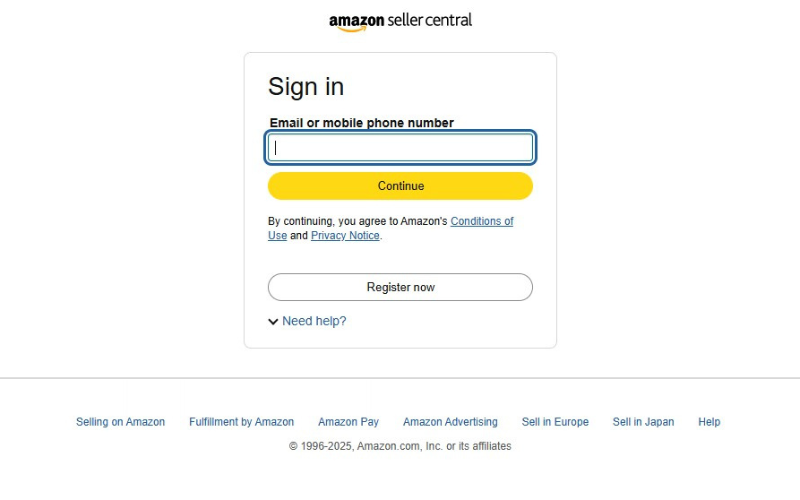
Step 1: Log in to Seller Central
Sign in to your Amazon Seller Central account.
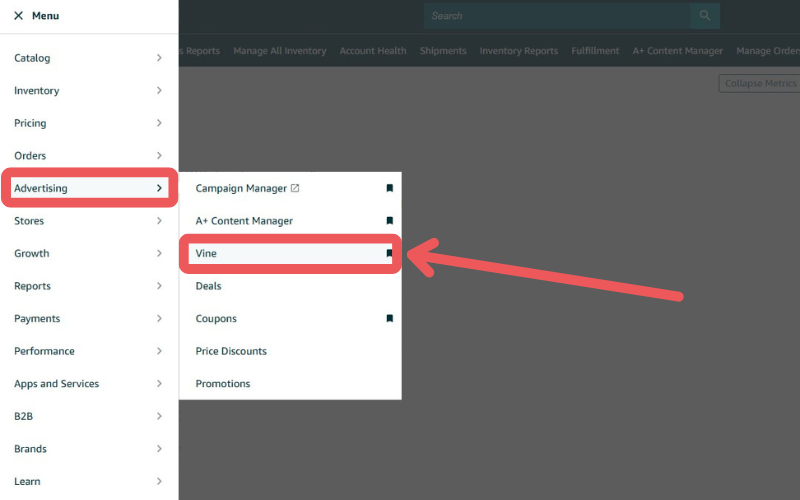
Step 2: Start the Enrollment Process
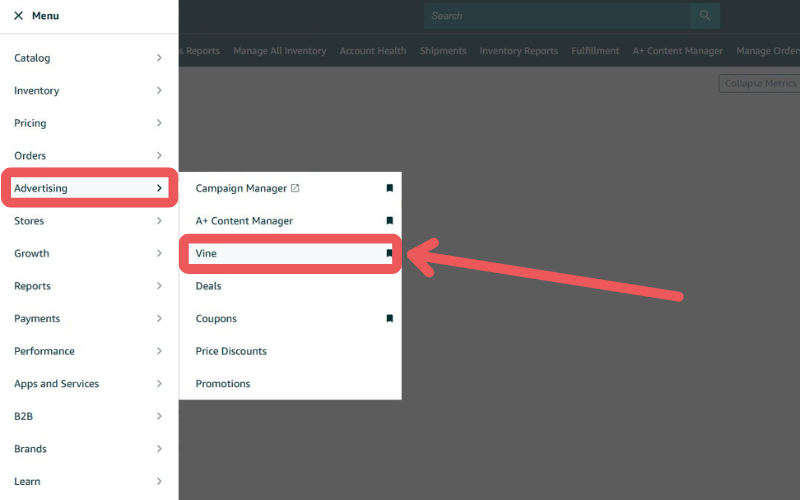
From the side menu, go to the Advertising tab and click Vine.
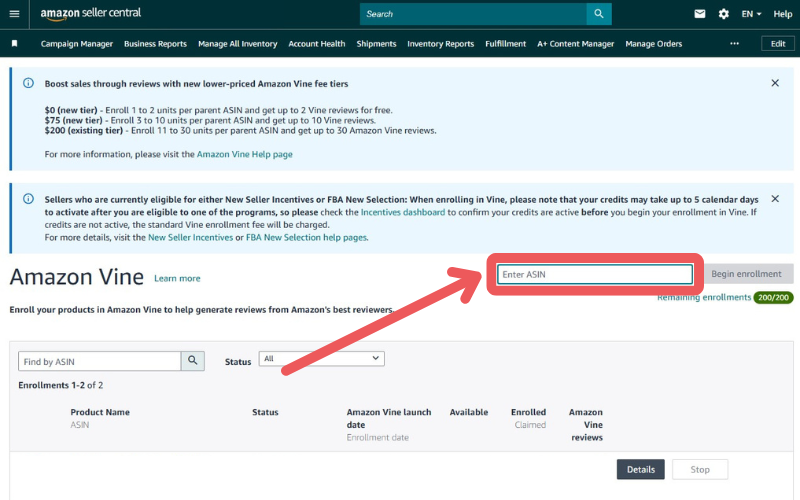
Step 3: Enter Your ASIN
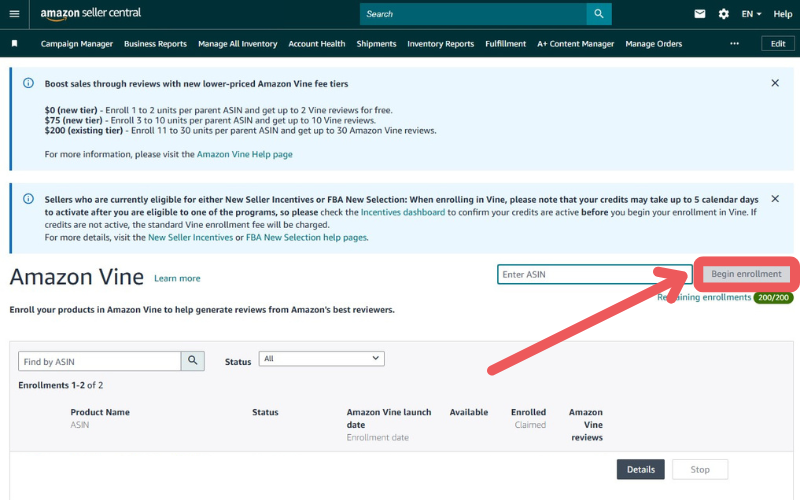
On the next screen, type in the ASIN of the product you want to enroll. Click Begin enrollment to move forward.
You can do this before the product is live. Amazon lets you enroll as soon as the FBA listing is customer-ready and a future launch date is set, which is the whole point of the program
Step 4: Choose the Number of Units
Select how many units you’d like to offer to Vine reviewers, up to a maximum of 30 units per parent ASIN. This determines your Vine enrollment fee.
Step 5: Confirm and Enroll
After entering the ASIN and selecting your quantity, click Enroll to finalize. Amazon recommends having units in the fulfillment network at least three weeks before your launch date, since Voices need time to claim, receive, use, and write.
Step 6: Monitor Progress
You can track the status of your enrollment from the Enrollment Details page under the Vine tab. Watch for reviews and inventory movement.
How to Cancel Enrollment in the Amazon Vine Program
If you’re starting to see organic traction or just want to pull back for any reason, you’re not locked in. Amazon gives sellers the option to cancel Vine enrollment whenever it makes sense for their business.
Just follow these simple steps:
Step 1: Go to Seller Central
Log in to your Amazon Seller Central account.
Step 2: Navigate to the Vine Program
Hover over the Advertising tab at the top menu and select Vine from the dropdown.
Step 3: Find the Enrolled Product
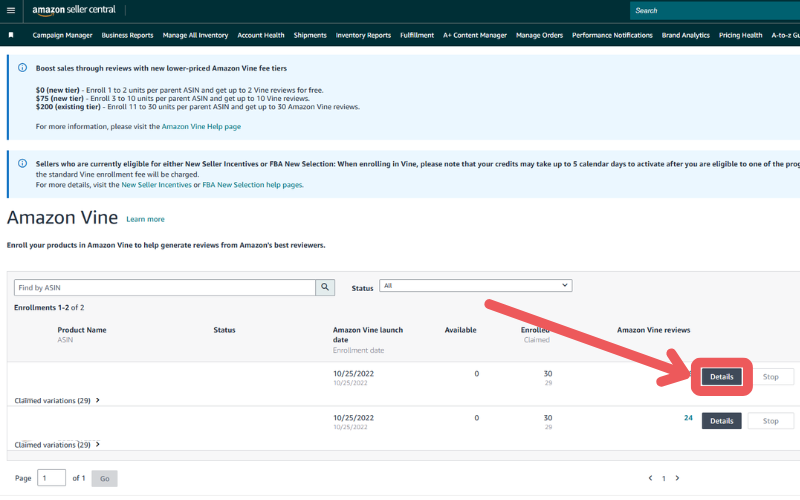
Locate the ASIN you want to remove from the program. Click on Details next to that listing.

Step 4: Cancel the Enrollment
At the bottom right corner of the page, click Stop Enrollment. Once you confirm, the product will be withdrawn from Vine.

Note:
Cancel and Stop are not the same button, and picking the wrong one costs you the ASIN. If no Voice has claimed a unit yet, Cancel removes the enrollment and you can re-enroll that product later.
Once units are claimed, your only option is Stop, which blocks further claims but locks you out of ever enrolling that product again. Claimed units are gone either way, and published reviews stay live.
Seen a New Seller Central Update? Let Us Know!
Amazon Seller Central constantly updates its interface. If you spot a change we missed, let us know using the form below!
10 Best Practices When Using Amazon Vine
Enrolling in Amazon Vine doesn’t automatically guarantee success. To get the most out of the program, it’s important to follow a few proven best practices that can help increase your chances of positive engagement and long-term results.
1. Choose the Right Product
Pick products that are new, unique, or recently launched, especially those that would benefit from early visibility and honest feedback. Avoid enrolling items that already have many reviews or are unlikely to appeal to Vine reviewers.
2. Optimize Your Product Listing
Make sure your listing is fully optimized with a clear title, informative bullet points, and high-quality images. This helps set accurate expectations, reducing the chances of poor reviews due to misunderstandings.
3. Pick Your Unit Count on Purpose
Going from 10 units to 11 moves your fee from $75 to $200, so the eleventh unit is the most expensive one you will ever enroll. Enroll 30 when the ASIN is a real launch priority, and stop at 10 when you are testing a product you are not committed to.
You don’t need all 30 units in stock at once, since you can ship more in as they get claimed. Run the math against your unit cost before you pick, because 30 free units on a $40 product is $1,200 of inventory on top of the $200 fee.
4. Monitor and Respond to Reviews
Keep an eye on the reviews as they come in and use the feedback to improve your product or listing. While you can’t contact reviewers directly, their comments often point out areas you may have missed.
5. Be Active in the Customer Q&A Section
Responding to customer questions shows you’re attentive and professional. You can also anticipate common questions by checking your competitors’ listings and addressing those in your content.
6. Enroll Across Every Marketplace You Sell In
Vine runs in the US, Canada, UK, France, Germany, Italy, Spain, Australia, and Japan, and each store carries its own fee and its own 30-unit ceiling. Enroll them in the same week so no single store crosses 30 reviews and knocks the others out of eligibility.
The fees are not identical across borders, so check the table above before you commit. A 30-unit enrollment in the UK runs GBP 140 while the same move in Japan runs JPY 22,000.
7. Build Reviews on Your Weakest Child ASIN
Merging variants to pool their reviews no longer works, because Amazon split review sharing for children that differ in function during 2026. Enroll the child that is thinnest on reviews and most important to your revenue, not the one that is cheapest to give away.
Color runs, size runs, pack counts, secondary scents, and model fitment still share reviews normally. Anything that differs in formula, materials, wattage, or capacity now stands on its own count.
8. Highlight Reviews in Your Marketing
Use strong Vine reviews in your A+ Content, product images, or social media promotions. It adds social proof and helps build trust with new customers.
9. Set Realistic Expectations
Remember that Vine reviewers are honest, and not all feedback will be glowing. Treat negative reviews as valuable insight rather than setbacks, they can guide improvements.
10. Follow Amazon's Guidelines
Ensure you’re in compliance with Amazon’s policies throughout your Vine participation. Avoid any practices that might be seen as influencing reviews or misusing the program.
Benefits and Drawbacks of Using Amazon Vine
There are advantages and disadvantages to using Amazon Vine. Weighing both sides carefully can help you determine whether the program aligns with your business goals and budget.
Before the lists, here is the argument itself. We turned the seller side and the Viner side of this fight into a song, because everything sellers complain about in Vine and everything Voices complain about in listings shows up in the same three minutes.
Pros of Amazon Vine
- Vine reviewers are selected based on their history of writing detailed and unbiased reviews, which adds trust to your product listing.
- Great for product launches, Vine can quickly help you gather reviews when organic ones are slow to come in.
- More reviews can lead to better search ranking and increased traffic to your listing.
- When shoppers see that your product has multiple legitimate reviews, they’re more likely to trust and buy it.
- Only brand-registered sellers can use Vine, which can help you stand out from unregistered competitors.
- Vine feedback often includes thoughtful comments about the product’s strengths and weaknesses, helping you improve your offer.
Cons of Amazon Vine
- There’s a fee per ASIN, and you must provide units for free, which can add up quickly, especially for low-margin or high-cost products.
- You can’t choose who reviews your product, and they may not be your target customer.
- Reviews are honest, and if your listing or product isn’t clear or well-developed, you could receive criticism.
- Although the program allows for up to 30 reviews, there’s no promise that all units will be claimed or reviewed.
- Once a review is live, it stays unless it violates Amazon’s policies. This limits your ability to manage your brand perception.
Is Using Amazon Vine a Smart Move for Your Brand?
Still not sure if Amazon Vine is right for you? Take this quick quiz to help you figure out whether enrolling your product in the Vine program makes sense for your brand.
Frequently Asked Questions About Amazon Vine
What kind of reviews will my business receive through Amazon Vine?
Reviews from Amazon Vine are honest and unbiased. Amazon does not guarantee positive feedback and will not remove a review unless it violates their Terms and Conditions. Sellers are not allowed to contact Vine reviewers about their reviews.
How many reviews can an ASIN receive through Amazon Vine?
Each ASIN can receive up to 30 reviews through the program. If your product already has existing reviews, Amazon Vine will only allow up to 30 total. For example, if you have 25 reviews, you can get 5 more through Vine.
How many ASINs can I enroll in Amazon Vine at once?
Amazon's current Vine documentation sets no published cap on how many parent products you can have enrolled at the same time. The limit that actually binds you is 30 units per parent product, plus whatever your unit economics will absorb, since every enrolled unit is inventory you give away.
Are Vine Voices required to leave a review after receiving the product?
No, Vine reviewers are not required to leave a review. However, Amazon monitors activity to ensure that only engaged reviewers stay in the program.
Can I enroll a product in Vine before it goes live?
Yes, and you should. Amazon lets you enroll as soon as the FBA listing is customer-ready with a future launch date set, and it recommends having inventory in the network three weeks ahead of launch.
That lead time is what separates a launch that opens with 12 reviews from one that opens with zero. Voices need time to claim, wait for delivery, use the product, and write.
When does Amazon actually charge the Vine fee?
Not at enrollment. Billing waits until 30 days after you enroll and until your first Vine review has published, and if nothing publishes within 90 days of enrollment you are never charged.
Why does Vine require FBA?
Amazon fulfills every Vine unit to keep reviewer identities private. Shipping merchant-fulfilled would hand you a Voice's name and address, which would compromise the honesty the program is built on.
How many reviews do I actually need before shoppers will buy?
Fewer than most sellers assume. Roughly 45% of shoppers say somewhere between 1 and 25 reviews is enough to feel comfortable buying, which puts a full 30-unit Vine enrollment right at the threshold that matters.
Rating range matters more than raw count past that point. The 4.0 to 4.7 band converts best, since anything higher starts reading as manufactured.
Get Reviews on Amazon By Participating in the Vine Program
One of the most effective ways to boost clicks and conversions on Amazon is by having a strong number of quality reviews. However, many sellers struggle to generate reviews early on, and Amazon Vine offers a structured way to help overcome that hurdle.
When used strategically, Amazon Vine can be a helpful tool to build early trust and visibility for your product. It’s not a fit for every product or brand, but for the right listings, it can make a measurable impact on your launch success.
Struggling to get more reviews or unsure how to use Amazon Vine? Contact our full-service Amazon agency and let our experts guide you through it.

