


Amazon Sellers, you may or may not come across this error if you are running ad campaigns.
This error will come up if your card has expired, invalid card information or even having no balance.
Follow the steps below to change your payment method for ads.
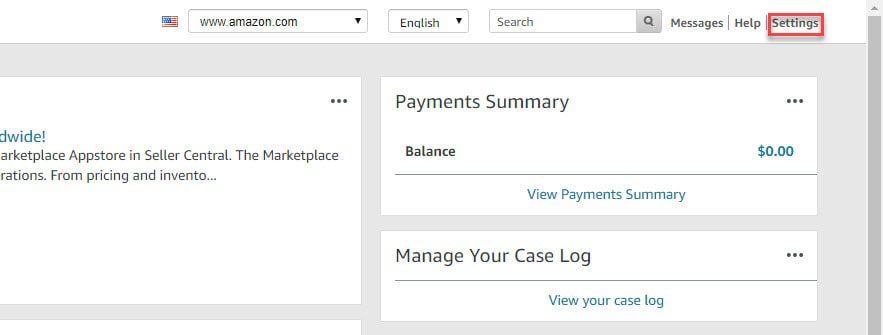
1. On the Seller Central page, click on settings on the top right of the page.
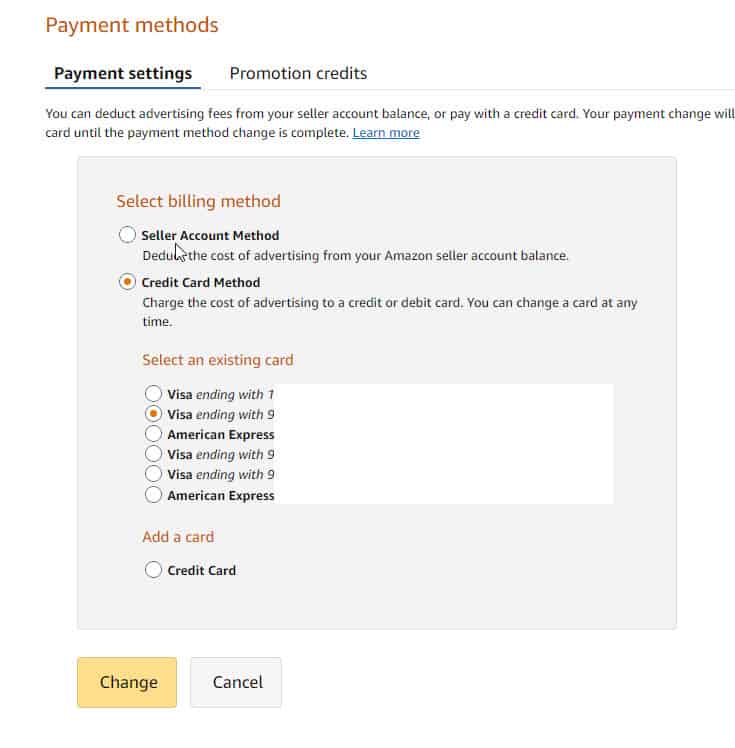
2. Select charge methods for advertising. (You can select charge methods if there are payment failures outside of advertisements.)
3. Select whichever methods you prefer to have Amazon charge on the cost of advertising.
Our Amazon agency is dedicated to serving your business needs, feel free to reach out to our Amazon experts regarding any inquiries you may have regarding your business.
How to Maximize Sponsored Product Campaigns on Amazon: A Complete Resource
How to Find the Best Amazon Keywords to Boost Sales and Rank Higher
What Is Amazon Product Sourcing: Your Ultimate Playbook
Power Up Your Profits: Unleashing the Potential of Amazon FBA Sales and Revenue
Effectively Manage Inventory For Fall Prime To Up Your Sales

Have our Amazon experts do a free analysis of your Amazon listing, and share details on how it can be optimized for better performance.

Steven Pope, Founder
Hi I’m Steven, founder of My Amazon Guy, a 500+ person Amazon Seller Central agency out of Atlanta, GA. We growth hack ecommerce and marketplaces through PPC, SEO, design, and catalog management.
More Amazon articles

Are you making the most out of your ads, or just throwing money at them, hoping they’ll magically boost your sales? Following the right Amazon

Are you searching for Amazon warehouse locations in Canada? Knowing where these facilities are can significantly streamline your FBA operations, save you time, and reduce

Are you planning on building an Amazon business? Before you do, you need to understand that creating a successful business on Amazon is not a
Reach us at +1 470-623-1951 Monday to Friday, from 9:00am to 5:00pm EST.