Are you struggling to optimize your listing images because you’re not sure what Amazon actually wants or what shoppers care about? That’s exactly why having an Amazon image design checklist matters if you want images that support clicks and sales instead of holding your listing back.
In a crowded search results page, your Amazon listing images play a huge role in how shoppers judge your product within seconds. Since buyers rely heavily on images to understand what they’re getting, those visuals need to grab attention and answer questions fast.
With everything sellers juggle daily, image optimization is often rushed or treated as a one-time task. An Amazon image design checklist helps sellers stay consistent, avoid common mistakes, and make sure every image serves a clear purpose.
In this guide, we discuss how to create Amazon product images that grab attention, build trust, and drive clicks. Our Amazon agency also talks about using a step-by-step image checklist to optimize main, secondary, and lifestyle shots for better conversions.
Table of Contents
Boost Your Listing Clicks Today
Make sure every image in your listing is optimized to grab attention and increase sales.
Why Your Amazon Images Decide Whether You Get the Click or Get Ignored
Your product images are often the first thing shoppers notice, even before they read your title. That split-second reaction can decide whether they click your listing or scroll past it without a second thought.
Roughly 67% of shoppers say product images play a major role in their buying decisions, which should be a wake-up call for sellers. If your images look unclear, outdated, or untrustworthy, shoppers will assume the product is the same.
Amazon images replace the in-store experience, meaning they have to do the heavy lifting fast. Strong visuals build trust, show value, and answer questions quickly, while weak images leave shoppers guessing and clicking on a competitor instead.
Amazon Image Design Checklist That Keeps Your Listings Click-Ready
Image optimization can feel confusing when you’re guessing what matters and what Amazon will flag. Having an Amazon image design checklist gives sellers a clear standard to follow, especially when updating listings or launching new products.
| Phase | Checklist Item | Tip / Key Action |
|---|---|---|
|
Phase 1: Technical “Must-Haves”
|
Resolution |
1600×1600 px minimum; 2000+ px recommended. |
|
|
File Format |
Use JPEG or WebP for fast loading. |
|
|
Aspect Ratio |
Main: 1:1; Secondary: 4:5 portrait. |
|
|
Main Background |
Pure white (RGB 255,255,255). |
|
|
Accuracy |
Show exact product (color, size, texture). |
|
Phase 2: Main Image Optimization |
Choose the Right Angle |
3/4 angle to show depth. |
|
|
Show the Entire Product |
Include full product; show all bundle items. |
|
|
Include Packaging |
Show if it adds value or is gift-ready. |
|
|
Keep Product in Focus |
Sharp, well-lit, color-accurate. |
|
|
Test Thumbnail Clarity |
Must be clear in mobile thumbnails. |
|
|
Highlight Key Features |
Subtly show accessories or details. |
|
|
Avoid Distractions |
No text, logos, graphics, or props. |
|
|
Fill the Frame |
Product occupies ~85%+ of image. |
|
Phase 3: Secondary Image Optimization |
Highlight #1 Benefit |
Dedicate one image to main benefit. |
|
|
Lifestyle in Context |
Show product in real-life use. |
|
|
Problem/Solution Shot |
Show the problem your product solves. |
|
|
Scale & Dimensions |
Include a size reference. |
|
|
Multi-Angle Detail Shots |
Zoom in on important features. |
|
|
Instructional / How-To |
Show setup or usage steps. |
|
|
Product in Motion |
Show product in action. |
|
|
Represent Your Ideal Customer |
Models should match target audience. |
Phase 1: The Technical “Must-Haves”
Before you start getting creative with angles or lifestyle shots, it’s crucial that your images meet Amazon’s technical requirements. If your images don’t comply, your listing could be suppressed or delisted, and shoppers won’t even get the chance to click.
1. Resolution
Images must be at least 1600 x 1600 pixels to enable the zoom function. For high-definition displays, 2000 px or higher ensures your product looks crisp and professional.
2. File Format
Use JPEG for best compatibility, or WebP for faster load times on mobile devices. Avoid animated GIFs, TIFF, or unsupported formats, as they may fail to display properly.
3. Aspect Ratio
Main images should be square (1:1) to meet Amazon’s primary listing requirements. Secondary images can use a 4:5 portrait ratio, which works well for A+ Content.
4. Main Background
Main images must have a pure white background (RGB 255, 255, 255). This creates a clean, professional look and keeps your listing compliant with Amazon rules.
5. Accuracy
Images should represent the exact product being sold, including color, size, and texture. Accurate visuals reduce returns, increase trust, and prevent negative reviews.
Phase 2: Main Image (Hero Image) Optimization
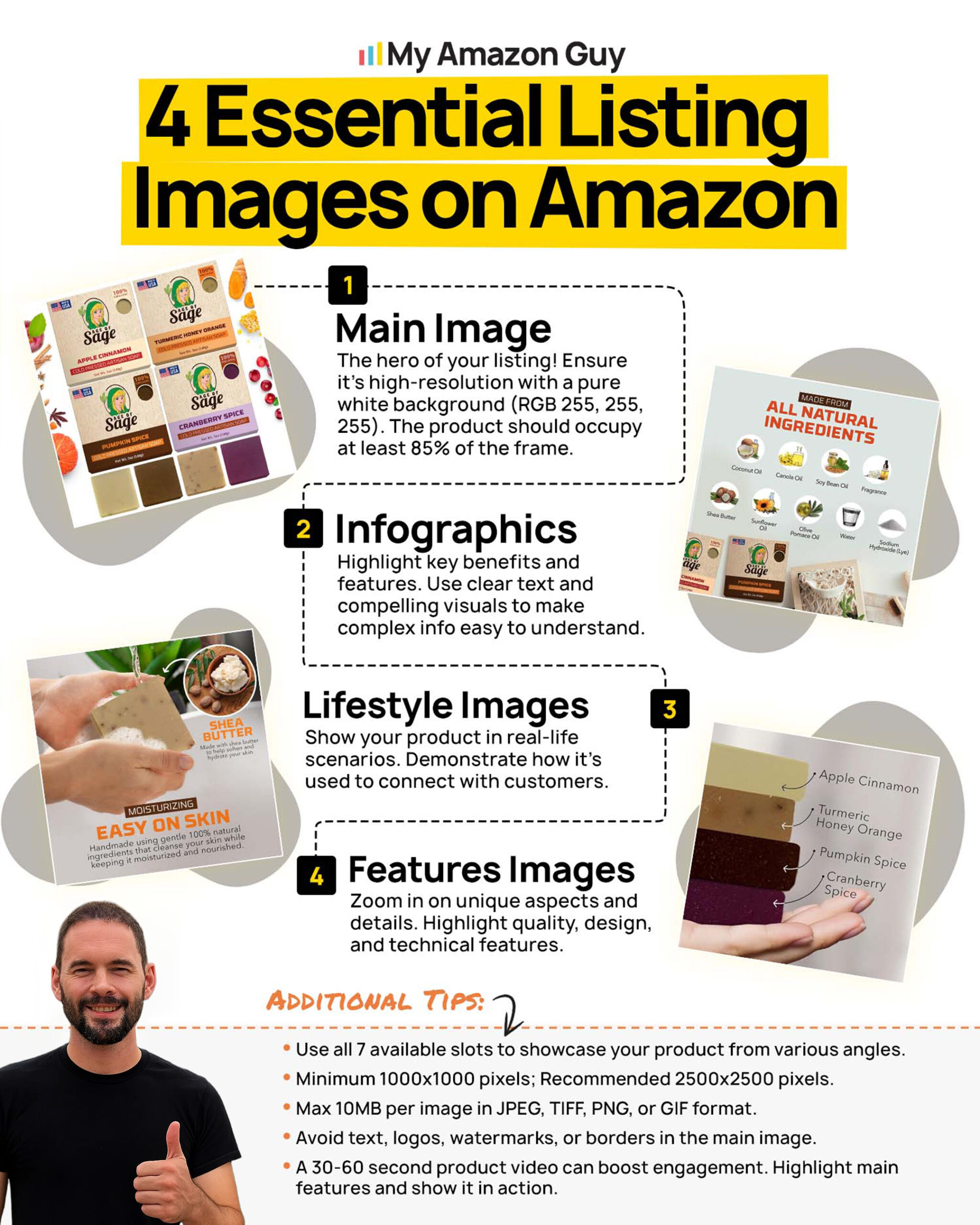
When shoppers scroll through Amazon search results, the main image is the first thing they notice. This image can make or break whether someone clicks your listing, so following a checklist ensures your product stands out and looks professional.
1. Choose the Right Angle
Position the product at a 3/4 angle to show depth and create a more realistic appearance. Flat, straight-on shots can make your product look generic and fail to grab attention.
2. Show the Entire Product
Make sure the main image includes the full product so shoppers know exactly what they’re getting. For bundles or kits, display all components together to highlight the value and completeness of the offer.
3. Include Packaging When Relevant
If the packaging enhances the perceived quality or is gift-ready, include it in the shot. This helps communicate professionalism and can influence purchase decisions.
4. Keep the Product in Focus
Ensure the image is sharp, well-lit, and accurately reflects the product’s color and texture. Blurry or dark images reduce trust and make shoppers less likely to click.
5. Test Thumbnail Clarity
Around 76% of adults in the United States make purchases using a smartphone, so it’s crucial that the main image is recognizable at small, mobile-friendly sizes. If the product loses detail or becomes unclear in thumbnail view, shoppers may scroll past without noticing it.
6. Fill the Frame
The product should occupy the majority of the image, roughly 85% or more of the frame. This keeps attention on the item and avoids wasted empty space that can make your listing appear less professional.
7. Avoid Distractions
Do not include text, graphics, logos, or unrelated props that could confuse the shopper. A clean, uncluttered main image signals credibility and ensures the product itself is the focus.
8. Highlight Key Features or Components
Subtly show important details like accessories, unique parts, or ingredients within the main image. This immediately communicates value, helps shoppers understand the product, and reduces the likelihood of returns.

Turn Shoppers Into Buyers
Let our Amazon agency help you create images that attract, engage, and convert.
Phase 3: Secondary Image Optimization
Once shoppers click on your listing because of the main image, the goal is to convince them to buy using your secondary images. These images answer every remaining question about your product and show shoppers why it’s the right choice for them.
1. Highlight the #1 Benefit
Dedicate one image to clearly communicate your product’s top benefit rather than just a feature. Use text that’s easy to read on mobile, so shoppers instantly understand the value.
2. Lifestyle in Context
Show the product being used in real-life scenarios by your target audience. This helps shoppers imagine how it fits into their daily lives and connects emotionally with your ideal customer.
3. Problem/Solution Shot
Visually demonstrate the problem your product solves with a clear “before and after” or comparison. This instantly communicates relevance and the need for your product.
4. Scale & Dimensions
Include a reference for size, like a hand, a phone, or a familiar object. This prevents shoppers from misjudging dimensions and reduces potential negative reviews.
5. Multi-Angle Detail Shots
Zoom in on important features like materials, stitching, textures, or ingredient labels. Close-ups build trust by showing quality and authenticity.
6. Instructional or How-To Images
Provide simple step-by-step visuals for setup, installation, or use. Clear instructions reassure shoppers that the product is easy to use and minimize confusion after purchase.
7. Product in Motion
Show the product in action instead of just static images. For example, if it’s a water bottle, show someone drinking from it to illustrate usability and lifestyle fit.
8. Represent Your Ideal Customer
Ensure any models in lifestyle shots reflect your target audience. When shoppers see themselves in the Amazon listing images, it increases relevance and the likelihood of a purchase.
Frequently Asked Questions
How many images should an Amazon product listing have?
Amazon allows up to 9 images per listing, and using as many as possible is recommended. More images give shoppers a complete view, answer questions, and increase confidence to buy.
Do my main and secondary images on Amazon need to follow different rules?
Yes, the main image must have a pure white background and focus solely on the product. Secondary images can show lifestyle shots, text overlays, or infographics to highlight features and usage.
Can I use props or models in my Amazon product images?
Props or models are allowed only in secondary images to demonstrate use or scale. They should never distract from the product or violate Amazon’s content guidelines.
Don’t Let Poor Amazon Product Images Hold Your Listing Back
On Amazon, where millions of sellers compete for attention, your products can easily get buried in search results. One way to avoid this is by having product images that are clear, professional, and built to grab clicks while communicating value.
However, it can be overwhelming to remember all the technical rules, hero image strategies, and lifestyle shot details. Having an Amazon image design checklist to reference ensures every image meets standards, supports clicks, and increases the chance of conversions.
Unsure how to optimize your listings for maximum impact? Contact our full-service Amazon agency, and we’ll help you create images that attract shoppers, build trust, and drive sales.
Make Your Products Stand Out
Learn how to design hero and secondary images that drive clicks and purchases.