Are you wondering “what is an Amazon ASIN”, and why sellers keep talking about it? An Amazon ASIN is a unique product identifier that plays a critical role in how your listing is tracked, ranked, and sold.
On a platform like Amazon, where around 600 million products compete for attention, it becomes difficult to organize and manage listings without a structured system. That is why Amazon uses ASINs to identify every product and connect it to reviews, rankings, and sales history.
Most sellers think an ASIN is just a random code sitting on the product page. In reality, it controls how your product is indexed, how your ads run, and how your catalog stays organized.
This article explains what an Amazon ASIN is, why it’s important for sellers, and how to find, create, and maximize it. Our Amazon agency also shares tips on using ASINs to improve visibility, manage inventory, and grow sales effectively.
Table of Contents
Fix Your ASIN Strategy Today
Struggling with duplicate listings, suppressed products, or messy catalogs, hurting your sales?
What Is An Amazon ASIN?
ASIN stands for Amazon Standard Identification Number. It is a unique 10-character combination of letters and numbers assigned to every product listed in Amazon’s catalog.
Think of an Amazon ASIN as the product’s internal ID inside Amazon’s system. When a new product is created in Seller Central, Amazon generates an ASIN that becomes tied to that specific product detail page.
Each ASIN connects the product to its reviews, sales history, ranking data, and advertising performance within a specific marketplace. If you sell the same product in another country’s Amazon marketplace, it may require a different ASIN because the catalog is marketplace-specific.
Why Amazon ASINs Are a Seller’s Secret Weapon
The ASIN is one of the most important tools a seller can have on Amazon. It helps sellers organize their listings and inventory while allowing Amazon to manage its massive catalog efficiently, but there’s more to it than just organization.
1. Accurate Cataloging and Searchability
ASINs ensure each product is correctly indexed in Amazon’s database. This makes it easier for customers to find your products when searching or browsing.
2. Inventory Management
Sellers use ASINs to track stock levels and variations such as size or color. Proper ASIN management prevents duplicate listings and inventory confusion.
3. Advertising and Competitor Analysis
ASINs are used in PPC campaigns and reverse ASIN lookups. This allows sellers to monitor competitors and target the right keywords to boost visibility.
4. Brand Protection
A unique ASIN helps brand owners control their listings and prevent counterfeit or unauthorized products. This keeps your brand authentic and protects your reputation.
5. Streamlined Listing Process
When selling an existing product, using the correct ASIN links your offer to the official detail page. This ensures efficiency and prevents catalog errors that could hurt sales.
6. Sales Performance Tracking
ASINs allow sellers to monitor product performance over time. You can track reviews, ratings, and sales metrics to make informed business decisions.
7. Marketplace Specificity
Each ASIN is tied to a specific Amazon marketplace. If you sell the same product in another country, a different ASIN may be required to maintain proper catalog control.
How to Find an ASIN of a Product on Amazon
ASIN is such a critical identifier for every product on Amazon that knowing where to find it is the first step to managing your listings and tracking performance. Whether you’re checking your own products or researching competitors, locating the ASIN quickly saves time and prevents mistakes.
Method 1: Check the Product URL
The fastest way to find a product’s ASIN is in its listing URL. Look for the 10-character code that appears after “/dp/” in the web address.
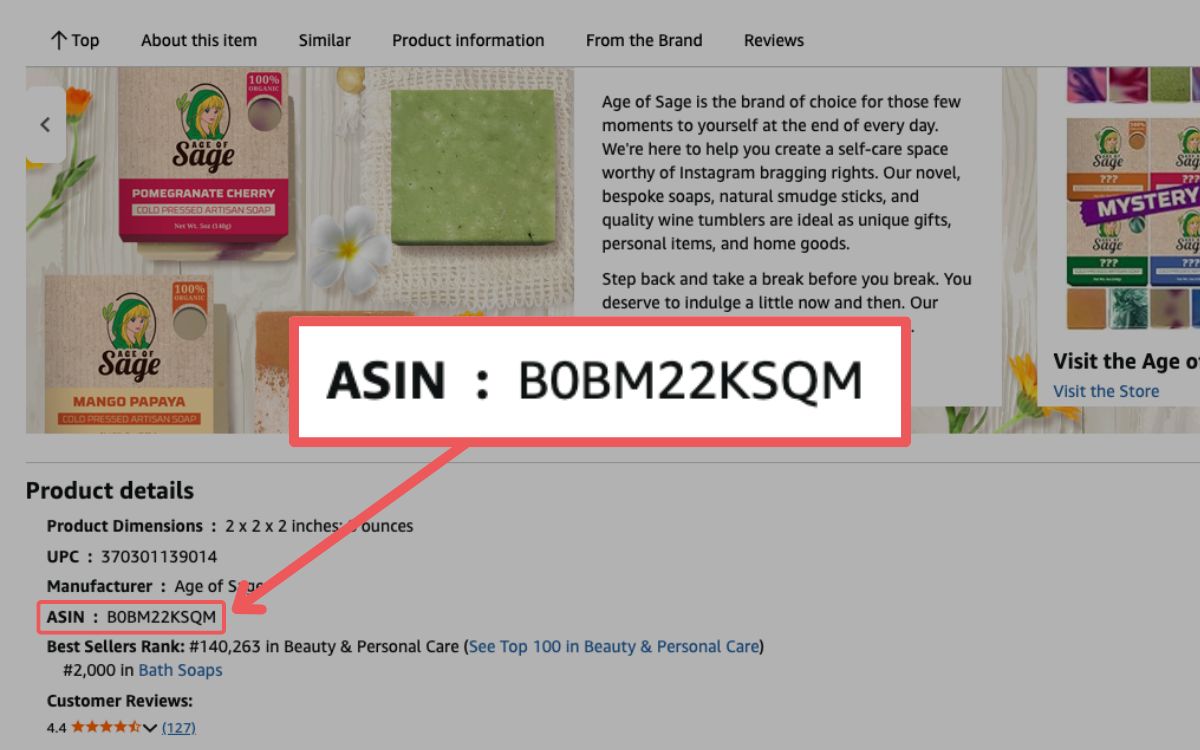
Method 2: Look in the Product Information Section
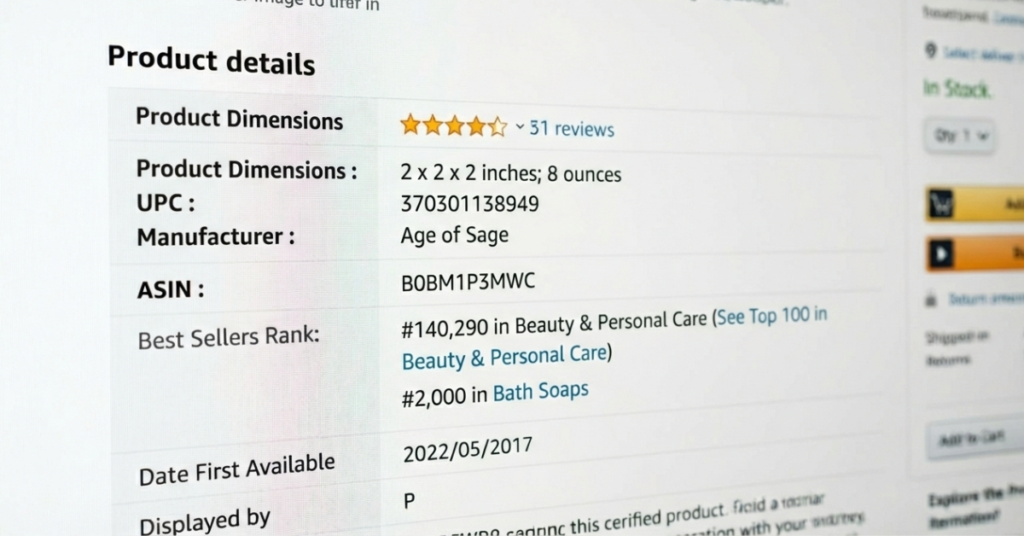
Scroll down the product page to the “Product Details” or “Additional Information” tab. The ASIN will be listed there along with other key product identifiers.
Method 3: Use Seller Central
If you’re an Amazon seller, log in to Seller Central and go to “Manage Inventory”. Each listing will display its ASIN, making it easy to reference for inventory, advertising, and catalog management.
Method 4: Utilize Third-Party Tools
For larger inventories, tools like Amazon Product Advertising API can help pull ASINs quickly. These tools save time by allowing bulk lookups instead of checking listings one by one.
Stop Losing Sales to Catalog Errors
Incorrect ASIN setup can tank rankings and ads, but our team fixes structural issues fast.
How to Create an ASIN on Amazon
Creating an Amazon ASIN is quite easy as long as you follow the process to the letter. Mistakes during creation can affect catalog accuracy, search visibility, and even your seller account, so knowing the correct steps is essential if you plan to add new products to Amazon.
Step 1: Verify Your Product Is Unique
Before creating a new ASIN, search Amazon to make sure your product does not already exist. Use the title, manufacturer, or UPC/EAN to confirm no matching listing is in the catalog.
Step 2: Access the Add a Product Tool
Log in to your Amazon Seller Central account, go to the Inventory menu, and select “Add a Product”. This is where you’ll start creating your new ASIN.
Step 3: Select New Product Option
Click “I’m adding a product not sold on Amazon” to create a unique listing. This ensures Amazon knows it’s a brand-new product requiring a new ASIN.
Step 4: Choose the Correct Category
Select the category and subcategory that best fit your product. Accurate categorization improves search visibility and helps customers find your item.
Step 5: Enter Product Information
Provide the following product information:
- Product ID: Enter your UPC, EAN, ISBN, or other GTIN.
- Details: Add brand, manufacturer, product title, description, and key features.
- Images: Upload high-quality images that meet Amazon guidelines.
- Offer Info: Set price, condition, and fulfillment method (FBA or FBM).
Step 6: Submit for Approval
Click “Save and finish” to submit your product information. Once approved, Amazon will assign a unique 10-character ASIN to your listing.
Pro Tip: Always ensure your GTIN is accurate, and never create a duplicate ASIN for an existing product. Incorrect ASIN creation can lead to listing errors or account penalties.
How to Maximize the Use of Amazon ASIN
Using an ASIN on Amazon effectively is key to driving visibility, sales, and protecting your brand. By understanding how to maximize its potential, sellers can optimize listings, improve advertising results, and maintain stronger control over their catalog.
1. Optimize Listing Content for SEO and Conversion
Use high-volume, relevant keywords in your product title, bullet points, and backend search terms. Adding A+ content and high-quality images can boost conversions by improving customer experience and engagement.
2. Leverage ASINs in Advertising
Target specific competitor ASINs with Sponsored Display ads to steal market share or defend your own listings. Running automatic campaigns helps discover new keywords and improve ad performance for your ASIN.

3. Maximize Visibility and Reputation
Programs like Amazon Vine help secure early reviews for new ASINs, while external traffic from social media or email campaigns signals Amazon that your listing is popular. Lightning Deals for highly rated ASINs can boost sales and ranking during peak events like Prime Day.
4. Protect Your ASIN
Enroll in Brand Registry to prevent hijackers from listing unauthorized copies of your product. Using Amazon’s Transparency program and regularly monitoring your listings ensures authenticity and protects your reputation.
5. Categorize and Analyze ASIN Performance
Classify ASINs by sales and life cycle (Emerging, Flagship, Potential, Longtail) to tailor marketing and pricing strategies. Use business reports to track traffic, conversion, and stock levels, ensuring top-performing ASINs remain visible and in stock.
6. Track Key Metrics and Conversion Trends
Measure customer acquisition costs, lifetime value, and new-to-brand purchase rates to understand profitability at the ASIN level. Analyze the conversion funnel and search trends to pinpoint underperforming products and adjust content or pricing for better results.
FAQs About Amazon ASIN
What does ASIN stand for?
ASIN stands for Amazon Standard Identification Number. It is a unique 10-character code assigned to every product in Amazon’s catalog to track and manage listings.
Is SKU the same as ASIN?
No, a SKU (Stock Keeping Unit) is created by sellers to track their own inventory. An ASIN is assigned by Amazon to identify the product to the public and manage the catalog.
Can I create a new ASIN for a product that already exists on Amazon?
No, creating a duplicate ASIN for an existing product can lead to listing errors or account suspension. You should always match your product to the existing ASIN in the catalog.
Why Mastering ASINs Matters for Sellers
An ASIN is a crucial identifier that helps Amazon organize its massive catalog and allows sellers to track, manage, and optimize their products. Understanding how ASINs work ensures your listings are accurate, searchable, and positioned for maximum visibility.
Learning how to find, create, and leverage ASINs can give sellers a competitive edge in advertising, inventory management, and brand protection. Proper ASIN management also helps prevent listing errors, duplicate products, and potential account issues, keeping your business running smoothly.
Are you ready to take control of your Amazon listings and maximize your sales potential? Reach out to our full-service Amazon agency and let our experts help you manage ASINs, optimize listings, and grow your business efficiently.
Protect and Optimize Your ASINs
From Brand Registry to hijacker removal, we safeguard and strengthen your product listings.