
Last Updated: March 13, 2026
Do you know how to locate entity ID on Amazon? If not, you could run into trouble when trying to fix Brand Registry issues or troubleshoot storefront problems.
Getting your brand registered is one of the key steps for sellers to protect intellectual property and manage storefronts. But bugs or syncing issues can prevent your Brand Store from displaying correctly.
To solve these problems, sellers need to know their Entity ID on Amazon. This unique identifier helps Amazon Seller Support quickly locate the correct store, but not every seller knows where to find it.
In this guide, our Amazon agency explains how to locate your Amazon Entity ID to quickly fix Brand Registry and storefront issues. We also share tips on using it effectively to prevent delays and ensure Amazon support can resolve problems accurately.
Table of Contents
Fix Brand Registry Issues Faster Today
Get your Amazon Entity ID ready and resolve storefront problems quickly with expert guidance.
What Is the Amazon Entity ID?
The Amazon Entity ID is a unique identifier embedded in your Brand Store URL. It allows Amazon to pinpoint exactly which storefront or brand requires attention whenever you submit a support case or report a Brand Registry issue.
Entity IDs are used across Amazon’s ecosystem to distinguish individual resources, accounts, or storefronts. While the term can appear in Vendor Central, Seller Central, and Amazon Advertising, its core purpose remains the same: to identify a specific “identity” within Amazon’s systems.
Because Amazon manages a vast network of stores, accounts, and advertising properties, knowing your Entity ID helps prevent confusion when multiple brands or stores exist under the same account. It ensures that Amazon support agents can quickly locate the correct storefront and resolve your issues more efficiently.
Importance of the Amazon Entity ID
The Entity ID on Amazon is your store’s unique digital fingerprint, which stays constant even as your products, campaigns, or store name change. This is why it is so important for identifying your brand accurately and resolving issues quickly.
- Ensures Amazon support can locate the correct Brand Store when you submit a case.
- Allows third-party software and automation tools to sync data and manage your account properly.
- Enables accurate tracking of advertising campaigns and correct attribution of clicks and sales.
- Keeps multiple regional or marketplace accounts organized and prevents cross-account errors.
- Provides a secure way to control permissions when granting access to employees or agencies.
- Serves as a permanent reference for account recovery or dispute resolution.
- Supports bulk operations by identifying which account or store changes apply to.
- Maintains consistent integration with APIs and reporting dashboards for accurate data.
Common Brand Registry Issues That Require the Amazon Entity ID
Around 130,000 Amazon sellers are brand registered because it provides crucial protections and tools to manage their storefronts. However, Brand Registry can sometimes come with bugs and system issues that require your Entity ID to properly identify and troubleshoot your store.
1. The Ghost Brand Issue
This happens when a seller is approved for Brand Registry, but their Brand Store doesn’t appear in Seller Central. Sellers see messages saying they “don’t have any registered brands,” even though the brand is approved.
2. Advertising Permission Errors
A brand may appear in Seller Central, but attempts to run Sponsored Brands ads fail due to authorization problems. The system doesn’t recognize the advertising account as linked to the registered brand.
3. Global Marketplace Mismapping
Sellers expanding into international marketplaces sometimes find that their Brand Registry isn’t recognized in new regions. The system may treat the seller as a generic account, causing access and brand verification issues.
4. Duplicate Brand Profiles
A brand may appear multiple times in Amazon’s system, creating confusion and inconsistencies. Sellers need their unique identifiers to ensure each profile is properly distinguished.
5. Trademark or IP Mismatches
When the registered trademark doesn’t match the listing information, Amazon may flag the brand for verification. These mismatches can delay content publishing, A+ Content creation, or advertising.
6. Brand Hijacking
Unauthorized sellers may attempt to use your brand name on listings. Amazon needs the Entity ID to verify rightful ownership before taking corrective action.
7. Technical Conflicts with Brand Roles
When multiple employees or agencies access the account, permissions can become tangled. Users may experience “Access Denied” errors if their IDs aren’t correctly linked to the brand’s Entity ID.
8. Updating Brand Profile Information
Making changes to the brand profile, such as renaming or updating details, often requires verification via the Entity ID. Without it, changes may be rejected or delayed by the system.
Secure Your Brand Storefront Now
Avoid delays and protect your brand by ensuring your Entity ID is correctly linked.
How to Locate the Entity ID on Amazon
Finding your Entity ID on Amazon is easier than many sellers think, but it can still be confusing with all the tabs and information in Seller Central. Knowing exactly where to look ensures you get the correct ID quickly, which is crucial for resolving Brand Registry issues.
Step 1: Sign in to Your Seller Central Account
Log in to the Seller Central account where your Brand Store is registered. Make sure this is the account that owns or manages your brand to avoid any access issues.
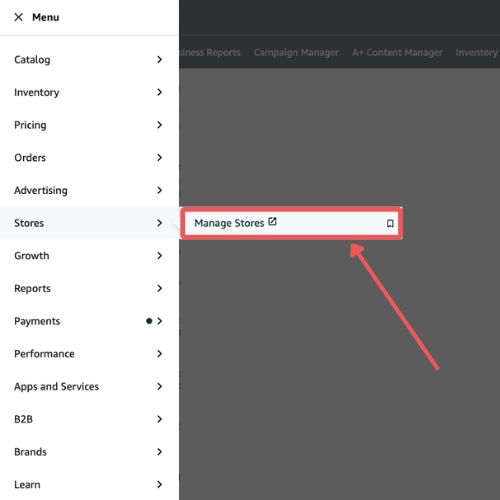
Step 2: Open the Manage Stores Section
Go to the Stores tab in Seller Central and click Manage Stores. This is where all your Brand Stores are listed, and you can select the one you want to work with.
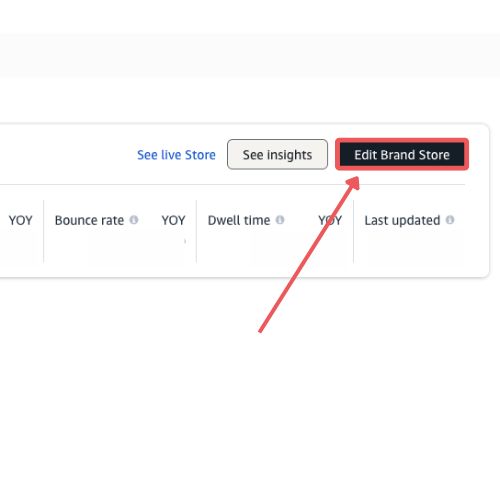
Step 3: Click Edit Brand Store
Find the store you need and click the Edit Brand Store button. This opens the Store Builder, which is where the Entity ID is hidden in the browser URL.
Step 4: Look at the Browser Address Bar
Once the Store Builder is open, check the URL at the top of your browser. This URL contains important information about your store, including the Entity ID.
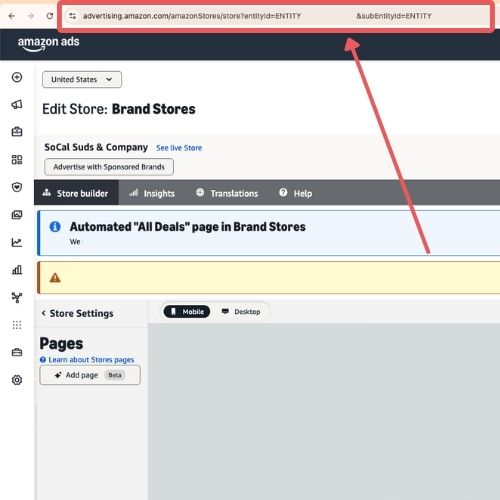
Step 5: Find and Copy the Entity ID
In the URL, look for the part that says “entityId=”. The letters and numbers right after this are your Entity ID (e.g., ENTITY12345ABCDE); copy it exactly for use in support tickets or troubleshooting.
Tips for Using the Amazon Entity ID to Fix Brand Registry Bugs
Since there are many Brand Registry issues that can prevent your storefront or A+ Content from working correctly, having strategies to use your Entity ID effectively is critical. Using it properly ensures faster resolution and prevents errors when communicating with Amazon support.
1. Include the Entity ID in Every Support Case
Always provide your Storefront Entity ID whenever you submit a Brand Registry ticket. This ensures Amazon support can immediately identify the correct storefront and avoid miscommunication.
2. Save the Entity ID for Future Troubleshooting
Keep a secure record of your Entity ID for each brand you manage. Having it ready saves time and prevents delays when new issues arise.
3. Verify You Copied the Correct Store ID
Double-check that the alphanumeric code from the URL matches the brand store you are referencing. Providing the wrong ID can slow down support and cause errors in resolving your case.
4. Include the Entity ID Along with the Storefront URL
Whenever you send a support request, include both the URL and the Entity ID. This gives Amazon support two ways to verify your store and helps speed up troubleshooting.
5. Use the Correct Regional Entity ID When Escalating Issues
If your brand operates in multiple marketplaces, make sure to use the Entity ID from the specific region’s Store Builder. Using the wrong regional ID can result in support telling you “Account not found” and further delays.
Frequently Asked Questions
What if my Brand Store isn’t showing up after brand registry approval?
This usually happens because of syncing issues or setup errors in Seller Central. Providing your Entity ID to Amazon support helps them quickly locate and fix your store.
Can I use the Entity ID when filing cases with Amazon Seller Support?
Yes, you should always include your Entity ID in support tickets or Brand Registry cases. It allows Amazon agents to identify your store accurately and resolve issues faster.
What else should I check if my brand registry or store isn’t functioning properly?
Make sure your Brand Registry enrollment is complete with the correct trademark information and admin email. Also, verify that your Brand Store is properly linked to your Seller Central account to avoid access problems.
What if I don’t have a trademark yet to enroll in Brand Registry?
You can use Amazon’s IP Accelerator program to start your trademark registration with recommended law firms. This gives you quicker access to Brand Registry tools while your trademark application is pending.
Master Your Brand Store with the Entity ID
Getting access to Brand Registry is one of the most important steps for Amazon sellers, but it can come with technical bugs and setup issues. Knowing how to locate your Entity ID on Amazon ensures you can troubleshoot problems quickly and accurately.
The Entity ID acts as your store’s unique identifier, helping Amazon pinpoint your Brand Store for faster resolution. Using it correctly prevents delays, avoids miscommunication, and makes managing multiple stores or marketplaces much simpler.
Are you struggling with Brand Registry bugs or Storefront issues? Contact our full-service Amazon agency and let our experts guide you step by step to fix the problems and protect your brand.
Optimize Your Brand Registry Setup
Ensure all your stores and listings are correctly mapped to prevent future issues.