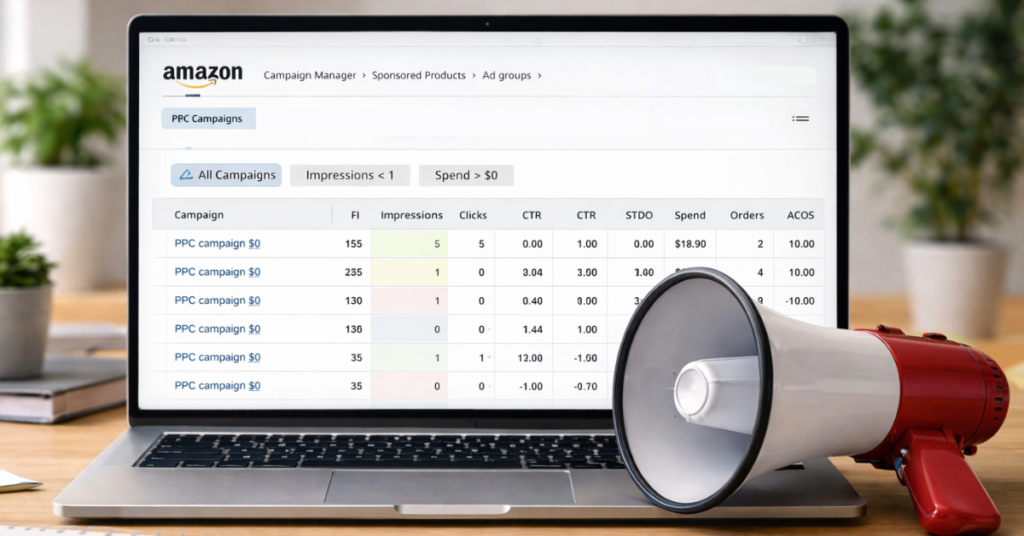
If you are not using an Amazon advertising filter to spot weak campaigns and missed chances, now is the time to start. Amazon advertising filters do far more than surface bad ACOS because they show where ads are not spending, not showing, or not converting.
Selling on Amazon may not require advertising, but in practice, it becomes one if you don’t want your products buried under more than 600 million listings. Running ads blindly can waste budget, and Amazon advertising filters help sellers focus attention on the campaigns that actually need fixing.
This blog breaks down how Amazon advertising filters work and how sellers can use them to find problems faster. Our Amazon agency also applies these same filtering tactics daily to help brands clean up ad waste and push spend where it should be working harder.
Take Control of Your Amazon Advertising
Discover how filters and expert management can make your campaigns more efficient and effective.
Why Amazon Advertising Filters Matter
Amazon advertising filters are built-in tools inside Campaign Manager that let sellers sort campaign data based on specific performance rules they choose. These filters work at the campaign, ad group, ad, or keyword level and help sellers quickly isolate what is working, what is stalled, and what is wasting money.
What makes filters matter is the ability to stack multiple conditions at once, like spend with no orders or high impressions with low clicks. Instead of reviewing ads one by one, sellers can instantly surface bleeding keywords, starving campaigns, or poor-engagement ads and take action before more budget gets burned.
Common Campaign Issues Amazon Advertising Filters Can Reveal
Some sellers think an Amazon advertising filter is just a basic sorting tool that doesn’t really help much. In reality, filters can uncover several key issues that are quietly affecting your Amazon campaigns.
1. Low or No Impressions
Filters can show campaigns or keywords getting fewer than one impression, which means ads are barely entering the auction. These campaigns need immediate review to figure out why they aren’t showing.
2. Banned Ads
Ads can stop showing because they have been banned by Amazon. Filters help identify these campaigns so you can take corrective action quickly.
3. Lost Buy Box
If a product loses the Buy Box, ads tied to that SKU may stop serving. Using filters, sellers can pinpoint campaigns affected by this issue.
4. FBA and FBM SKU Mismatch
Ads may be set up for one fulfillment method while another SKU is actually in stock. Filters help catch these mismatches that block ad delivery.
5. Low Click-Through Rate
Filters can identify campaigns with a CTR below a certain threshold. This signals that shoppers are seeing the ad but not clicking.
6. Low Conversion Rate
Some ads get clicks but no sales. Filters for conversion rate help highlight these cases so sellers can review product pages and fix the issues.
How to Effectively Use Amazon Advertising Filters
Although Amazon advertising filters can help sellers uncover problem campaigns, using them incorrectly can waste time and lead to missed opportunities. Follow these tips to effectively apply filters and find ads that need attention.
1. Start with a Primary Filter
Choose a main filter, such as campaigns with fewer than one impression. This immediately highlights ads that aren’t showing at all.
2. Add a Secondary Filter
You can layer a second filter, like previous spend, orders, or CTR, on top of the first. This combination helps you find campaigns with multiple issues simultaneously.
3. Explore Multiple Filter Combinations
Filters are flexible, and you can apply more than two at a time. For example, you could look for campaigns with low impressions and some previous spend and no orders to catch hidden problem campaigns.
4. Apply Filters Across Your Portfolio
When you have many Amazon PPC campaigns, using filters lets you scan hundreds of campaigns quickly. This makes it much faster to spot ads that are not performing.
5. Use Filters to Make Decisions Quickly
Filters show where ads are failing, like banned ads, lost buy box, or poor targeting. Once you see the results, you know exactly where to focus your time without manually reviewing every campaign.
Maximize Your Amazon Ad Performance with Filters
Managing Amazon ads can be overwhelming and time-consuming, which is why using advertising filters can be a huge time-saver if you know how to apply them correctly. Filters help you quickly find campaigns that aren’t performing and focus your efforts where they matter most.
Are you having trouble identifying underperforming campaigns or wasted ad spend? Our full-service Amazon agency can help you set up and manage your advertising filters to optimize your campaigns and grow your sales efficiently.
Optimize Your Amazon Ads Today
Stop wasting budget on underperforming campaigns and start focusing your ad spend where it matters.