Many sellers ask whether they need Amazon SPP vs Amazon SPN and what the real difference is. Knowing how they work is the first step to choosing the right type of support for your brand.
There are multiple ways sellers can get help on Amazon, from freelancers to full agencies listed inside Amazon’s ecosystem. Using the wrong channel can create account access risks, poor execution, and wasted budget.
Both systems were built to connect sellers with service providers, but they serve different roles behind the scenes. When you understand how each one functions, you can use them correctly instead of guessing.
This guide explains the differences between Amazon SPP vs Amazon SPN and how sellers can use each to securely manage access and find trusted service providers. Our Amazon agency also helps sellers set up these tools and connect with vetted experts to grow their business efficiently.
Table of Contents
Hire Verified Experts With Confidence
Work with a full-service Amazon agency that handles setup, access control, and growth execution.
What Is Amazon SPP and How Does It Work
Amazon SPP, or Solution Provider Portal, is the backend system Amazon requires third-party agencies, consultants, and software developers to use when working with seller accounts. It acts as a centralized gateway where providers register, verify their identity, manage permissions, and request authorized access to Seller Central accounts without sharing passwords.
For sellers, Amazon SPP matters because it controls how outside partners gain access to your account and data. When you approve a provider through SPP, you grant secure, trackable permissions that allow them to manage ads, listings, or API integrations while keeping your account protected and compliant with Amazon’s security standards.
Benefits of Using the Amazon Solution Provider Portal for Sellers
Amazon SPP offers sellers several important advantages that make managing third-party access safer and more efficient. Using it correctly gives you control, security, and streamlined operations all in one place.
- Eliminates risky secondary logins and protects sensitive account data.
- Set exactly which providers can access your account and what they can see.
- Only registered, authorized partners can request access, reducing fraud risk.
- Manage all API integrations and service provider relationships from a single dashboard.
- Quickly find, test, and implement services and tools to grow your business.
How Sellers Use the Amazon Solution Provider Portal
The Amazon Solution Provider Portal is designed to create a secure bridge between sellers and third-party agencies or software providers. It can be straightforward for sellers to use as long as they follow the proper authorization process inside Seller Central.
Step 1: Find a Registered Provider
Go to Seller Central and navigate to Apps and Services, then choose Explore Services to browse approved providers listed in Amazon’s network.
Step 2: Start the Conversation
Click Contact Provider to discuss scope, pricing, and the exact permissions they will need before granting access.
Step 3: Authorize the Partner Properly
Inside Seller Central, go to Settings, then User Permissions, and select Authorized Partners to send an official access invitation instead of sharing login credentials.
Step 4: Approve Specific Permissions
Choose only the permissions required, such as advertising, inventory, or reports, so the provider does not receive unnecessary access.
Step 5: Monitor and Manage Access
You can review or revoke access at any time through the Authorized Partners dashboard to maintain control of your account.
What Is Amazon SPN and How Does It Work
The Amazon Service Provider Network, or SPN, is a curated directory of vetted third-party experts designed to help sellers manage and grow their business. It connects sellers with professionals who specialize in areas like advertising, account management, FBA prep, compliance, and international expansion.
Sellers use SPN to quickly find trusted service providers without guessing which agencies are legitimate. The network is searchable by service type, marketplace, and language, allowing sellers to hire the right partner for their specific needs while keeping operations efficient and secure.
Benefits of Using the Amazon Service Provider Network for Sellers
The Amazon Service Provider Network gives sellers access to vetted experts, which is why many rely on it to grow their business safely. SPN helps sellers get professional support without risk or wasted time.
- All providers are vetted by Amazon in the SPN, so sellers can hire trusted experts safely.
- Optimized listings, advertising, and catalog services help sellers increase sales faster.
- Cataloging, imaging, FBA prep, logistics, and compliance reduce operational workload for sellers.
- Experts handle international rules, taxes, and marketplaces to simplify global expansion.
- Outsourcing tasks lets sellers focus on product development and brand growth.
How Sellers Use the Amazon Service Provider Network
The process to use the Amazon Service Provider Network is very easy to follow as long as you have a Seller Central account and a clear idea of the services you need. By using SPN correctly, sellers can safely hire vetted experts without risking account compliance or data security.
Step 1: Access the SPN
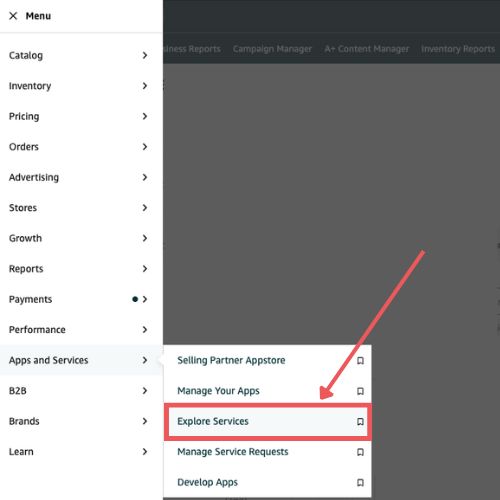
Log in to Seller Central, go to Apps & Services, and select Explore Services to open the SPN directory.
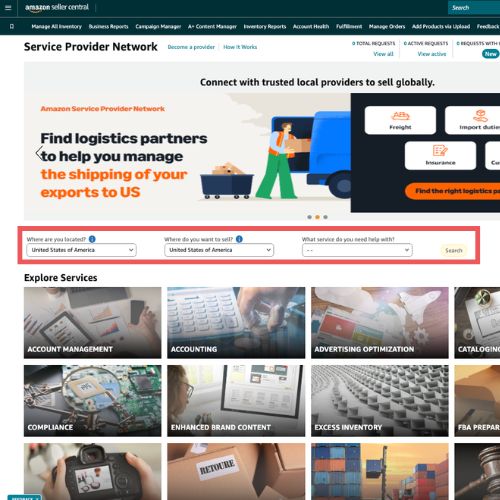
Step 2: Filter and Search
Choose the service category, location, and language to find providers that match your specific needs.
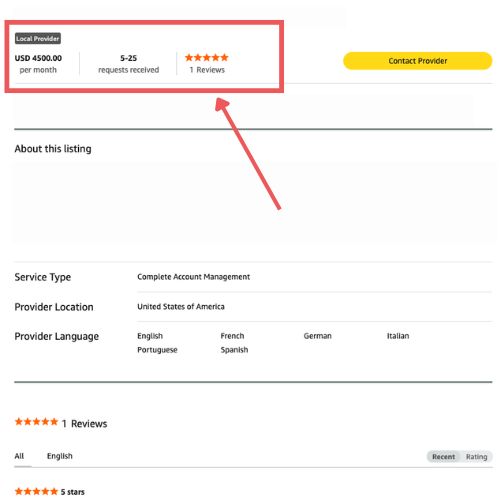
Step 3: Evaluate Providers
Review profiles for customer ratings, completed service requests, specializations, and estimated pricing.
Step 4: Contact and Hire
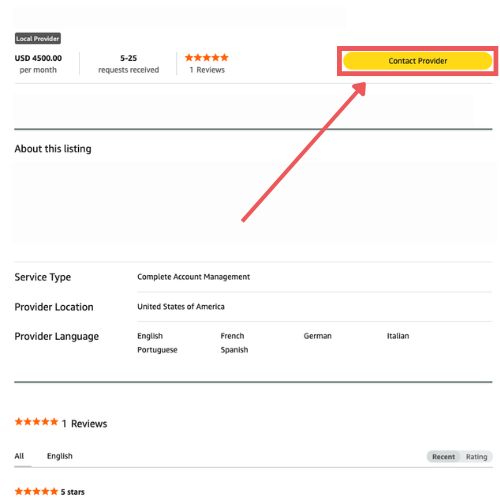
Click Contact Provider to submit a request describing your needs. You will negotiate terms and start the project directly with the provider.
Step 5: Manage Your Services
Track ongoing conversations, quotes, and active projects through Apps & Services > Manage Service Requests in Seller Central.
Secure Your Account the Right Way
Stop risking your Seller Central access and let professionals manage your permissions correctly.
Key Differences Between Amazon SPP vs Amazon SPN
Some sellers still don’t know the difference between Amazon SPP and Amazon SPN, which is why they often confuse the two. The truth is, they are entirely different systems that serve separate purposes for Amazon sellers.
| Feature | Amazon SPP | Amazon SPN |
|---|---|---|
|
Main Purpose |
Secure access portal for service providers |
Directory to find vetted service providers |
|
Primary User |
Agencies, developers, software providers |
Amazon sellers |
|
Visibility |
Private portal |
Public within Seller Central |
|
Seller Role |
Approve or revoke provider access |
Search, compare, and hire providers |
|
Security Focus |
Identity verification and API control |
Quality vetting and provider screening |
|
Cost |
Annual fee for providers |
Free for sellers to browse |
1. Core Purpose
The Amazon Solution Provider Portal is primarily an operational gateway for providers. Agencies, software developers, and third-party service providers use it to manage their clients, check API health, verify identity, and maintain secure access to seller accounts.
The Amazon Service Provider Network, on the other hand, is a public-facing directory for sellers. It helps sellers discover and hire vetted professionals for tasks like advertising, tax compliance, FBA prep, and product imaging.
2. Primary Users
SPP is designed for providers, not sellers. Only registered agencies and developers can log in, manage team permissions, and oversee which sellers have granted them access.
SPN is designed for sellers. They use it to search for service providers, read verified reviews, and request quotes from experts without needing to manage access or technical setups.
3. Visibility and Access
The Solution Provider Portal is private and secure. Providers can only see the clients who authorize them, and all access is controlled through verified identity and API tokens.
The Service Provider Network is public within Seller Central. Any seller can browse the directory, filter by service type, location, or language, and find vetted experts to contact.
4. Verification and Security
SPP focuses on identity and compliance verification. Agencies must complete live video checks, submit business documents, and pass security standards to gain access to seller accounts.
SPN focuses on work quality verification. Amazon vets providers to ensure they deliver professional, reliable services according to platform standards, but sellers still review profiles and ratings before hiring.
5. Costs
SPP now requires providers to pay an annual fee and follow a strict “Authorized Partner” workflow. This ensures that only verified, active providers can access seller data, replacing the old secondary user method.
SPN remains free for sellers to browse and contact providers. The directory allows sellers to find global experts without paying a fee, while providers listed must already maintain their SPP account for access.
FAQs About Amazon SPP vs Amazon SPN
Will Amazon be liable if I have issues with a provider from the Amazon SPN?
No, Amazon does not guarantee the work of SPN providers. Sellers are responsible for reviewing provider profiles, checking references, and agreeing on terms before hiring.
What security does Amazon SPP provide when a provider accesses my account?
SPP requires providers to pass identity verification and follow the Authorized Partner workflow. This keeps your Seller Central login and data secure while granting controlled access.
Can I revoke a provider’s access once authorized through Amazon SPP?
Yes, you can instantly revoke access through Seller Central under User Permissions. This immediately removes the provider and their team from your account.
Master Amazon SPP and SPN to Grow Faster
Amazon offers a variety of tools to help sellers manage and scale their business effectively. Understanding how these tools work is essential to making the most of your seller account and avoiding common mistakes.
Two of the most important tools for sellers are the Amazon SPP and the Amazon SPN. Learning the differences between them ensures you can securely grant access to trusted providers while also finding vetted experts to support growth.
Still unsure how to use SPP or SPN for your business? Contact our full-service Amazon agency and let our experts guide you through the setup, access management, and hiring of trusted service providers.
Ready to Grow Without Account Risk?
Let our Amazon experts handle advertising, compliance, and secure access management for you.