
Are your Amazon long-term storage fees eating into your profits? These fees can sneak up on sellers and quickly add unnecessary costs to your FBA business.
For most Amazon FBA sellers, inventory management is one of the trickiest parts of running their business. They have to balance sending enough stock to meet demand while avoiding excess inventory that sits in storage for too long.
But managing this balance isn’t always easy, and mistakes can be costly. The biggest culprit for lost profit is often the Amazon long-term storage fee, charged on inventory that stays in fulfillment centers for over a year.
Here, our Amazon agency will break down how the Amazon long-term storage fees work and why they matter for FBA sellers. We also share practical strategies to monitor inventory and reduce these fees before they eat into your profits.
Table of Contents
Cut Your Amazon Storage Fees Today
Stop losing profits to aging inventory by taking control of your FBA stock now.
What Is the Amazon Long-Term Storage Fee
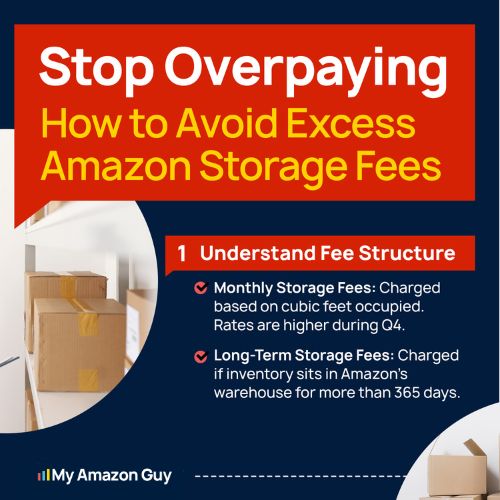
The Amazon long-term storage fee is a legacy charge that was applied to FBA sellers who kept inventory in Amazon warehouses for more than 365 days. Amazon replaced this with the Aged Inventory Surcharge, which starts applying monthly after 181 days, with higher fees for items stored beyond 365 days, based on cubic footage or per-unit cost, whichever is greater.
Amazon implemented the long-term storage fee to manage warehouse space efficiently and maintain service levels for millions of sellers and customers. With over 9.7 million sellers and 82% using FBA, allowing products to sit indefinitely would limit space for fast-moving items and create bottlenecks in fulfilling orders.
How Amazon Long-Term Storage Fees Affect Sellers
A few dollars in storage fees may not seem like much, but these charges can quickly add up and eat into your profits. There are also hidden impacts on cash flow and inventory management that can hurt your business if not addressed:
- Fees reduce your profits, sometimes exceeding the cost of slow-moving products.
- Money tied up in long-term inventory can’t be used for marketing, product launches, or other investments.
- Excess aging stock can drop your IPI score, which may trigger storage restrictions from Amazon.
- Sellers may have to discount, liquidate, or pay to remove inventory to avoid escalating fees.
- To increase sales velocity, sellers often reduce prices, directly impacting overall profitability.
- Overstocked warehouses limit space for faster-selling products, creating bottlenecks in fulfillment.
The Current Amazon Long-Term Storage Fee Rates
Amazon frequently updates its policies and fee structures, which is why it’s crucial for sellers to stay informed about the latest changes. As of March 2026, these are the current rates for the Amazon long-term storage fee, also known as the Aged Inventory Surcharge.
| Inventory Age | Monthly Fee | Per-Unit Fee | Notes |
|---|---|---|---|
|
181-210 days |
$0.50 |
N/A |
Applies to standard items; excludes clothing, shoes, bags, jewelry, watches |
|
211-240 days |
$1.00 |
N/A |
– |
|
241-270 days |
$1.50 |
N/A |
– |
|
271-300 days |
$5.45 |
N/A |
– |
|
301-330 days |
$5.70 |
N/A |
– |
|
331-365 days |
$5.90 |
N/A |
– |
|
366-455 days |
$6.90 |
$0.30 |
Amazon charges whichever is greater |
|
456+ days |
$7.90 |
$0.35 |
Amazon charges whichever is greater |
Where to Check Amazon Long-Term Storage Fees
Knowing where to check your Amazon long-term storage fee is essential to avoid surprises and stay on top of your inventory costs. Keeping an eye on these charges ensures you’re always in the know and can take action before fees eat into your profits.
1. Identify "At-Risk" Inventory
- Log in to Seller Central.
- Go to Inventory > FBA Inventory.
- Click the Aged Inventory tab at the top of the page.
- Use the Inventory Age filter. Select 181+ days to see older inventory.
- Check the Estimated Aged Inventory Surcharge column. This shows projected fees for each SKU.
2. View Actual Monthly Charges
- Go to Reports > Fulfillment.
- Expand the Payments section on the left-hand sidebar.
- Select Aged Inventory Surcharge Report.
- View the report online or download it as a CSV file. The report shows fees by SKU, age tier, and cubic feet.
3. Quick Dashboard Summary
- Navigate to Inventory > Dashboard.
- Scroll to the Estimated Aged Inventory Surcharge widget.
- Click View Details to see how much inventory falls into each age tier and the projected fees for each.
Stay Ahead of Aged Inventory Charges
We analyze your FBA inventory and implement strategies to lower long-term storage costs.
Common Mistakes That Cause Long-Term Storage Fees
Amazon long-term storage fees don’t just appear out of nowhere. Many sellers, knowingly or unknowingly, make mistakes that lead to extra charges, and learning these common errors can help prevent bigger problems down the line.
1. Attempting the "Remove and Restock" Loophole
Some sellers try to avoid long-term storage fees by creating a removal order for old inventory and immediately sending it back to FBA. Amazon anticipates this tactic and often blocks the same ASIN from being restocked for 60 to 90 days, which can halt sales.
2. Treating FBA Like a Warehouse Instead of a Churn Center
Sellers sometimes keep 12 months or more of inventory in FBA, thinking it’s a safe long-term storage solution. Amazon’s model relies on high inventory turnover, and holding stagnant stock uses up warehouse space, potentially triggering penalties.
3. Not Having a Backup Plan Ready
When a removal triggers a 90-day restock ban, sellers without an alternative selling method often lose momentum. Failing to pivot to Fulfilled by Merchant (FBM) during this period can halt sales and delay clearing aging inventory.
4. Waiting Too Long to Reduce Prices on Slow-Moving Inventory
Many sellers hesitate to lower prices, hoping to maintain margins on older stock. Holding onto stale inventory without aggressive liquidation increases long-term storage fees and may lead to even higher removal costs later.
5. Ignoring Amazon Warehousing & Distribution (AWD)
Newer sellers often send all inventory directly to FBA, overlooking other Amazon storage options. AWD allows bulk inventory storage and auto-replenishment to FBA, helping sellers avoid placement fees and long-term storage surcharges while keeping stock ready for fast-moving listings.
How to Manage and Reduce Amazon Long-Term Storage Fees
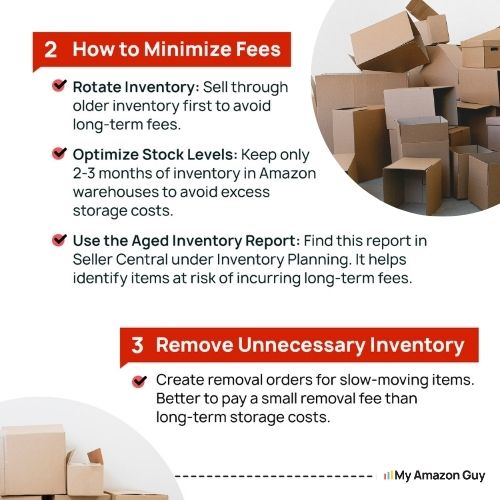
There are several strategies sellers can use to manage Amazon long-term storage fees. Following these practices helps reduce unnecessary charges and minimize the impact of long-term storage fees.
1. Forecast Demand Accurately
Use historical sales data and seasonality trends to plan how much inventory to send to FBA. Accurate forecasting helps prevent overstocking items that could sit in storage and incur long-term fees.
2. Use Smaller, More Frequent Shipments
Instead of sending large batches all at once, ship smaller quantities on a regular schedule. This keeps inventory fresh, reduces the risk of items aging past the 181-day threshold, and aligns with Amazon’s preferred turnover.
3. Prioritize High-Velocity SKUs for FBA
Focus on sending your best-selling products to FBA and keep slower movers in FBM or alternative storage. This ensures that warehouse space is used efficiently and reduces the chance of slow-moving items incurring extra fees.
4. Bundle or Repackage Slow-Moving Items
Combine slow-selling products into bundles or update packaging to make them more appealing. Bundling can increase sales velocity and move inventory faster, avoiding long-term storage charges.
5. Monitor Inventory Health with Amazon Tools
Regularly review the FBA Inventory Age report and Aged Inventory Surcharge projections. Proactively identifying items approaching the 181-day threshold lets you run promotions, removal orders, or liquidation before fees are applied.
FAQs About Amazon Long-Term Storage Fees
How does Amazon calculate long-term storage fees?
Amazon calculates long-term storage fees based on how long your inventory has been stored in FBA and the space it occupies in cubic feet. The fee is applied monthly once inventory passes the aging thresholds, and Amazon charges either the per-cubic-foot rate or the per-unit fee (for older inventory), whichever is higher.
When do Amazon long-term storage fees get applied?
Fees are assessed on inventory that has been in FBA for more than 181 days. They are calculated monthly on the 15th, with higher rates once items pass the one-year mark.
How can I check if my inventory will incur these fees?
Sellers can check projected fees in Seller Central under Inventory > FBA Inventory in the Aged Inventory tab. You can also download the Aged Inventory Surcharge report under Reports > Fulfillment to see fees by SKU and age tier.
Take Control of Your Inventory and Protect Your Profits
Managing your inventory effectively is one of the most critical aspects of running a successful Amazon FBA business. Some sellers fail to track stock levels and aging inventory, which leads to unnecessary costs and lost profits.
One of the biggest hidden drains on your revenue is the Amazon long-term storage fee. By understanding how these fees work and monitoring your inventory, you can prevent them from eroding your margins.
Still struggling to keep your Amazon long-term storage fees under control? Reach out to our full-service Amazon agency and let our experts help you optimize inventory, reduce fees, and protect your bottom line.
Prevent Long-Term Fees on FBA Inventory
Our experts help you track and manage inventory to avoid costly Amazon surcharges.