The new Amazon Business Discount Badge rewards single-unit business prices at least 5% under the reference price, and it no longer requires 4 stars.
The change turns Business Price into a visible selling point in Amazon Business search results and detail pages. Amazon says B2B sales of products with business pricing grew nearly twice as fast in 2026 as products without it.
This article covers how sellers qualify, what the validated reference price (VRP) means, and what stays the same for quantity discounts. It also lays out a pre-launch checklist that brands can run in-house or with an Amazon agency before the rollout.
Amazon Business Discount Badge Requires 5% Off the Validated Reference Price
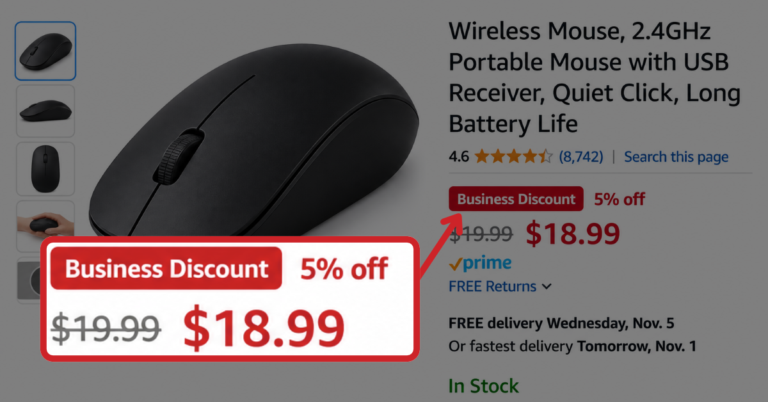
Amazon confirmed the new badge in an official Seller Forums announcement in mid-October 2026, calling it “an always-on deal badge” for qualifying B2B offers. For single-unit business prices, it replaces the Business Savings Blue Badge and shows a red savings percentage next to a crossed-out reference price.
To qualify, a single-unit Business Price must sit at least 5% under the product’s validated reference price (VRP). Amazon applies the badge automatically, but nothing displays at all if the product has no VRP.
A smaller cut still gets noticed, since at least 2% off the VRP earns strikethrough pricing in search and red savings on the detail page. The badge itself only appears once the discount reaches 5%.
| Discount vs. VRP | Example ($40 VRP) | What buyers see |
|---|---|---|
|
Under 2%
|
$39.50
|
No savings display
|
|
2% to 4.9%
|
$39.20
|
Strikethrough and red savings
|
|
5% or more
|
$38.00
|
Badge, strikethrough, and red savings
|
The 4-star rating rule is gone for this badge, which opens the door for newer ASINs with few reviews. Quantity discounts keep the Business Savings Blue Badge, which still requires 3% off the first tier and a 4-star rating.
Amazon Business Pricing Moves Into Search Results and Detail Pages
One industry analysis of the badge notes that Amazon is moving Business Price from a backend setting to a feature buyers see in search. That shift gives procurement teams a faster way to compare supplier pricing side by side on the same results page.
Amazon says the badge can reach millions of organizations buying on Amazon Business. Brands in office supplies, janitorial, packaging, and MRO categories, where business buyers reorder often, have the most exposure to the change.
A business price is one discounted rate per single unit, shown only to verified business buyers. A quantity discount lowers the per-unit price at set volume tiers, and it remains under the Business Savings Blue Badge rules.
Sellers can start with ASINs that already drive meaningful business order volume, rather than discounting every SKU. My Amazon Guy’s guide on how to sell industrial equipment on Amazon covers B2B listing basics for MRO and shop gear.
- Sort ASINs by business order share in Business Reports
- Compare each Business Price to the 2% and 5% marks
- Flag ASINs that have no VRP
- Check margin after referral and fulfillment fees
Validated Reference Price (VRP) Required Before Any Savings Display
A recent seller-side breakdown of the badge reports that a VRP isn’t always the same as a seller’s regular selling price, and Amazon must validate it first. Sellers should confirm each target ASIN has a VRP before lowering its business price, since a cut without one changes nothing on the listing.
Business prices are set from Manage All Inventory in Seller Central, and Amazon’s help page titled “Set a business price or quantity discount” lists the steps. My Amazon Guy’s Amazon B2B pricing guide covers quantity tier setup for sellers adding volume breaks.
- Open Manage All Inventory
- Find the target ASIN
- Enter the single-unit Business Price
- Save and check the live listing
Sellers using automated repricing should review their rules so business prices stay at least 5% below the VRP without dropping under margin floors. My Amazon Guy’s Amazon dynamic pricing strategy guide explains how to set price floors and ceilings.
Amazon has said the badge is coming soon but has not announced a launch date. The announcement also does not confirm that every seller or product will receive it at once, so sellers should watch Seller Central notifications.