

Last Updated: February 27, 2026
Still not using Amazon Advertising Attribution because you cannot clearly see how your external ads impact your Amazon sales? Then it’s time to understand what Amazon Advertising Attribution really does and why ignoring it can cost you serious revenue.
Sellers invest in outside traffic every day through platforms like Facebook, Google, influencers, email lists, and content marketing. One of the only ways to track how that traffic performs inside Amazon is through Amazon Advertising Attribution.
Many sellers avoid it because they think it’s complicated or unnecessary. The truth is, they simply don’t understand how powerful it is for measuring ROI and improving marketing decisions.
In this guide, our Amazon agency explains how Amazon Advertising Attribution helps sellers track external marketing campaigns and measure their impact on sales. We will also show how to set up Attribution, avoid common mistakes, and follow best practices to maximize ROI.
Table of Contents
Track External Ads Like A Pro
Learn which Google, Facebook, TikTok, or email campaigns convert best on Amazon.
What Is Amazon Advertising Attribution
Amazon Advertising Attribution is a free analytics tool available to sellers enrolled in Brand Registry that measures how external marketing drives sales on Amazon. It tracks traffic from channels outside the marketplace and connects that activity directly to product page views, add-to-carts, and purchases.
The system works by generating unique tracking links for each external campaign, whether you are advertising on Google, Facebook, email, or influencer content. When shoppers click those tagged links and purchase within a 14-day window, Amazon records the data under a last-touch attribution model and reports full-funnel metrics inside the dashboard.
Most sellers use Amazon Advertising Attribution because it removes guesswork from external marketing spend and proves what is actually producing revenue. That matters even more when you consider that social media marketing delivers an average ROI of around 250%, making it one of the most profitable traffic sources when tracked and optimized correctly.
How Amazon Advertising Attribution Helps Sellers
Using Amazon Advertising Attribution gives sellers clearer visibility into what their external marketing is actually doing. Knowing this allows you to stop guessing and start making decisions based on real revenue data.
- Track how ads from Google, Facebook, Instagram, email, and video campaigns directly impact Amazon sales
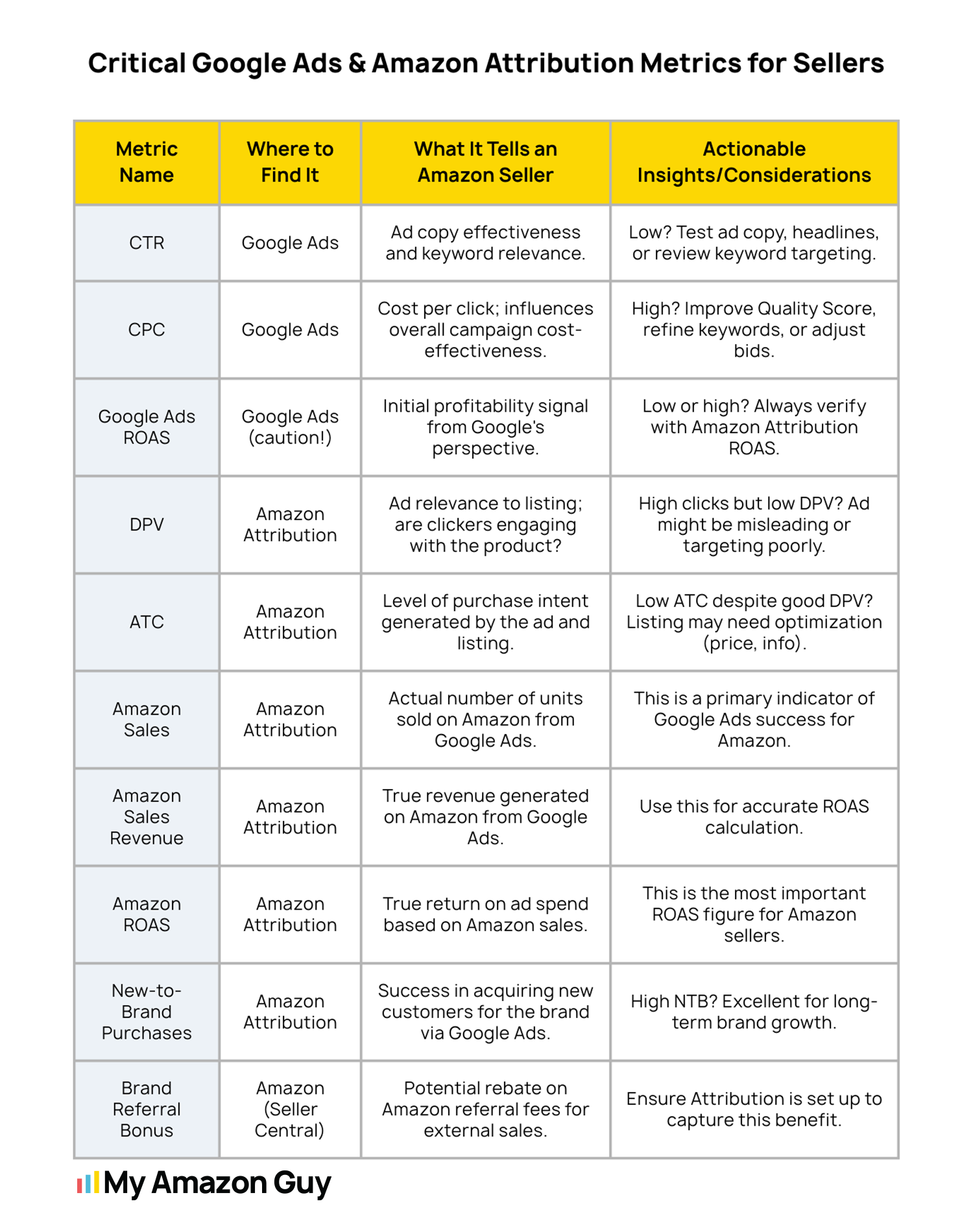
- See full-funnel metrics, including impressions, clicks, detail page views, add-to-carts, and purchases
- Identify which external campaigns are actually driving conversions
- Reallocate budget toward high-performing campaigns and cut underperforming ones
- Earn an average 10% Brand Referral Bonus on qualifying external traffic
- Understand how customers discover, research, and buy your products
- Use conversion data to improve ad targeting and creative
- Apply insights to improve Sponsored Ads performance
- Make data-driven decisions to scale your business efficiently
How to Enable Amazon Advertising Attribution
Sellers can enable Amazon Advertising Attribution to track how external campaigns drive sales, and the process is straightforward when you follow the right steps. By following this guide, you can set up tracking properly and start measuring ROI from non-Amazon channels quickly.
Step 1: Confirm Eligibility
You must have a professional seller account enrolled in Amazon Brand Registry or be a registered vendor. Also, ensure you have access to the Amazon Advertising Console to create campaigns.
Step 2: Access the Amazon Attribution Console
Log in to the Amazon Advertising Console and navigate to Measurement & Reporting > Amazon Attribution. This is where all campaign creation, tagging, and reporting happens.
Step 3: Create an Attribution Campaign
Click “Create campaign” and select whether to create it manually or upload a bulk file. Manual creation is ideal for social media or email campaigns, while bulk upload is best for Google or Facebook campaigns with large ad sets.
Step 4: Select Products and Ad Groups
Choose the ASINs you want to track and create ad groups for each marketing channel or tactic. Naming ad groups clearly helps track performance by source, like “Facebook_Top_Funnel” or “Google_Search_Branded”.
Step 5: Generate the Tracking Tag
Enter the destination URL for each product or Brand Store page, then click “Create” to generate a unique Amazon Attribution tag. Copy this URL carefully since this is what you’ll use in your external ads.
Step 6: Implement Tags on External Platforms
Paste the generated tracking tag as the final URL in your external ads, whether on Google, Facebook, TikTok, email, or influencer posts. Avoid URL shorteners, as they can break tracking parameters.
Step 7: Validate and Monitor Data
Wait 1-2 days for initial data to populate in the dashboard, then monitor metrics like impressions, clicks, detail page views, add-to-carts, and purchases. Use this information to optimize campaigns and reallocate budget to the highest-performing channels.
Maximize Your Amazon Attribution Tracking
See exactly which external campaigns drive your sales and optimize your ad spend.
Common Mistakes Sellers Make with Amazon Advertising Attribution
Amazon sellers often make errors that waste marketing dollars and mislead decision-making, and when it comes to Amazon Advertising Attribution, there’s no exception. Learning about these mistakes can help sellers avoid common pitfalls and get more accurate insights from their campaigns.
1. Incorrect Implementation of Tracking Tags
There are sellers who fail to apply unique attribution tags for each campaign, sending traffic directly to Amazon listings instead. This mistake results in no data being recorded for the campaign, making it impossible to know which ads are driving sales.
2. Ignoring the 14-Day Attribution Window
Some sellers expect clicks to immediately turn into sales, not accounting for Amazon’s 14-day last-touch model. This leads to premature conclusions and the false assumption that a campaign isn’t working.
3. Misinterpreting Metrics and Data
Focusing solely on clicks or CTR without looking at conversions can mislead sellers about performance. Misreading “Total Metrics” or partial reporting for specific ASINs may make it seem like ads aren’t contributing, even when they are.
4. Poor Alignment with Landing Pages
Sending external traffic to unoptimized or low-quality product pages can generate clicks but fail to convert shoppers. Many sellers overlook the importance of page quality, which directly impacts the effectiveness of their campaigns.
5. Overlooking the Brand Referral Bonus
Sellers sometimes ignore the Amazon Brand Referral Bonus, missing out on up to roughly 10% back on qualifying sales. Failing to factor this into campaign strategy reduces potential ROI and undervalues off-Amazon traffic.
Best Practices with Amazon Advertising Attribution
Sellers can make the most of Amazon Advertising Attribution by following proven strategies that ensure every dollar spent on external campaigns is measurable and optimized. When sellers implement these strategies correctly, they can improve ROI, gain deeper insights into customer behavior, and scale their campaigns confidently.
1. Use the Brand Referral Bonus Strategically
Amazon offers an average 10% credit back on qualifying sales driven by external traffic through Attribution tags. Prioritize products with high referral fees, like electronics accessories or clothing, to maximize this bonus and reduce overall Amazon commission costs.
This approach allows sellers to bid more aggressively on Google or Facebook campaigns without increasing net costs. Effectively, the Brand Referral Bonus can offset fees and amplify ROI when applied consistently.
2. Master the Shopping-Signal Model
Amazon now focuses on “shopping signals” in its view-through reporting, giving credit only when customers demonstrate genuine purchase intent. Use the “Purchases (all views)” metric for historical comparisons, but optimize budgets based on the new standard to focus on incremental, actionable sales.
Ignoring this model can misrepresent which campaigns truly drive conversions. By aligning with the updated methodology, sellers can better identify which ads are generating meaningful revenue.
3. Apply Channel-Specific Tactics
Different platforms perform differently depending on campaign goals. For example, bottom-of-funnel Google Search campaigns convert best for “Buy [Brand Name]” keywords, TikTok influencer links show early add-to-cart behavior, and Meta retargeting drives conversions from Shopify traffic to Amazon Storefronts.
Using unique Attribution tags per channel ensures you can measure each source accurately. This allows for precise optimization and prevents wasted ad spend on underperforming channels.
4. Optimize Using Advanced Insights
Check Brand Halo reports to see how ads for one product drive purchases of other products within your brand. Linking multi-product ads to Amazon Storefronts rather than individual product pages increases conversion by offering a branded, distraction-free shopping experience.
Also, for large-scale campaigns, use the Bulk Upload Tool to create tags for thousands of keywords at once. This ensures no traffic goes untracked and saves hours of manual work, especially for Google and Meta campaigns.
5. Follow the Golden Rule of Tagging
Never reuse the same tag across an entire platform or campaign type. Use a granular naming convention that includes channel, campaign type, audience, and date, like “FB_Video_BroadAudience_Feb2026″.
This lets you pivot and analyze data in spreadsheets to identify exactly which creatives, audiences, or campaigns are profitable. Granular tagging ensures precise tracking, making your optimization efforts much more effective.
FAQs About Amazon Advertising Attribution
Can I use Amazon Attribution for all my products?
You can use it for any ASIN associated with a brand enrolled in Amazon Brand Registry. Each product needs a unique tag if you want accurate campaign-level data.
How does Amazon Attribution work?
Amazon Attribution uses unique tracking tags applied to external ads or campaigns. It measures clicks, views, and conversions, then attributes sales to the correct marketing channel within a 14-day last-touch window.
What insights can Amazon Attribution provide for my ads?
Attribution gives data on which channels drive traffic, add-to-carts, and purchases. It also shows view-through conversions, brand halo effects, and the overall ROI of your external campaigns.
How can I set up Amazon Attribution for my products?
Sellers log in to the Amazon Advertising Console, create a campaign, select the products to track, and generate unique Attribution tags. These tags are then applied to the corresponding URLs in external ad platforms to start collecting data.
Maximize Your Amazon Marketing with Attribution
Amazon Advertising Attribution is a powerful tool for tracking how external marketing efforts drive sales on Amazon. It gives sellers clear, data-driven insights into which campaigns are performing and which need adjustment.
Using Attribution helps sellers measure ROI, optimize ad spend, and understand the full customer journey from clicks to conversions. By leveraging these insights, brands can make informed decisions and scale campaigns with confidence.
Are you ready to get the most from your external advertising and boost your Amazon sales? Contact our full-service Amazon agency, and let our experts set up, manage, and optimize your campaigns for maximum results.
Scale Amazon Sales With Expert Help
Let our agency implement and manage Attribution to maximize conversions and revenue.