
Amazon product title requirements now cap the Item Name at 75 characters and add a 125-character Item Highlights field, replacing the 200-character limit Amazon set in January 2025.
Last Updated: October 23, 2026
Are you tired of worrying about Amazon listing penalties for overly long product titles? Frustrated with inconsistent listing quality and titles packed with duplicate information?
Concerned that ineffective titles are hurting your sales and driving customers away? If so, you need to understand the latest Amazon product title requirements.
These updated guidelines address these pain points by splitting titles into a 75-character Item Name and a 125-character Item Highlights field, restricting special characters, and limiting word repetition. By adhering to these rules, you can improve your listing quality, enhance the customer shopping experience, and increase your chances of sales success on Amazon.
Updated Amazon Product Title Guidelines
On January 21, 2025, Amazon introduced product title guidelines to improve consistency and the shopping experience. That update capped titles at 200 characters and banned special characters like !, $, and ? unless they are part of the brand name.
It also limited repeated words to avoid redundancy, with exceptions for prepositions, articles, and conjunctions. Sellers fixed non-compliant titles in Manage All Inventory after the January 21 deadline.
Amazon sent correction suggestions to brand owners, who had 14 days to act before titles were updated automatically. Listings stayed active during that rollout, and Amazon hosted an Ask Amazon event on January 8, 2025, to answer seller questions.
Amazon Product Title Requirements Are Changing in 2025
What are the Amazon product title requirements in 2026?
Amazon now splits the old 200-character title into a 75-character Item Name and a 125-character Item Highlights field, a change that began on July 27, 2026, and covers every product type except media, per Amazon’s seller announcement. The special character and word repetition rules from January 2025 still apply, and Amazon’s title requirements page counts the brand name toward the twice-per-word limit.
| Rule | January 2025 | Since July 27, 2026 |
|---|---|---|
|
Title length
|
200 characters
|
75 characters (Item Name)
|
|
Extra searchable field
|
None
|
125 characters (Item Highlights)
|
|
Banned characters
|
!, $, ?, and others
|
! $ ? _ { } ^ ¬ ¦
|
|
Word repetition
|
Twice max
|
Twice max, brand counts
|
|
Non-compliant titles
|
Amazon fix after 14 days
|
AI rewrite after 14-day review
|
|
Search weight
|
Title only
|
Item Name and Highlights equal
|
Does Item Highlights count for Amazon search ranking?
Yes, Amazon’s Q&A on the product title update confirms the Item Name and Item Highlights are equal search inputs, so keywords moved down one line stay indexed. Since August 10, 2026, Item Highlights shows on its own line under the Item Name on desktop and mobile, with the number of visible characters varying by screen size and display settings.
What happens when Amazon's AI rewrites a product title?
Amazon builds a shorter title from the existing listing and applies it after a 14-day review window, with recommendations rolling out from July 27, 2026, through the rest of the year. Brand owners can approve, edit, or reject each suggestion in Review Listings Changes, and sellers can still rewrite any title later in Manage All Inventory.
How do I update Amazon product titles in bulk?
Download the Category Listings report, edit the Item Name and Item Highlights columns side by side, then upload the file through List Your Products. Amazon says bulk changes typically go live within eight hours, and sorting the sheet by character count catches any row still over 75 or 125.
Where should the brand name and variation details go?
Amazon recommends keeping the brand name and the most important variation attribute, such as size or color, in the Item Name. When 75 characters cannot hold every attribute, move the secondary ones into Item Highlights, so a water bottle keeps “32 oz” and “Black” in the Item Name while “leak-proof lid, BPA free” drops to the line below.
Amazon Product Title Insights for 2026
Amazon product titles still decide whether a listing gets found and clicked, even with the Item Name now capped at 75 characters. A clear, descriptive title paired with a well-written Item Highlights line gives shoppers enough detail to pick your listing on the search results page.
Why do optimized product titles matter to Amazon sellers?
How you write your product titles directly impacts how many people find and buy your products online. In the video below, you’ll see an example of a product listing whose title needs improvement and optimization.
How to Know If Your Listing Is Working for You (Amazon Listing Optimization)
Your product title plays a key role in search visibility and conversion. A well-optimized Amazon-compliant title with relevant keywords can help you rank higher in search results.
Additionally, the title contributes to your product listing’s Click Through Rate, as our founder and CEO, Steven Pope, explained in this LinkedIn post. A title that reads clearly in search results earns more clicks, and those clicks feed back into ranking.
Suppose you are searching for “niacinamide soap” on Amazon and these two products below are on the search results page; which are you likely to click? Look at how much product detail each title gives you before you even open the listing.
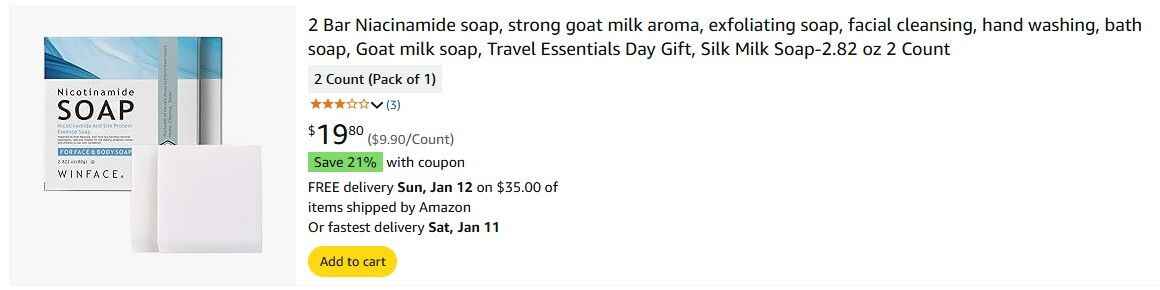
Optimized Product Title
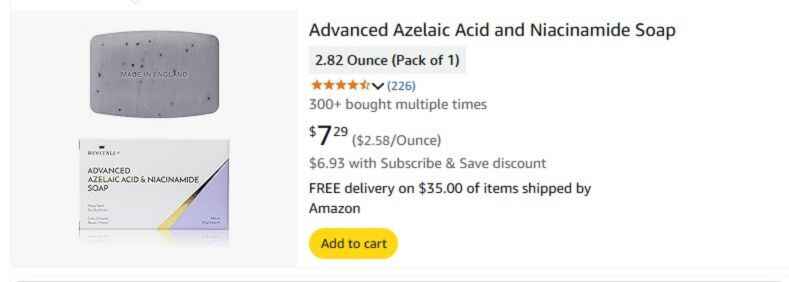
Unoptimized Product Title
You are more likely to click on the first product because its title is more descriptive. Under the 2026 rules, that detail has to fit in 75 characters, with the rest carried by Item Highlights on the line below.
How Do You Add Keywords to Your Amazon Product Titles?
A well-balanced title helps improve Amazon SEO, making products more searchable and discoverable. Product titles are a great place to use the primary keywords you identify through your keyword research.
Under the 2026 rules, the primary keyword belongs in the 75-character Item Name, and secondary keywords can move to Item Highlights. Amazon indexes both fields, so moving a keyword down one line does not drop it from search.
How do you optimize title density
Title density is how many high-value keywords fit into the Item Name without making it hard to read. With only 75 characters to work with, every keyword has to earn its spot, and the rest should move to Item Highlights.
- Include Top Keywords
Place your one or two highest-traffic keywords inside the 75-character Item Name, as close to the front as reads naturally. Move the next tier of keywords into Item Highlights, where they stay indexed.
- Use Exact Match Keywords
Match high-volume keywords directly in your title (e.g., “turmeric soap bar”). Adding precise keyword matches improves indexing for relevant searches.
- Strategic Keyword Placement
Place high-search-volume keywords at the beginning of your title. Ensure the title remains natural for readability without excessive repetition.
- Keyword Density Ratios
Aim for low density on high-volume terms already heavily used in other titles. Focus on finding low-density keywords with high search volume to gain a competitive edge.
- Target Specific Keywords
Optimize with seasonal or niche keywords (e.g., “handmade Thanksgiving bar soap”). Avoid overusing irrelevant terms or brand names.
AmazonProduct titles are a great place to use the primary keywords you identify through your keyword research.
Tools for Keyword Analysis
Use tools to analyze keyword volume and identify high-impact keywords that are underutilized in product titles. Brand owners can add Amazon’s Search Query Performance dashboard to see which searches actually lead shoppers to their listings.
Amazon Product Title Best Practices
The best Amazon product titles follow the same core habits, whether the limit is 200 characters or 75. The practices below still apply under the 2026 rules, with each one adjusted so the strongest details land in the Item Name and the rest move to Item Highlights.
1. Emphasize Your Unique Selling Proposition (USP)
Highlighting your product’s unique qualities grabs attention and sets it apart from competitors. Use specific, factual language that addresses a customer need or pain point, since Amazon bans subjective claims in titles.
Example:
Good: “Gluten-Free Pancake Mix – Made with Organic Almond Flour, 16oz”
Bad: “Delicious Pancake Mix – Best in the Market”
2. Specify Key Product Attributes
Including attributes like size, color, material, or quantity ensures clarity and boosts conversions. Combine the brand name, target keyword, and product attributes in a concise format.
Example:
Good: “Nike Air Zoom Pegasus 39 – Men’s Running Shoes, Black, Size 10”
Bad: “Nike Running Shoes – Comfortable and Stylish”
3. Eliminate "Empty" Words
Words like “very” or “awesome” add no value and waste space. Stick to descriptive and functional keywords.
Example:
Good: “Bamboo Cutting Board – Large, Durable, Easy-to-Clean”
Bad: “Authentic Bamboo Cutting Board – Super Amazing Quality”
4. Check Competitors’ Product Title Optimization
Learn from competitors to refine your titles and identify overlooked opportunities. Research competitor titles to find unique keywords or formatting techniques.
Example:
If competitors list “Stainless Steel Water Bottle – 32oz,” you could add “Leak-Proof” to stand out.
5. Utilize Product Title Formulas
Structured titles ensure consistency and relevance across products. Use niche-specific formulas for your product category.
Example Formulas:
Electronics: Brand + Product + Specs (e.g., “Sony WH-1000XM5 Wireless Headphones – Noise Canceling”)
Beauty: Brand + Product + Attributes (e.g., “Maybelline Fit Me Foundation – Matte Finish, 120 Classic Ivory”)
Amazon recommends keeping the brand name in the Item Name, and the brand counts toward the 75-character limit. Smaller brands with little brand search should keep the brand name short, so the product keyword still lands early in the title.
6. Use Positive Sentiment Words
Positive words make a title feel appealing and trustworthy, but only when they name a real feature like “durable” or “easy-to-clean.” With 75 characters to work with, one functional descriptor beats two vague ones, and Amazon’s guidelines already ban subjective claims like “Best seller.”
Example:
Positive: “Smart Vacuum Cleaner with Easy Navigation and Powerful Suction”
Neutral: “Vacuum Cleaner with Navigation and Suction Power”
Reality Role of Language Improving E-commerceLanguage has a very important role to attract customer’s attention to buy a product
7. Consider Readability While Optimizing for SEO
Readable titles earn more clicks, so use short phrases and simple words while keeping the keywords that drive search visibility. Aim for a Flesch readability score of around 58 or higher, which keeps the title close to plain, everyday English.
Example:
Optimized: “Wireless Earbuds with Long Battery Life and Noise Cancellation” (62 characters), with “Fast charging, USB-C case, sweat resistant, for gym, running, and calls” in Item Highlights
Hard to Read: “Wireless Bluetooth Earbuds High-Performance Battery, Noise Reducing Tech”
8. Utilize Connected Keywords
Threecolts Research shows that top-performing titles often use connected keywords to form phrases, enhancing relevance and readability. Use tools to identify common keyword patterns in your category and structure them as cohesive phrases.
Example:
Connected: “Handmade Gold-Plated Name Necklace – Personalized Gift for Her”
Disjointed: “Gold Necklace, Gift, Handmade, Personalized Name”
9. Test and Analyze Your Efforts
Use Manage Your Experiments in Seller Central to A/B test two title versions, then confirm the winner by clicks and conversions in your Business Reports. The tool is free for Brand Registry owners, and Amazon says optimized content can lift sales by up to 25%.
Example:
Test titles like “Organic Peanut Butter – No Added Sugar, 16oz” versus “Natural Peanut Butter – Sugar-Free, 16oz” to see which performs better.
Why Amazon Product Title Requirements Strain Small Teams
Shorter titles sound like less work, but the 2026 split doubles the fields every ASIN needs, and new sellers feel it first. Many write one long title with no search data behind it, so Amazon’s AI shortens it for them, and the detail page ends up with keywords the seller never picked.
Writing Amazon product listings now takes longer because every child ASIN needs an Item Name and Item Highlights checked against the character limits and the twice-per-word rule, so a parent with 12 children means 24 fields. When titles, ads, and images sit with different people, a rewrite can strip a keyword the PPC team still bids on, and catalog growth stalls as each launch gets written from scratch.
Small ecommerce teams struggle to keep Amazon SEO consistent because each AI suggestion opens its own 14-day review clock, and a team that checks Seller Central once a week can lose half of that window. That is why brands invest in ongoing Amazon SEO services, which fold rule changes like the move from 200 to 75 characters into regular listing maintenance and watch rank while Amazon reindexes new titles.
Outsourced Amazon account management becomes critical as catalogs expand, since hundreds of ASINs can draw AI suggestions faster than one in-house manager can review them. Full-service Amazon management adds the people and process to clear each review window on time and keep one title standard across the whole catalog.