

Last Updated: January 30, 2026
Struggling to find your Amazon merchant token ID? The process is actually simple, but many sellers get stuck because they are not sure where to look or why it even matters.
Seller Central gives sellers access to a massive amount of data and tools, which is one reason so many e-commerce brands choose Amazon over other platforms. Between reports, settings, integrations, and account details, sellers can manage almost every part of their business in one place.
The downside is that all this information can make basic tasks feel more complicated than they should be. As a result, some sellers do not know where to find their Amazon merchant token ID, even when a tool, agency, or Amazon itself asks for it.
In this guide, we explain what the Amazon merchant token ID is and why it matters for sellers managing third-party tools, APIs, and account integrations. Our Amazon agency also shows how to find it, keep it secure, and use it correctly to avoid account issues and streamline operations.
Table of Contents
Simplify Your Account Management
Let our team handle your integrations and setups so your Amazon business runs smoothly.
What Is an Amazon Merchant Token ID
The Amazon Merchant Token ID is a unique alphanumeric code assigned to every seller account on the platform. With more than 9 million active sellers on the platform, Amazon uses this token to keep track of each seller and ensure tools, reports, and APIs connect to the correct account.
This token acts like a secure fingerprint for your store, allowing third-party applications, inventory systems, and reporting tools to access your account without sharing your login information. It is required for Amazon services like the Marketplace Web Service (MWS), Amazon Merchant Transport Utility (AMTU), and certain Seller Central support processes.
Although the token is distinct from your Seller ID, it is just as critical and remains the same for the life of your account. Because it is a private identifier, it should be kept secure while being accessible for authorized applications and services that help manage and grow your Amazon business.
Why the Amazon Merchant Token ID Matters for Sellers
The main purpose of the Amazon Merchant Token ID is to uniquely identify your seller account and connect it to Amazon’s tools and services. However, this ID also enables critical operations that keep your business running smoothly and securely.
1. Connects Third-Party Software and APIs
The Merchant Token allows your account to securely link with inventory management, advertising, and analytics tools. Without it, these apps cannot access your data, making automation and reporting impossible.
2. Ensures Accurate Product and Feed Management
When uploading products using flat files or XML feeds, the Merchant Token ties every listing to your specific storefront. This prevents errors like orphaned SKUs or misassigned inventory that can hurt sales and reporting accuracy.
3. Speeds Up Seller Support Verification
Amazon Seller Support uses the Merchant Token to quickly locate and verify your account. This makes resolving account-level issues like tax exemptions, suspensions, or brand registry faster and more accurate.
4. Enables Access to Amazon’s APIs and Utilities
The Merchant Token is required to access MWS, Selling Partner API (SP-API), and the AMTU. These tools are essential for automated reporting, bulk file transfers, and integrating your Amazon store with other business systems.
5. Distinguishes Your Business Among Millions of Sellers
With millions of active sellers on Amazon, the Merchant Token acts as your account’s unique digital fingerprint. It ensures that Amazon can accurately track your transactions, listings, and account activity without confusion with other sellers.
Protect Your Seller Data
Ensure your merchant token ID is managed securely by professionals you can trust.
How to Find the Amazon Merchant Token ID
Finding the Amazon merchant token ID is easier than most sellers think, but many miss it because Seller Central contains so much information. With a detailed step-by-step process, you can locate your Merchant Token quickly and have it ready for integrations or support requests.
Step 1: Log in to Seller Central
Sign in to your Amazon Seller Central account using your professional selling credentials. This ensures you have access to the account settings where the Merchant Token is stored.
Step 2: Navigate to Settings
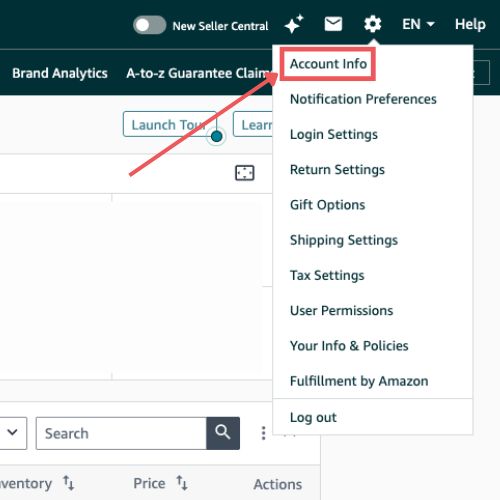
On the Seller Central homepage, locate the gear icon in the top right corner. Clicking this icon will open a menu with all your account management options.
Step 3: Open Account Info
From the Settings drop-down, select “Account Info”. This page contains your business information, tax settings, and other identifiers for your seller account.
Step 4: Find Business Information
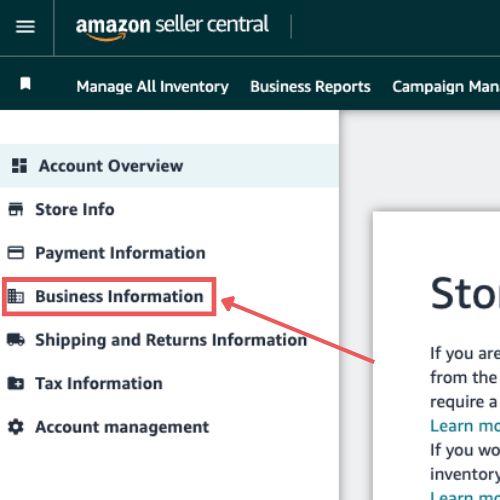
Scroll down until you see the “Business Information” section. This is where Amazon stores account-level identifiers like the Merchant Token.
Step 5: Reveal Your Merchant Token
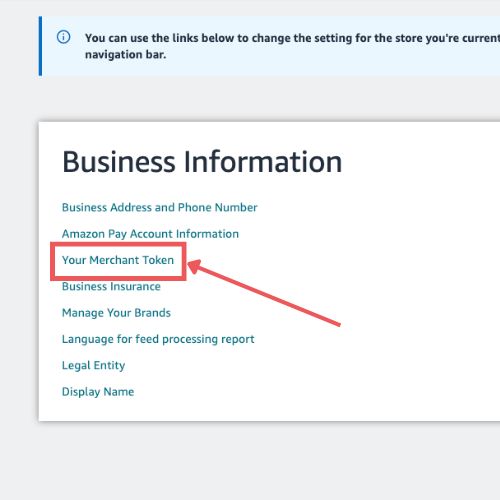
Click the link labeled “Your Merchant Token” (sometimes called Merchant ID). Your unique alphanumeric code will appear, and this is the identifier you can use for third-party tools, APIs, or Seller Support.
Amazon Merchant Token ID Security Tips
The Amazon merchant token ID is a sensitive account identifier, so keeping it secure is essential to protect your business data. There are several best practices sellers can follow to avoid unauthorized access and prevent disruptions to their Amazon account.
1. Treat the Merchant Token as Confidential
Your Merchant Token acts as a unique key to your Amazon account, so it should never be shared publicly. Avoid posting it in forums, social media, or screenshots, and only provide it to trusted apps or partners.
2. Share Only with Verified Third-Party Applications
Whenever possible, give your Merchant Token only to applications found in the Amazon Selling Partner Appstore. These apps have been vetted for security, while unverified tools can put your account at risk.
3. Conduct Regular Access Audits
Periodically review which tools and services have access to your Merchant Token. Revoke any access for apps or consultants that you no longer use to prevent potential backdoor access to your account.
4. Use Granular User Permissions
Limit who on your team can view or use your Merchant Token. Only owners or high-level admins should have access, and junior staff or virtual assistants should be restricted from Account Info.
5. Monitor Integrations and Account Health
After connecting a new tool or service, keep an eye on your Account Health Dashboard. This ensures that the app is working correctly and not triggering policy violations that could affect your account.
FAQs About Amazon Merchant Token ID
Is my Amazon Merchant Token ID unique?
Yes, every seller account has a unique Merchant Token ID that distinguishes it from millions of other Amazon sellers. This ensures that all integrations and reports are tied specifically to your account.
Does the Merchant Token change over time?
No, your Merchant Token remains the same for the lifetime of your seller account. This ensures consistent access for tools, APIs, and integrations without disruption.
Is the Merchant Token the same as my Seller ID?
No, the Merchant Token and Seller ID are not the same. The Seller ID is more public-facing and appears in URLs or storefront details, while the Merchant Token is a private, unique identifier used for APIs, third-party tools, and account verification.
What should I do if I lose or forget my Merchant Token ID?
You can always retrieve it by logging into Seller Central and following the steps under Settings > Account Info > Business Information > Merchant Token. Keep a secure record so you can access it quickly for integrations or support.
Can I share my Amazon Merchant Token ID?
No, sharing your Merchant Token with unverified parties is against Amazon’s Terms of Service. Only provide it to trusted, authorized third-party applications or developers.
Take Control of Your Amazon Merchant Token ID
With so much information available in Seller Central, it’s easy for sellers to feel overwhelmed or get lost in the platform. That’s completely understandable, but knowing where to locate your Merchant Token ID and how to use it is essential for running your account smoothly.
Understanding the Merchant Token ID and its role in connecting to third-party tools, APIs, and support can save time and prevent errors. By following the steps and best practices outlined in this guide, sellers can confidently manage integrations, listings, and account operations without confusion.
Need help managing your Amazon account in a way you can actually trust? Contact our full-service Amazon agency and let our experts handle your integrations, account setups, and tools so you can focus on growing your business.
Confidently Manage Your Amazon Account
Trust our full-service Amazon agency to guide you through token ID usage and integrations.