
Most sellers do not have an Amazon SEO problem. They have a sequence problem.
They rewrite a title in March, add backend terms in June, and buy a keyword tool in September. Nothing compounds because nothing follows anything else.
This is the step-by-step Amazon SEO process our team runs on client accounts, in the order we run it. We have managed $1.2B+ in ecommerce revenue across 400+ brands, and the pattern holds across almost all of them.
You will get the sequence, the field specifications, an audit template you can copy into a sheet, and a cadence checklist. You will also get the diagnostic that tells you which step to start on, because the answer is different for a listing indexed for 200 keywords than for one indexed for 2,000.
Table of Contents
Let Us Run It
Seven to eight specialists work on every client catalog, covering SEO, PPC, catalog, and design, so the five steps actually happen on schedule.
TL;DR - Amazon SEO Guide to Rank on Amazon
The Amazon SEO guide step-by-step process runs in five stages, in this order.
- Research keywords that convert, not keywords with volume
- Optimize every listing field so Amazon can index those terms
- Fix conversion rate so the rankings you earn hold
- Add sales velocity through PPC and promotions
- Monitor weekly and re-optimize only when the data says to
Run them out of order, and you waste a cycle. Most sellers stall because they skip step one and start rewriting titles.
Amazon SEO in 2026: What Changed and What Still Ranks
The inputs barely moved. What changed is how many systems read those inputs at once.
Amazon still ranks products on relevance and sales performance. The difference in 2026 is that your title, Item Highlights, bullets, and backend field each feed a different reader, and what satisfies one does not automatically satisfy the next.
How Do I Improve My Amazon Product Ranking?
You improve Amazon search ranking by getting indexed for more relevant terms, then converting the traffic those terms send you. Everything else is downstream of those two things.
Indexing is binary and fixable this week. Conversion is gradual and compounds, which is why the two have to run in sequence rather than in parallel.
What Are the Amazon Ranking Factors in 2026?
Amazon has never published a ranking factor list, so what follows is what we watch move accounts across 400+ brands. The five that move position directly are relevance to the search term, conversion rate, sales velocity, price, and stock availability.
Everything else works by feeding those five, including images, A+ Content, reviews, fulfillment speed, and advertising. Amazon does confirm that listing quality and account health affect where you place, which is why a suppressed variation or a stranded ASIN drags the whole parent.
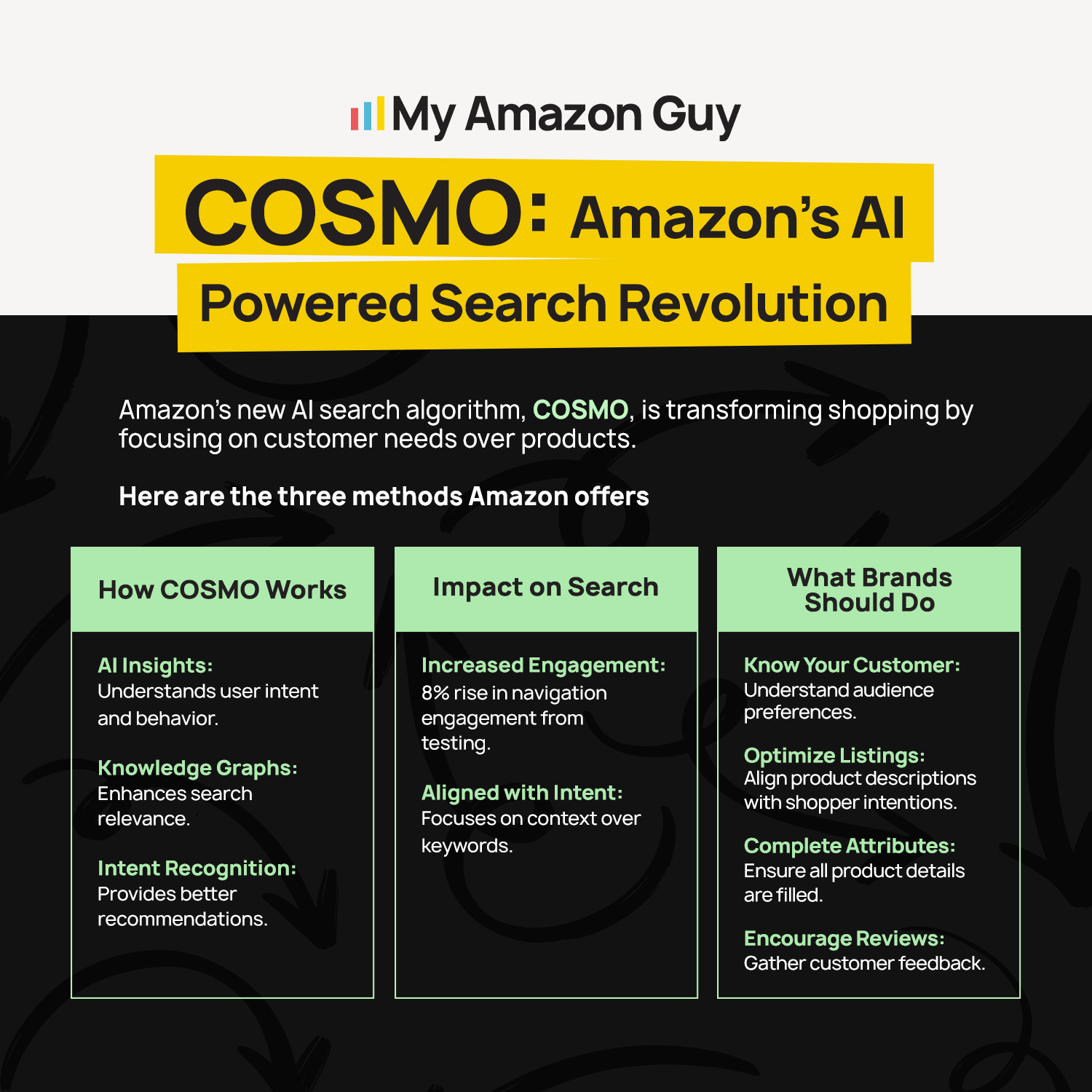
Does COSMO Change How I Should Write My Listing, and How Do I Optimize for Rufus?
Both matter less than the noise suggests, and both reward the same fix. Amazon’s newer systems read context and intent rather than matching strings, so a listing that states who the product is for, what it fits, and when someone would use it gives them something to work with.
The practical move is attribute completeness. Fill every applicable field in the product detail page, use your bullets to answer real buyer questions, and write descriptive alt text on every image, since Amazon says search engines read that text even though shoppers never see it on the page.
Why Did My Organic Sessions Drop While My Rankings Stayed the Same?
Your rank held and your share of that keyword shrank. Search volume shifted, a competitor started buying the top slot, or Amazon changed how many organic positions appear above the fold.
Rank position is not traffic. Track sessions and impressions alongside rank, or you will optimize a number that no longer pays you.
Where to Start Based on Your Amazon Listing's Current State
Where you start depends on your listing’s current state, not on a universal first step. A listing indexed for 200 keywords needs different work than one indexed for 2,000, and treating them the same is how sellers lose a quarter.
This section gives you the diagnostic and the benchmarks to place yourself against. Score your listing first, then run only the step the table points you to.
What Should I Fix First on My Amazon Listing?
Start with indexing. If Amazon does not associate your ASIN with a term, no amount of conversion work will rank you for it.
The mistake we see most often is a seller running advanced keyword work on a listing that is only indexed for a few hundred terms. That is a sequencing failure, and it burns a full optimization cycle.
| Your current state | Start with | Why |
|---|---|---|
|
Indexed for under 800 keywords
|
Step 1 and Step 2
|
You are invisible for most of your category, so expand the index before optimizing what ranks
|
|
Indexed for 800+, few on page one
|
Step 3 and Step 4
|
Amazon knows you exist and shoppers are not buying, so conversion and velocity are the constraint
|
|
Ranking 20 to 50 on your money terms
|
Step 4
|
Those positions are the closest thing to free revenue in your account
|
|
Ranking well, sales flat
|
Step 5
|
Something drifted, and monitoring will tell you what
|
How Many Keywords Should My ASIN Be Indexed For?
Across the accounts we manage, under 800 indexed keywords per ASIN is thin and 2,000 or more is healthy in most categories. The number matters less than the direction it moves every month.
These are our internal benchmarks from managing 400+ brands, not published Amazon data. Use them as reference points rather than rules, since a niche industrial part will never index like a supplement.
| Metric | Average | Good |
|---|---|---|
|
Indexed keywords per ASIN
|
400 to 800
|
2,000+
|
|
Keywords on page one
|
Under 10
|
30+
|
|
Unit session percentage
|
8% to 12%
|
18%+
|
|
Time between listing refreshes
|
9 to 12 months
|
60 to 90 days
|
Step 1: Amazon Keyword Research That Finds Terms That Convert
Volume tells you how many people search. Conversion tells you which of them buy.
Rank for 50 terms that convert, and you have a business. Rank for 500 that do not, and you have traffic you cannot monetize.
How Do I Find Seed Keywords for My Product?
Start in the Amazon search bar and type the plainest description of your product. The autosuggest list is Amazon showing you real demand for free.
From there, Brand Registered sellers get three dashboards inside Brand Analytics, covering Search Query Performance, Top Search Terms, and Search Catalog Performance. Top Search Terms also shows search frequency rank and the three products getting the clicks, which is competitive intelligence Amazon hands you at no charge.
How Do I Mine Competitor Listings for Keywords?
Run a reverse lookup on the three ASINs beating you, then subtract the terms you already index for. What remains is your gap list.
Amazon states plainly that you cannot see a competitor’s keywords directly. Third-party tools infer them from ranking data, which is close enough to act on and worth treating as directional rather than exact.
How Do I Prioritize Which Keywords To Target First?
Sort by relevance and buyer intent before you sort by volume. A term that describes your exact product beats a broader term with ten times the searches.
Amazon’s own framing splits short-tail terms, which carry volume and competition, from long-tail terms, which carry specific intent and convert better. You want both, weighted toward long-tail while your review count is still building.
Three mistakes that cost the most time here.
- Building one giant list and never mapping terms to a specific listing field
- Chasing head terms while sitting at 40 reviews
- Rebuilding the list from scratch every quarter instead of updating it
Step 2: Amazon Listing Optimization Field by Field
Now you place the keywords where Amazon can read them. Every field has a different job, a different limit, and a different indexing behavior, so a term that works in your title can be dead weight in your backend.
Work through the fields in order and treat each one as its own decision. The sellers who get this wrong are usually the ones who wrote a single keyword list and pasted it everywhere.
How Do I Write an Amazon Title That Ranks and Converts?
Lead with the brand name and product type, then spend what is left on your single strongest converting term. Amazon caps titles at 75 characters including spaces in every category except media, so every space, unit, and piece of punctuation costs you keyword room.
The qualifiers you cut move into Item Highlights, a separate field carrying 125 more searchable characters that displays alongside your title. Leave a long title in place, and Amazon’s AI rewrites it for you, though brand owners get 14 days to review or modify the change before it publishes.
How Should I Write Amazon Bullet Points for SEO?
Open each bullet with a short label, then answer one buyer question underneath it. One bullet, one objection handled.
Amazon wants a short label at the front of each bullet, then about 100 characters of explanation. Our own testing across client catalogs points to a tighter constraint, since indexing appears to favor the first 1,000 characters of the bullet block, which means keywords buried in bullet five may never index at all.
What Goes in Amazon Backend Search Terms?
Everything that belongs in the index but does not belong in front of a shopper. Misspellings, Spanish-language terms, abbreviations, product synonyms, and use cases that would read badly in a bullet.
Amazon wants lowercase entries separated by spaces, with articles and prepositions left out. The field is small and finite, so every wasted character is a term you are not indexing for.
Should I Repeat Keywords in the Title and the Backend?
No. Words already sitting in your title and bullets are indexed, and repeating them in the backend spends a limited field on coverage you already have.
Pull every duplicate out and refill that space with terms that appear nowhere else on the page. This single edit is the highest-return hour in Step 2, and almost nobody does it.
| Field | Amazon's guidance | Our working rule |
|---|---|---|
|
Title |
75 characters including spaces, plus 125 in Item Highlights
|
Brand and product type first, one converting term in what remains
|
|
Bullets |
Short label, then about 100 characters
|
Front-load keywords, since indexing favors the first 1,000 characters of the block
|
|
Description |
Use a phrase once, then use variations
|
Write for the shopper, treat indexing as secondary
|
|
Backend search terms
|
Lowercase, space-separated, no filler words
|
Zero words that already appear in the title or bullets
|
Amazon is explicit that stuffing keywords damages the shopping experience and can hurt your placement. Readability is a ranking input, not a tradeoff against one.
Step 3: Improve Conversion Rate So Your Rankings Hold
Ranking is a loan Amazon extends and then calls in. Fail to convert, and the position goes to whoever will.
This is the step sellers skip because it does not feel like SEO. It is the step that decides whether Steps 1 and 2 stick.
How Do Product Images Affect Amazon Ranking?
Images do not carry keywords into the index, but they set your click-through and conversion rate, which do move ranking. A better main image raises both numbers at once.
Amazon asks for the product to occupy at least 85 percent of the main image, shot on a plain white background, while secondary images cover the remaining angles. Get the primary keyword visible in the main image where category rules allow it.
Does A+ Content Help Amazon SEO?
Indirectly, and more than most sellers expect. A+ Content lifts conversion, and conversion lifts ranking, which is the entire mechanism.
A+ Content is free for Brand Registered sellers, which makes an empty A+ section the cheapest gap in most accounts we audit. Our A+ Content and SEO walkthrough covers how to write the modules so they carry weight.
How Does Pricing Affect My Amazon Search Rank?
Price sits in the ranking inputs directly, because it moves conversion and because Amazon compares your offer to the field. In our audits, a price more than 20 percent above the category median needs a conversion story strong enough to justify it.
Check your price against the three ASINs ranking above you before you blame your keywords. Sometimes the SEO is fine, and the offer is not.
Step 4: Increase Sales Velocity to Push Keywords Up
Indexing gets you into the auction, and velocity decides where you place inside it. Amazon watches how fast an ASIN converts on a given term, then hands the top positions to whoever proves the term sells.
This is the step where paid and organic stop being separate budgets. The orders you buy today become the ranking signal you keep next quarter.
Does Amazon PPC Help Organic Ranking?
Yes, and the mechanism is simpler than most explanations make it. Ads generate orders on a specific search term; those orders tell Amazon the term converts for your ASIN, and organic position follows.
Most teams run Amazon PPC and SEO as separate jobs with separate meetings. We run them as one loop, pulling converting search terms out of the advertising data and writing them into the listing, then easing spend on those terms once organic holds.
How Much PPC Spend Does It Take To Move One Keyword?
Work backwards from the orders required, not forwards from a budget. Estimate the conversion rate on the term, calculate how many clicks that means, multiply by your cost per click, and you have the number.
We walked through this math on a household cleaning ASIN targeting the term “floor cleaner for mopping”, tracking weekly rank against keyword-level spend until the position moved. The lesson from that account was that a single term with a defined spend plan beats a broad budget spread across 40 keywords.
Do Coupons, Promotions, and External Traffic Help Ranking?
Coupons and Subscribe and Save create velocity spikes that Amazon registers, which makes them useful at launch and during seasonal pushes. They are accelerants, not a strategy.
External traffic is where sellers get into trouble. Rebate schemes, search-find-buy, and paid review funnels all carry account risk, and we have said for years that these shortcuts end in dead ends.
See What You Are Missing
Most of the listings we audit are indexed for under 800 keywords, and their owners had no idea until someone counted.
Step 5: Monitor Rankings and Know When to Re-Optimize
Monitoring is what turns four steps of work into a system that compounds. Without it, you are guessing at whether the last change helped, and guessing is how sellers end up rewriting a title that was already working.
Track rank weekly, index monthly, and share quarterly. The data tells you when to go back to Step 1, which is the only trigger worth acting on.
How Do I Check if My Listing Is Indexed for a Keyword?
Type your ASIN and the keyword together into the Amazon search bar. If your product returns, you are indexed for that term, and if nothing returns, you are not.
That is the fastest diagnostic in Amazon SEO, and it takes 10 seconds. Run it on your top 20 terms before you touch anything else.
Why Is My Listing Not Indexed for My Main Keyword?
Usually the term appears nowhere Amazon reads, or it appears in a field that is over its limit. Occasionally, the term is restricted in your category or blocked as a competitor brand name.
Check the title, bullets, and backend field in that order. If the term is present in all three and still does not index, the listing likely has a suppression or attribute problem rather than a keyword problem.
How Do I Use the Search Query Performance Report for SEO?
Look at impression share and purchase share per query rather than at rank. The report shows how much of a term’s total volume your brand captured, which tells you where you are leaving revenue on the table.
Sort by queries where your impression share is strong, and your purchase share is weak. Those are conversion problems on terms you already win traffic for, and they are usually faster to fix than ranking problems.
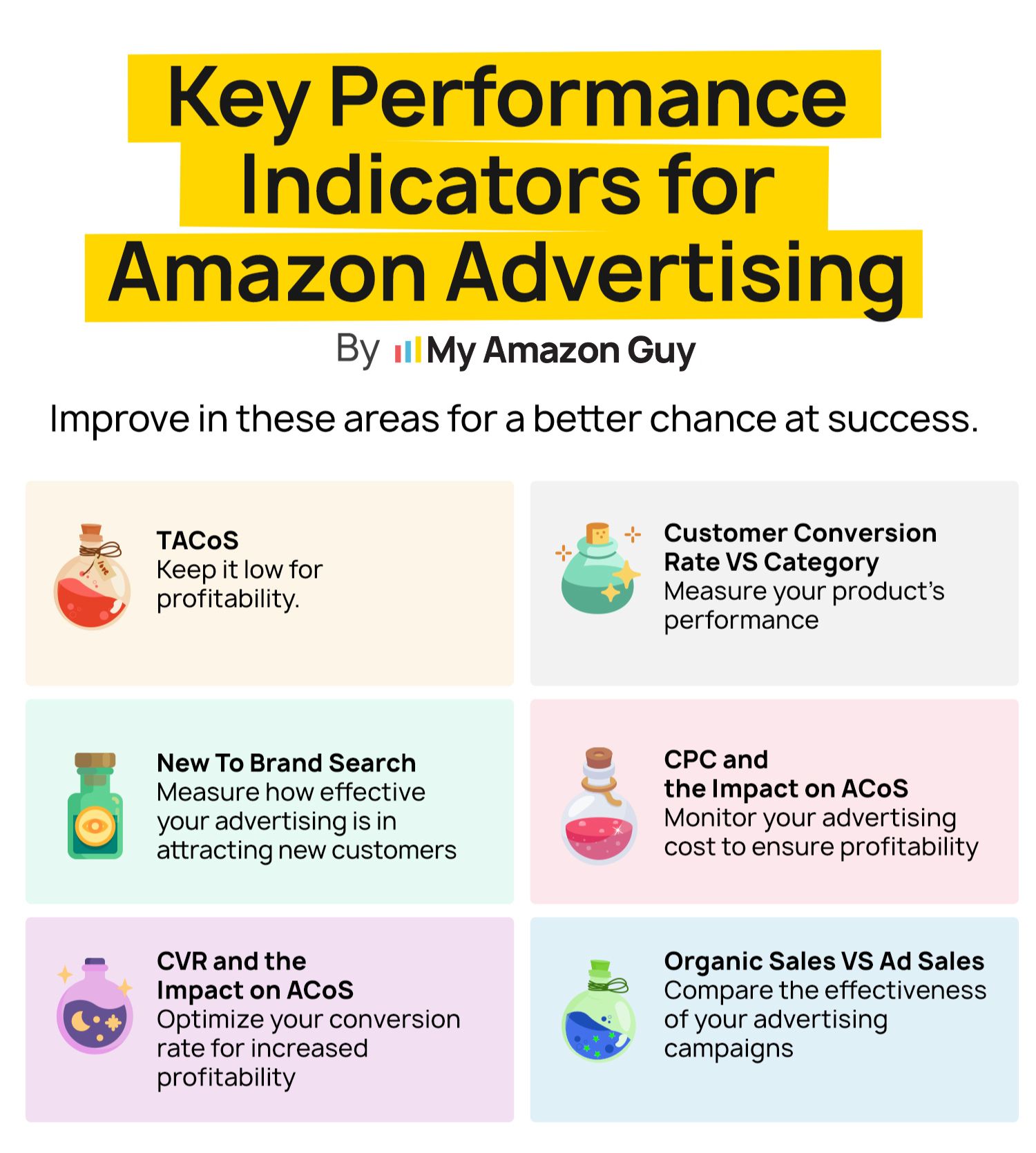
Which Amazon SEO KPIs Should I Track, and How Often?
Weekly for rank and spend, monthly for indexing and conversion, quarterly for share. Anything more frequent is noise, and anything less lets drift compound.
- Weekly: rank on your top 20 terms, keyword-level ad spend, unit session percentage
- Monthly: total indexed keyword count, page-one keyword count, sessions and conversion by ASIN
- Quarterly: impression share and purchase share from Search Query Performance
How Often Should I Update My Amazon Listing?
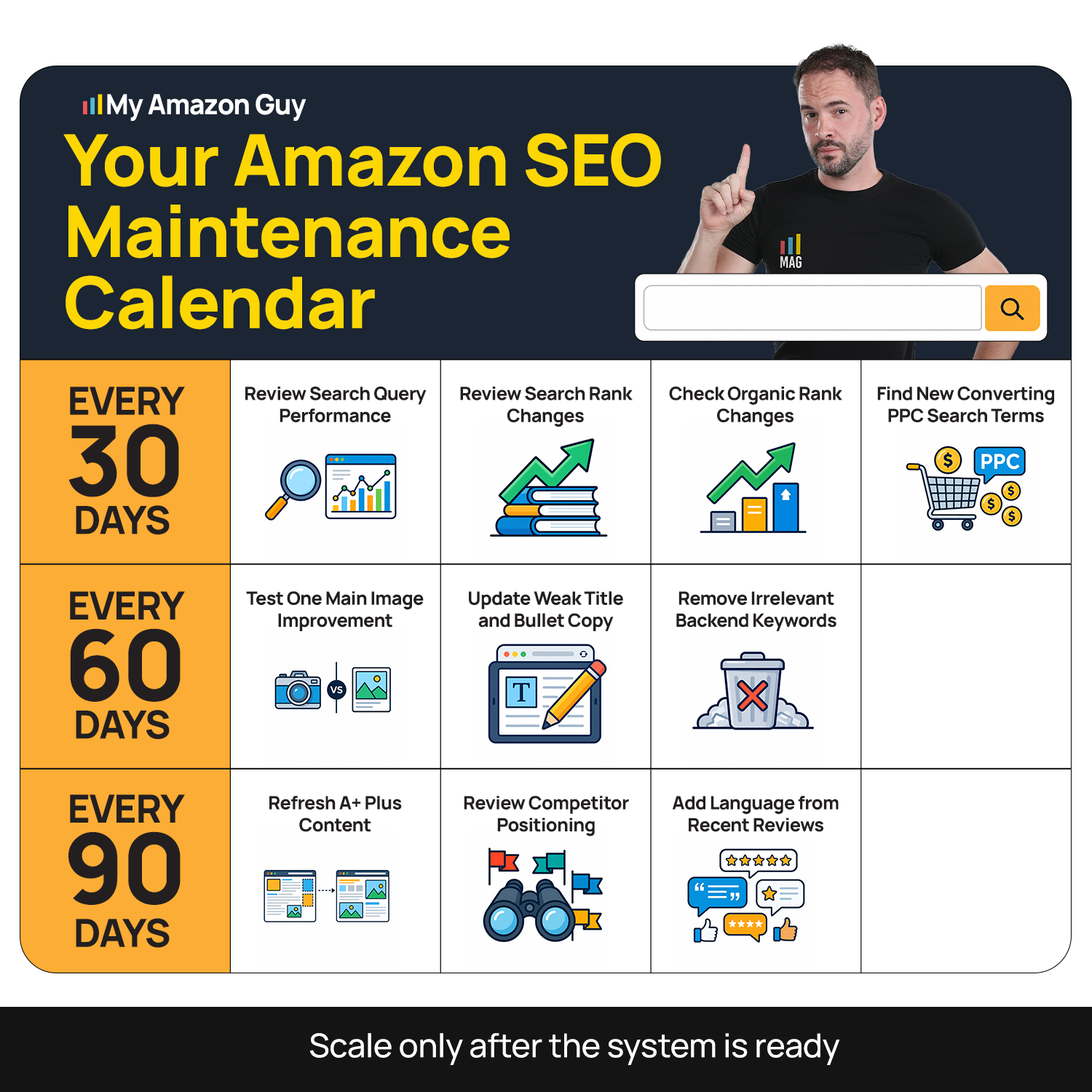
Every 60 to 90 days for active ASINs, and immediately when a data point tells you to. Common industry advice says every three to six months, which is too slow for a competitive category and too fast to accumulate meaningful data in a quiet one.
The real trigger is data volume rather than the calendar. Optimize before enough impressions accumulate, and you are guessing; wait too long, and a competitor takes the position while you plan.
Advanced Amazon SEO Tactics Once the Fundamentals Work
The tactics below only pay off once the first five steps are running. Try them on a listing that is thinly indexed or converting badly, and you will spend money proving what a basic audit would have told you for free.
Everything here is about concentration rather than coverage. You are picking a small number of terms you already have a claim to and forcing them up, instead of spreading effort across a keyword list that never moves.
What Is a Strike Zone Keyword on Amazon?
A strike zone keyword is a term you already rank for outside the first page, which in our framework means positions 20 to 50. You are relevant enough to appear and invisible enough that nobody clicks.
These terms are the cheapest revenue in your account because the hard part is done. Amazon already associates you with the query, so you are buying position rather than buying relevance.
How Do I Move a Keyword From Page Three to Page One?
Concentrate spend and conversion on one term at a time. Point exact-match ads at it, make sure the listing answers that specific query above the fold, and hold the pressure for two to three weeks.
Spreading the same budget across 30 keywords moves none of them. Sequence beats scale here, the same way it does everywhere else in this process.
Amazon SEO Audit Template You Can Copy
Copy the table below into a sheet, add a row per ASIN, and score each element pass or fail. The failures become your next optimization cycle, worked in step order rather than in the order you noticed them.
Run this on your three highest-revenue listings before you run it on anything else. If the same rows fail across all three, the problem sits in your process rather than in any one listing.
| Element | Pass criteria | Common failure |
|---|---|---|
|
Indexing |
Returns for your top 20 terms in the ASIN plus keyword test
|
Indexed for under 800 total keywords
|
|
Title |
Under 75 characters with the primary term inside it, reads naturally
|
Keyword string with no buying logic
|
|
Bullets
|
Keywords front-loaded, one objection handled per bullet
|
Terms buried past the first 1,000 characters
|
|
Backend terms
|
Zero overlap with title and bullets
|
Duplicates the title word for word
|
|
Main image
|
Product fills at least 85 percent of frame, white background
|
Lifestyle shot used as the main image
|
|
A+ Content
|
Present, with descriptive alt text on every module
|
Empty or template-filled
|
|
Reviews |
Within 20 percent of the ASINs ranking above you |
Under 50 with head terms being targeted
|
|
Price |
Inside the range of the top three organic results
|
Premium price with no conversion support
|
|
Stock |
No stockouts in the last 90 days
|
Repeated short stockouts on the hero ASIN
|
|
Conversion |
Unit session percentage above category average
|
Traffic rising while conversion falls
|
Amazon SEO Checklist by Cadence
The audit tells you what is broken and the cadence keeps it from breaking again. Most rankings do not collapse in a single event; they drift while nobody is looking.
Work the table below on a fixed schedule rather than when something feels wrong. The weekly rows take under an hour, and they are what catch problems while the fix is still cheap.
| Cadence | What you do |
|---|---|
|
Weekly |
Check rank on top 20 terms, review keyword-level spend, scan for suppressions and stockouts
|
|
Monthly |
Pull indexed keyword count, refresh the gap list from competitor movement, review conversion by ASIN
|
|
Quarterly |
Rewrite underperforming bullets and titles, refresh A+ modules and alt text, audit backend fields for duplicates
|
|
Annually |
Full catalog audit, seasonal keyword mapping, category-level share review
|
Frequently Asked Questions About Amazon SEO
How long does Amazon SEO take to work?
In our accounts, indexing changes usually show within 24 to 72 hours, while ranking movement takes four to eight weeks.
What is the step-by-step process for Amazon SEO?
Keyword research, then listing optimization, then conversion rate, then sales velocity, then monitoring. The order matters more than the individual tactics inside each step.
Can I rank on Amazon without spending on ads?
Yes, but slower. Ads manufacture the early conversion data that Amazon uses to decide whether you deserve a position, so a zero-ad launch takes considerably longer to gather the same signal.
Does the product description still get indexed?
Yes, write it as though it is indexed. Amazon has not published on this recently, and a keyword-aware description costs you nothing while a thin one gives up coverage you may already be earning.
Why does my competitor rank higher with a worse listing?
Sales history and review volume outweigh copy quality on established terms. Their listing is worse, and their conversion signal is older, which is exactly why velocity is Step 4 rather than an afterthought.
How many reviews do I need to compete?
Our working rule is to get within about 20 percent of the review count on the ASINs ranking above you. Absolute counts matter less than the gap between you and the position you want.
Should I hire an Amazon SEO agency or do it in-house?
In-house works when someone owns this process weekly and has the tools to run it. Hire out when the catalog is large enough that the audit alone takes days, or when the process keeps getting deprioritized against fires.
Does Amazon penalize listing changes?
No, but frequent changes reset the data you need to judge the last change. Space edits far enough apart that you can attribute the result.
Your Rankings Are a Process Problem, Not a Keyword Problem
Amazon SEO is not a list of tactics; it is an order of operations. Get indexed, optimize the fields, fix conversion, buy velocity on the terms that matter, then monitor and repeat.
The sellers who stall are the ones who run those steps out of sequence or in bursts. Diagnose where your listings actually sit before you touch anything, work the audit table row by row, then hold a weekly cadence so drift never gets a head start on you.
Are you tired of rewriting listings and watching your rankings sit still? Contact our full-service Amazon agency and let our Amazon experts run this process on your catalog, starting with a free Amazon SEO audit that tells you exactly which step your listings are stuck on.
Stop Losing Ground
Amazon is rewriting non-compliant titles automatically, so listings you have not touched are changing without you.