---
title: "How to Contact Amazon’s Catalog Team"
description: "Step by step instructions with images on how to contact Amazon's catalog team on Seller Central. Any issues with product listing and inventory issues through email or by phone."
featured_image: "https://myamazonguy.com/wp-content/uploads/2019/07/Getting-Amazon-Seller-Central-Support-1.png"
url: "https://myamazonguy.com/catalog-page-removals/amazons-catalog-team/"
date_modified: "2025-03-07T10:48:48-04:00"
---

### Example: Gating issue such as pesticides

1. Navigate to the top-right hand corner in chosen seller central account and click on “Help”.

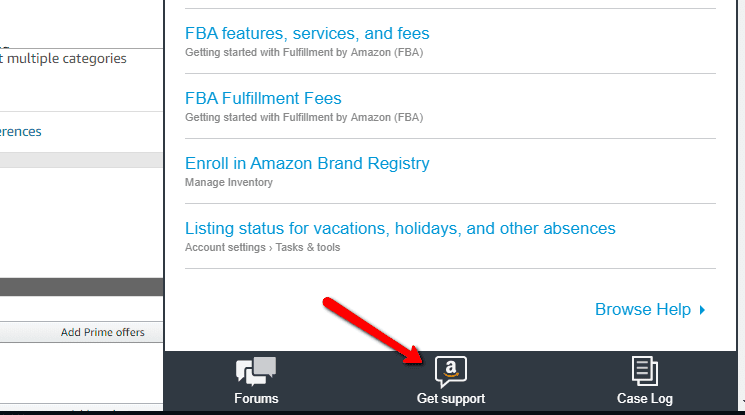
1. This will bring a side panel out. Navigate to the bottom of the side panel and click on “Get support”.

![How to File a Ticket on Amazon](http://myamazonguy.com/wp-content/uploads/2019/07/How-to-File-a-Ticket-on-Amazon.png)

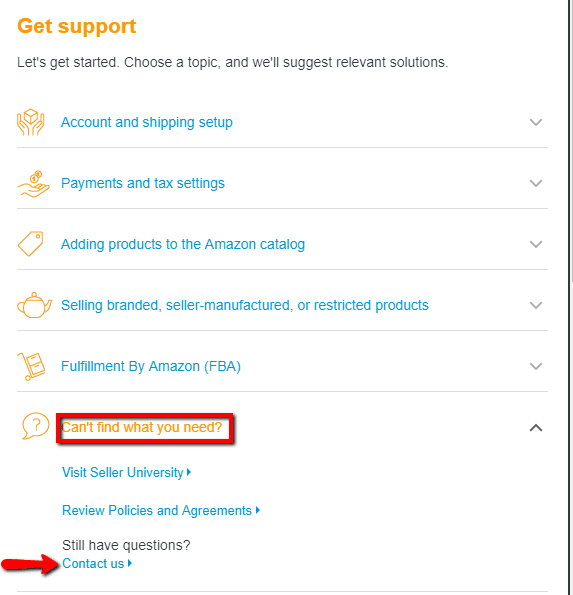
1. This will bring a list of options to get help on. Click on “Can’t find what you need?” near the bottom. This will drop down more options. Now click on “Contact Us”.

![Getting Amazon Seller Central Support](http://myamazonguy.com/wp-content/uploads/2019/07/Getting-Amazon-Seller-Central-Support.png)

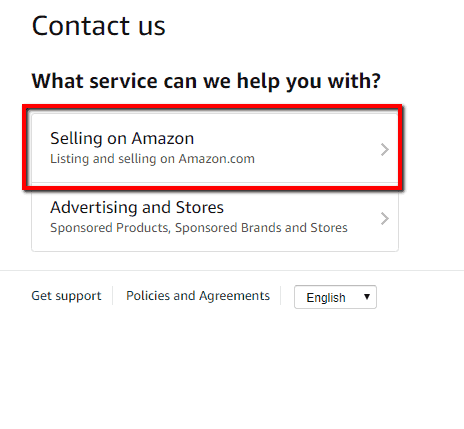
1. Once the Contact us page has loaded, click on “Selling on Amazon” on the left-hand side.

![Issue Listing Products on Amazon](http://myamazonguy.com/wp-content/uploads/2019/07/Issue-Listing-Products-on-Amazon.png)

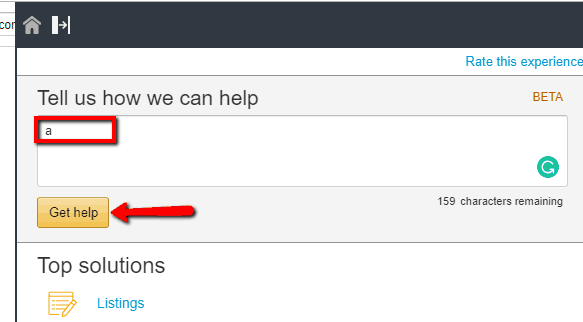
1. This will bring up another side panel. Type something random in the “Tell us how we can help” text box then click “Get help”.

![Get Help from Amazon Seller Central Tickets](http://myamazonguy.com/wp-content/uploads/2019/07/Get-Help-from-Amazon-Seller-Central-Tickets.png)

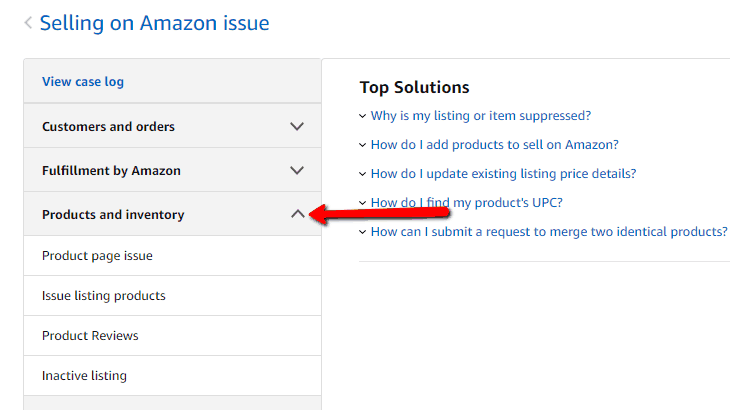
1. Now click on “Products and inventory”.

![Products and Inventory Help on Seller Central](http://myamazonguy.com/wp-content/uploads/2019/07/Products-and-Inventory-Help-on-Seller-Central.png)

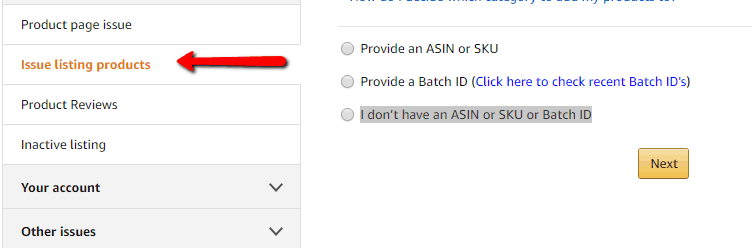
1. Click on “Issue Listing Products”.

![Issue Listing SKU ASIN on Amazon Seller Central](http://myamazonguy.com/wp-content/uploads/2019/07/Issue-Listing-SKU-ASIN-on-Amazon-Seller-Central.png)

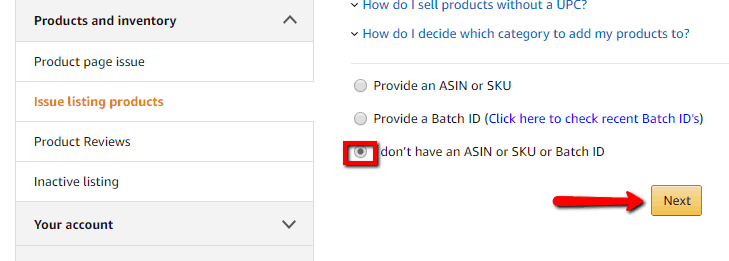
1. Click on “I don’t have an ASIN or SKU or Batch ID” then “Next”.

![ASIN SKU Batch ID Help Amazon Seller Central](http://myamazonguy.com/wp-content/uploads/2019/07/ASIN-SKU-Batch-ID-Help-Amazon-Seller-Central.png)

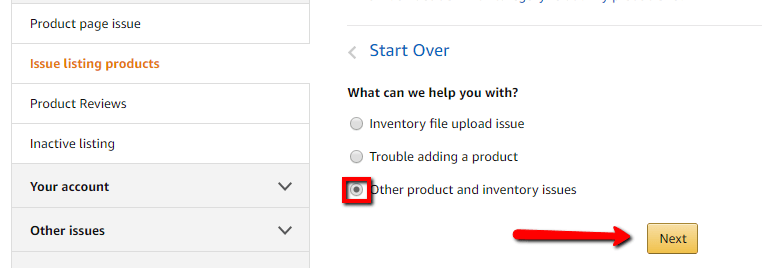
1. Click on “Other product and inventory issues” then “Next”.

![Other Product and Inventory Issues on Amazon Seller Central](http://myamazonguy.com/wp-content/uploads/2019/07/Other-Product-and-Inventory-Issues-on-Amazon-Seller-Central.png)

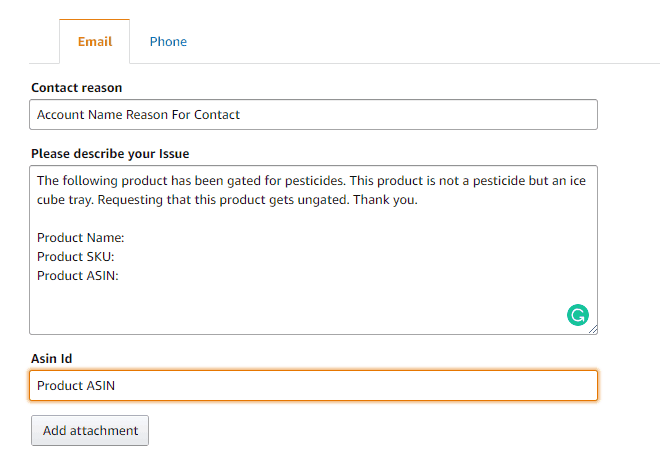
1. Here you can fill out the “Contact Reason”, “Please describe your issue”, “Asin Id”, and “Your email”. Example below.

![Describe Issue to Amazon Seller Support](http://myamazonguy.com/wp-content/uploads/2019/07/Describe-Issue-to-Amazon-Seller-Support.png)

Follow our [Full Service Amazon Agency](https://myamazonguy.com/) for more tips and if you have any questions please contact our [Amazon Agency](https://myamazonguy.com/).