
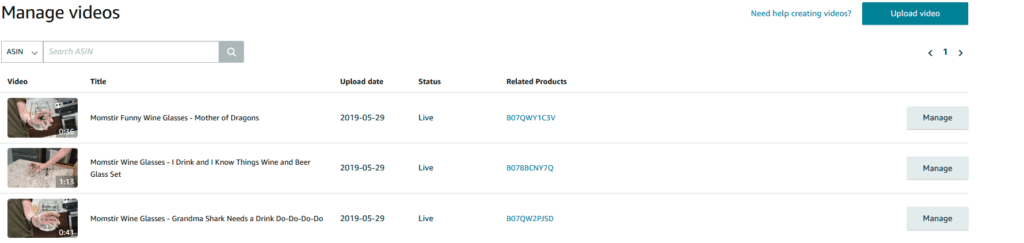
You have to have brand registry first to load videos to Amazon Seller Central. If you need more information about brand registry click this video first.
To upload videos go here: https://sellercentral.amazon.com/creatorhub/video/library/
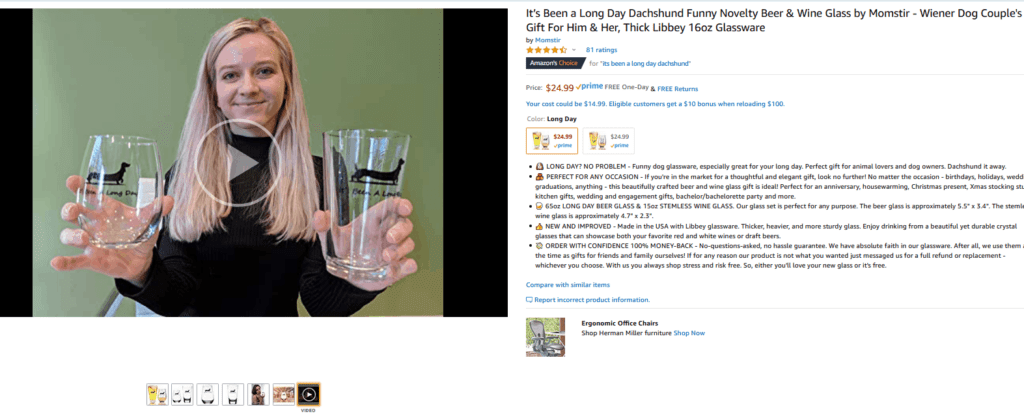
Once you load the video it will show up in the photo section on the top left of an Amazon listing.
Videos are not clicked on much on Amazon. However, they increase conversion rates.
Amazon Creator Connections: The Amazon Influencer Marketing Guide for 2026
Amazon Image Policies and Troubleshooting Guide: Avoid Suppressions and Boost Conversions
Top Amazon PPC Agencies That Actually Improve ROI and Reduce Wasted Spend
Top 10 Amazon Agencies That Actually Help Sellers Win in 2025
The Definitive Guide to Choosing an Amazon Account Management Agency

Q4 and BFCM bring major sales opportunities. Join us on October 22, 2026 and learn how to connect traffic, ads, email, content, and conversion across the full funnel.

Steven Pope, Founder
Hi I’m Steven, founder of My Amazon Guy, a 500+ person Amazon Seller Central agency out of Atlanta, GA. We growth hack ecommerce and marketplaces through PPC, SEO, design, and catalog management.
More Amazon articles

Starting a business on Amazon can be exciting, but it’s not easy. There are many tasks involved, like sourcing products, setting up listings, managing inventory,

Did you know that you can continue driving sales even after the holiday rush? That’s why having an Amazon post-holiday strategy is key to keeping

Experiencing a sudden sales drop on Amazon can catch you off guard and leave you wondering what went wrong. It’s one of those moments where
Reach us at +1 470-623-1951 Monday to Friday, from 9:00am to 5:00pm EST.