
Last Updated: September 4, 2026
Struggling with stockouts and overstocks despite your best efforts at inventory management? The problem is usually not your forecast; it is that Amazon changed what a healthy inventory number even looks like.
Amazon stockouts and overstocks are no longer only a sales problem, because Amazon now charges a fee at both ends of your inventory range. We have managed $1.4B+ in ecommerce revenue across 430+ brands, and inventory is the single most common reason a growing account stalls.
Balancing stock levels to avoid stockouts that cost you sales and overstocks that drain your cash is the whole job now. Multiple warehouses make it harder, because stock spread across FBA, AWD, and a third-party warehouse rarely shows up in one place.
Our Amazon agency breaks down the fee corridor sitting between the low inventory level fee and the aged inventory surcharge in this guide. We also cover the weekly review that catches drifting SKUs, the inventory KPIs worth tracking, and how to clear excess stock before day 181.
Table of Contents
A stockout costs two to three times normal ad spend to undo, and we know the fastest path back.
TL;DR - Amazon Stockouts and Overstocks
Amazon charges a fee at both ends of the inventory range now. That turns stockouts and excess inventory into a budgeting problem instead of a guessing game.
- Under 28 days triggers fees
- Past 181 days triggers surcharges
- Capacity limits reset every month
- Stockouts cost rank before revenue
- Aim for 35 to 150 days
Most sellers plan for the stockout and quietly eat the overstock. Set a floor and a ceiling on every SKU, then manage to the middle.
Amazon Stockouts: The Hidden Threat to Your Sales
On Amazon, the top rule is to never run out of stock. Stockouts are expensive to undo, and across the accounts our team manages, we typically budget two to three times normal ad spend to buy back the rank a stockout gave away.
Shipping delays and customs holds mean the fix has to start before the shelf empties. That is why a smart pricing strategy matters, since slowing velocity buys you weeks that a rushed reorder cannot.

The First Rule for Amazon Is Don’t Go Out of Stock
Why Amazon Stockouts Happen
Even the most experienced Amazon sellers can fall victim to stockouts. The cause is almost never one bad decision; it is a lead time that moved while the forecast stayed still.
- Demand Forecasting Misfires
Perfectly predicting future sales is impossible, but inaccurate forecasts can leave you with empty shelves. - Supplier Snags
Unexpected delays from suppliers can disrupt your carefully laid plans. - Surprise Surges
Sudden unforeseen spikes in demand, perhaps due to a social media trend or events like Prime Day, can overwhelm stock levels. - Capacity Blocks
Amazon can cap what you ship in, so an approved purchase order does not guarantee the units reach a fulfillment center on time.
Understanding these root causes enables sellers to take proactive steps to minimize the risk and impact of stockouts. Fix the forecasting and supplier gaps first, since those two account for most of the stockouts we see across the portfolio.
The High Cost of Stockouts on Amazon
The consequences of stockouts extend beyond lost sales, and they cascade through your account for weeks after the shelf refills. These repercussions include:
- Eroding Customer Trust:
Out-of-stock products frustrate customers, damaging your brand reputation and potentially driving them to competitors. - Search Ranking Decline
Amazon’s algorithm favors products with consistent availability. Stockouts can lead to lower search rankings, reducing product visibility. - Missed Sales Opportunities
Each stockout represents lost revenue, impacting your overall sales performance and profitability. - Increased Acquisition Costs
Regaining lost customers after a stockout often requires higher advertising costs to rebuild brand awareness. - Low Inventory Level Fees
Running thin now costs money before you even run out, since Amazon charges per unit sold once days of supply drops under 28.
Understanding the full impact of stockouts is crucial for developing effective prevention strategies to reduce the risk of stockouts. The ranking decline is the one that outlasts the stockout, which is why the recovery costs more than the lost orders did.
Preventing Amazon Stockouts: A Proactive Approach
Proactive measures are crucial to minimizing stockouts, and every one of them works better before the count gets low. Consider the following strategies:
- Raise Prices Strategically
Bump the price around 10% to slow velocity and stretch the units you have left. - Utilize Automatic Replenishment Tool
Set low-stock alerts with Amazon’s demand forecast tool, a free Seller Central feature. - Pause Advertising
Turn off PPC on out-of-stock ASINs and move that budget to products you can actually ship. - Optimize Listing Visibility
Keep one listing variation live so the parent holds its Best Seller Rank. - Future Release Dates
Set a future release date on new products to build demand before inventory lands.
Implementing these strategies alongside proactive inventory management will help mitigate the effects of stockouts. Set the alert threshold at 45 days rather than at your reorder point, because the alert is only useful if it fires while you still have options.
Have you experienced a stockout? Get clearer, actionable solutions by watching my video on how to handle stockouts.
How to Handle Stockouts as an Amazon Seller? Close Listing to Maintain BSR?
Amazon Overstocks: The Silent Drain on Profits
While preventing stockouts is crucial, the other side of the inventory management spectrum deserves equal attention. Overstocking rarely announces itself, which is exactly why it costs more than most sellers realize.
Overstocks can be as damaging to your Amazon business as stockouts. Excess inventory ties up valuable capital, inflates operational costs, and risks product obsolescence.
Common Causes of Overstocking on Amazon
Several factors contribute to overstocking, often stemming from poor inventory management practices. Most of them trace back to one habit, which is ordering against a hope instead of against a report.
- Mismanagement of Inventory Reports
Ignoring excess inventory flags and Amazon’s recommended restock quantities lets the pile build unnoticed. - Ignoring Optimal Stock Levels
Ordering without checking sales velocity buys storage space instead of sales. - Inadequate Promotional Planning
Overestimating promo demand leaves you holding the surplus long after the deal ends. - Neglecting Capacity Limits
Capacity went monthly on January 1, 2026, and Capacity Monitor now holds the number that blocks your shipment. - Overloading Inventory for Peak Periods
Shipping big ahead of peak without a real forecast turns Q4 stock into Q2 storage fees.
Identifying these common issues can help sellers develop strategies to avoid overstocking. Promotional planning is the one worth auditing first, since a single overbought Prime Day still shows up on storage bills nine months later.
Impact of Overstocking on Amazon
Carrying surplus inventory can have severe financial and operational consequences for your Amazon business. The costs arrive slowly, which is why they usually go unchallenged until a quarterly review; here are the consequences you might encounter:
- Increased Costs
Storage fees, handling labor, and write-offs on damaged or obsolete units all climb together. - Cash Flow Constraints
Money locked in unsold stock cannot fund ads, new products, or payroll. - Operational Challenges
Excess units slow down picking, counting, and every transfer you run. - Product Risks
The longer stock sits, the more exposed it is to damage, theft, and obsolescence. - Lost Opportunities
Every dollar in a slow SKU is a dollar not working in a fast one. - Aged Inventory Surcharges
Units past 181 days pick up a monthly surcharge that climbs through seven age tiers.
Understanding these consequences is crucial for effective inventory management to avoid overstocking. Cash flow is the constraint that actually stalls brands, because money locked in slow units is money you cannot spend on the SKUs that are working.
Reducing Amazon Overstocks: Key Strategies
To prevent overstocking from draining your profits, consider these strategic approaches. Each one is cheaper the earlier in the inventory age curve you apply it.
- Optimize Inventory Levels
Set a floor and a ceiling per SKU from your own sales data, then order to the middle. - Make Use of Data Insights
Pull Amazon’s inventory reports monthly to see velocity and excess before the fees post. - Prioritize High-Performing Products
Give your restock budget to proven sellers instead of spreading it across slow movers. - Monitor Inventory Health
Keep IPI above 400 and check Capacity Monitor monthly, since capacity now recalculates every month. - Plan for Seasonal Fluctuations
Build cover ahead of peak and pull it back after, rather than holding one flat number all year. - Continuous Review and Adjustment
Reset stock levels as demand shifts instead of locking in last quarter’s plan.
Implementing these strategies can help you reclaim your inventory investment and optimize your Amazon business. Run the review weekly rather than monthly, since a SKU flagged at day 90 still has cheap exits and the same SKU flagged at day 150 does not.
The 2026 Fee Corridor Behind Amazon Stockouts and Overstocks
Amazon penalizes guessing in both directions, so the planning target is a range rather than a single number. Stay above roughly 35 days of supply and below 150 days of inventory age and you sit outside both fee walls.
| Guardrail | What triggers it | What it costs |
|---|---|---|
|
Low inventory level fee
|
Days of supply under 28 on both the trailing 30-day and 90-day windows
|
$0.32 to $1.11 per unit on standard size, up to about $2.09 on bulky
|
|
Aged inventory surcharge
|
Units held in a fulfillment center past 181 days, aged first-in, first-out
|
Seven tiers, topping out at $7.90 per cubic foot or $0.35 per unit
|
|
Monthly capacity limit
|
Five months of projected sales, weighted by your IPI score
|
Blocked shipments and overage charges
|
|
Fuel and logistics surcharge
|
Every FBA fulfillment fee since April 17, 2026
|
3.5% layered on top of the published fee
|
Three of those four lines did not exist in this form two years ago. Sellers still planning against one restock number are managing to a rulebook Amazon already rewrote.
What Is the Amazon Low Inventory Level Fee and When Does It Apply?
The fee lands on every unit you sell while your historical days of supply sits under 28 on both the trailing 30-day and 90-day windows. Rates run from $0.32 to $1.11 per unit on standard-size products, which strips $750 out of a SKU selling 1,000 units a month in the middle band.
The 2026 change is the one catching variation sellers off guard. Amazon now measures days of supply per seller-FNSKU rather than per parent ASIN, so one low-stock color triggers the fee on its own units while the parent listing still looks healthy, and bulky products lost their exemption on January 15, 2026.
When Does the Amazon Aged Inventory Surcharge Start?
Day 181, not month six, and Amazon takes the snapshot on the 15th of every month instead of twice a year. The old long-term storage fee is gone, replaced by a monthly surcharge that climbs through seven age tiers.
January 16, 2026 added a top tier at 456 days or more, priced at $7.90 per cubic foot or $0.35 per unit, whichever is greater. Amazon ages units first-in, first-out across the whole network, so a fresh shipment never resets the clock on stock already sitting there.
How Do I Avoid the Low Inventory Level Fee Without Overstocking?
Hold 35 to 55 days of cover rather than aiming at 28, because the threshold is a cliff and not a slope. That buffer absorbs a supplier delay without pushing you toward the 181-day line on the other side.
Capacity is the constraint most sellers forget in that math. Amazon moved to monthly capacity limits on January 1, 2026, with ASIN-level restock caps layered on top, so read our guide to managing Amazon FBA restock limits before you build the shipment.
Recover Amazon Rankings Fast After Stockouts Without Starting Over
How to Clear Excess Amazon Inventory Before Day 181
Start moving slow stock at day 90, not day 180. By the time the surcharge posts, your cheapest options have expired, and you are choosing between a deep discount and a removal fee.
| Inventory age | Move | Why it works at this point |
|---|---|---|
|
Day 60
|
Coupon or percentage-off promotion
|
Cheapest lever available, and it protects full price on the main offer
|
|
Day 90
|
Subscribe and Save, bundling, or targeted ads
|
Buys velocity without permanently repricing the ASIN
|
|
Day 120
|
Outlet deal or a liquidation quote
|
Recovers cash while the surcharge clock still has runway
|
|
Day 150
|
Remove, liquidate, or dispose
|
Last window before the surcharge starts compounding monthly
|
|
Day 181
|
Surcharge begins
|
You are now paying rent on a decision you already made
|
Every rung down that ladder costs more margin than the one above it. Sellers who calendar the day 90 review almost never reach the bottom row.
Should I Liquidate or Remove Aged Amazon Inventory?
Removal makes sense when the units are resellable through another channel and the freight math clears. Liquidation or disposal wins when recovery value is lower than removal plus inbound cost, which is common on low-price Amazon overstock.
Timing now changes the bill, because Amazon moved removal and disposal to a per-unit charge at the point of removal starting March 1, 2026. Our breakdown of return versus dispose for unfulfillable inventory walks the decision through with real numbers.
Does AWD Help Me Avoid the Low Inventory Level Fee?
Yes, when auto-replenishment is actually running. Amazon Warehousing and Distribution holds bulk stock upstream and feeds FBA on a schedule, and SKUs replenished mainly through AWD are exempt from the fee.
The failure mode is assuming AWD covers you by default. Stock sitting in AWD does not count toward your FBA days of supply, so a SKU can be deep in upstream inventory and still get charged at the fulfillment center.
Amazon Stockouts & Delays? Here’s What to Do NOW
We audit days of supply, inventory age, and capacity limits across every ASIN at no cost.
The Weekly Review That Prevents Amazon Stockouts and Overstocks
Both problems come from the same gap, which is nobody looking at days of supply between reorder cycles. This four-step review takes 20 minutes a week and catches every SKU drifting toward either wall.
Step 1: Pull Days of Supply by FNSKU
Open the FBA Inventory page and sort by days of supply at the child level, not the parent. Export it weekly so you see direction instead of a snapshot, because a SKU falling from 60 days to 42 matters more than one sitting flat at 38.
Step 2: Flag Anything Under 35 or Over 120 Days
Under 35 days is your stockout watchlist, and over 120 days is your overstock watchlist. Everything between those two numbers is healthy and does not need your attention this week.
Reorder Point Formula
Reorder point = (average daily units sold × total lead time in days) + safety stock
A SKU selling 20 units a day with a 45-day lead time needs 900 units just to cover the gap. Add 14 days of safety stock at 280 units, and the reorder point lands at 1,180.
Step 3: Check Capacity Monitor Before You Build the Shipment
Confirm your remaining capacity before committing a purchase order, since capacity recalculates monthly now rather than quarterly. Check the ASIN-level restock cap too, because account headroom does not guarantee space for the one product you actually need in stock.
Step 4: Route Each Flag To Price, Promo, or Removal
Low-side flags go to pricing or an expedited reorder, and high-side flags go to promotion or removal. Every flag gets an owner and a date, or the review turns into a report nobody acts on.
Common Mistakes in the Weekly Inventory Review
The review fails in predictable ways rather than random ones. Four mistakes cause most of the damage, and all four make the numbers look better than they are.
- Reviewing at parent level instead of child level
- Ignoring in-transit units and counting only what is sellable
- Forecasting from last month rather than last year for seasonal SKUs
- Treating the IPI score as an early warning when it is a lagging one
The first one is the most expensive, because a healthy parent average hides the exact variation that will trigger a fee. Fix that habit and the other three get easier to spot.
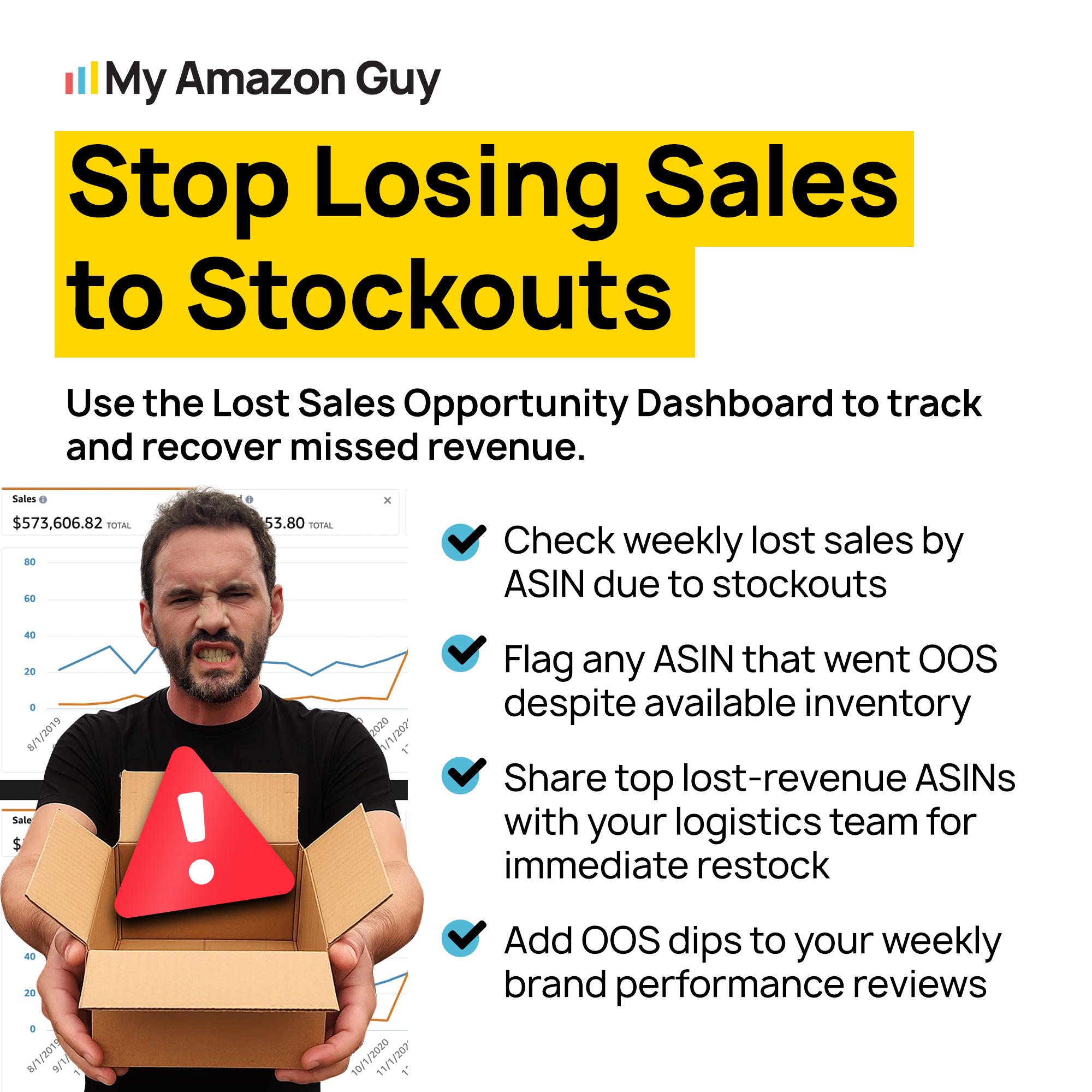
Stop Losing Sales to Stockouts
Inventory KPIs Amazon Sellers Should Track
Six numbers tell you whether you are inside the corridor. Review them weekly at the SKU level and monthly at the account level.
| KPI | Good target | Where to find it |
|---|---|---|
|
Days of supply by FNSKU
|
35 to 55 days
|
FBA Inventory page
|
|
Units older than 120 days
|
Under 10% of total inventory
|
Inventory Age report
|
|
Sell-through rate
|
Three or more turns per quarter
|
Inventory Performance dashboard
|
|
IPI score
|
450 or higher
|
Inventory Performance dashboard
|
|
Stranded and unfulfillable units
|
Under 1% of inventory
|
Fix Stranded Inventory report
|
|
In-stock rate on top 20 ASINs
|
98% or higher
|
Business Reports
|
Those targets are what our brand managers hold accounts to across the portfolio. A brand hitting five of six is rarely the brand calling us about a fee surprise.
How Do I Know if I Am Overstocked on Amazon?
Sort by inventory age, flag everything past 120 days, then check that list against sell-through. Units older than 120 days moving less than one turn per quarter are the ones that will reach the surcharge.
The IPI score will not warn you in time. By the time the number drops, the aged units are already close to the day 181 line, and your cheap exits are gone.
How Do I Forecast Amazon Demand Without Inventory Software?
Pull 24 months of Business Reports and build a simple weekly index from last year rather than last month. Seasonal SKUs need year-over-year shape, and a trailing 30-day average will always under-forecast a peak you can see coming.
Amazon’s own demand forecast inside Restock Inventory gives you a 40-week probabilistic view for free. Use it as a sanity check on your spreadsheet, not as the plan itself.
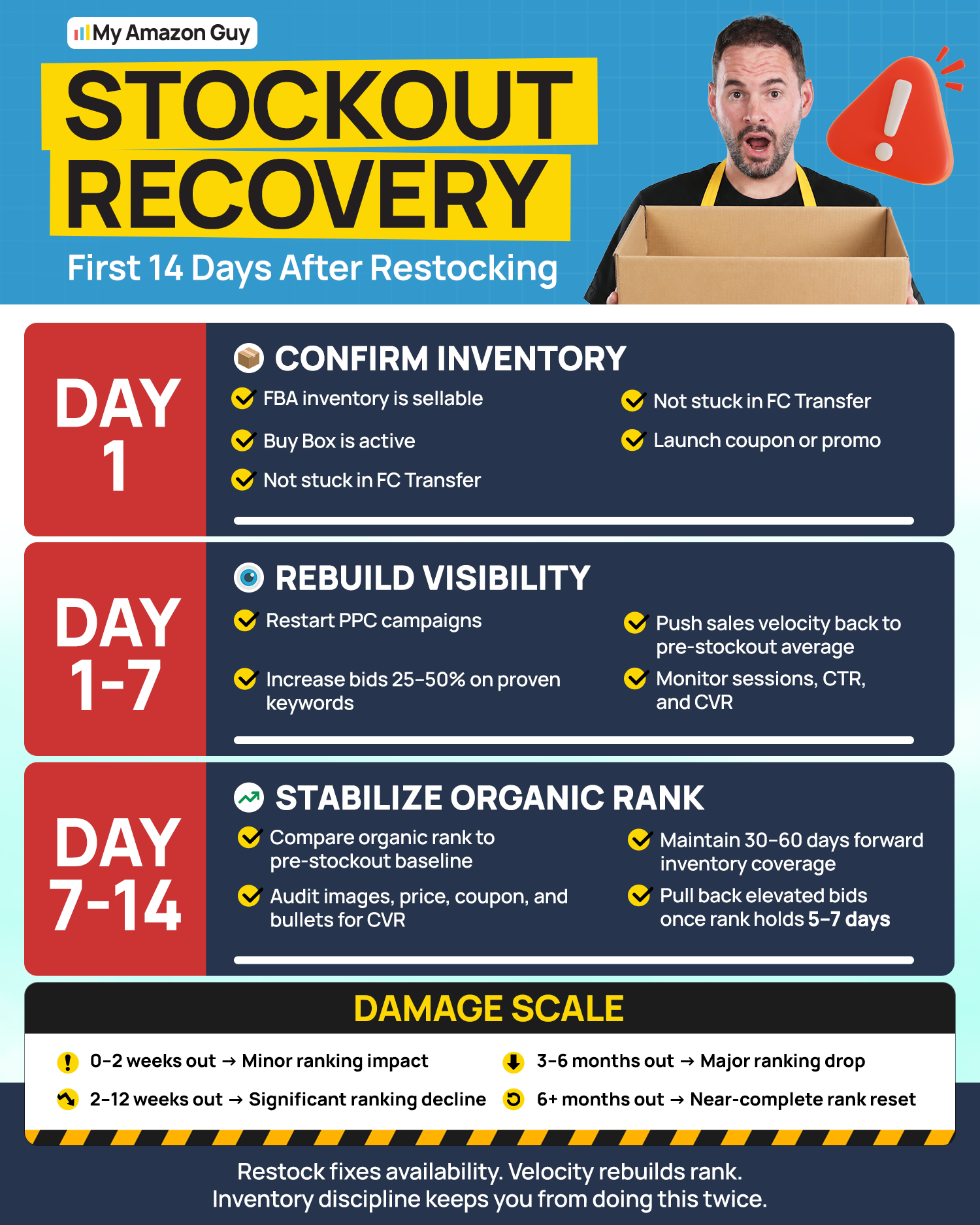
Stockout Recovery
Amazon Stockout vs Overstock: Which One Costs More?
A stockout costs more in the first 30 days, and an overstock costs more over a year. The stockout takes your rank, the overstock takes your cash, and only one of them gets harder to fix the longer you wait.
| Factor | Amazon stockout | Amazon overstock |
|---|---|---|
|
Speed of damage
|
Immediate, rank slides within days
|
Slow, surfaces on the monthly fee bill
|
|
Direct fee exposure
|
Low inventory level fee per unit sold
|
Storage, utilization, and aged inventory surcharges
|
|
Hardest cost to see
|
Lost keyword rank and Buy Box share
|
Cash locked in units that will not sell at full price
|
|
Recovery time
|
Weeks of paid spend to buy back position
|
Months of discounting to work the pile down
|
What Happens to My Amazon Ranking When I Run Out of Stock?
Amazon reads availability as a relevance signal, so the algorithm hands your keyword positions to competitors while the listing is unbuyable. Sales velocity is the input that earns rank, and a stockout sets that input to zero.
Recovery is not automatic once units land. Our walkthrough of how to recover a sudden Amazon ranking drop covers the velocity push that rebuilds position after the shelf refills.
Can I Sell Through a Stockout Without Losing the Sale?
Sometimes, if another channel is holding stock. A better-for-you snack brand we manage was hours from sending an email campaign with fewer than 10 units left on its Shopify listing, so our team rewrote the campaign links mid-flight and pointed the traffic at the fully stocked Amazon listing instead.
That redirect produced $3,300 in sales in a single day and moved the product to #28 in its category, then into the top 20 inside the two-week window our strategy had forecast. The full prevent lost sales during a stockout case study breaks down the segmentation and the fallback protocol behind it.
How to Handle Low Inventory on Amazon Without Losing Ad Momentum
Amazon Multi-Warehouse Coordination: The Balancing Act
As you manage both stockouts and overstocks, your warehouse strategy decides how much room you have to fix either one. Stock spread across FBA, AWD, and a third-party warehouse gives you options, but only if you can see all of it at once.
Managing inventory across multiple locations adds complexity and demands a system that keeps counts accurate in real time. Done well, coordination lowers shipping costs and speeds up delivery, which are the two things Amazon customers notice most.
Benefits of Multiple Warehouses on Amazon
Having multiple warehouses offers several advantages beyond simple storage space. The biggest one is optionality, since stock in two places can cover a shortfall in either.
- Reduced Shipping Costs
Storing units closer to your buyers cuts the distance and the freight bill. - Faster Delivery Times
Regional stock shortens transit, which lifts conversion on speed-sensitive listings. - Risk Mitigation
Splitting inventory limits the damage when one region hits a weather or labor disruption. - Scalability
More locations absorb volume growth without forcing everything through one bottleneck.
These benefits highlight the importance of effectively managing a multi-warehouse network. Risk mitigation is the one that pays off unpredictably, since it costs you nothing until the week it saves your Q4.
Challenges of Multi-Warehouse Management on Amazon
The advantages come with real operational weight, and most of it lands on tracking. Every location you add multiplies the places a count can drift out of sync.
- Complex Inventory Tracking
Keeping accurate counts across locations is nearly impossible without one connected system. - Increased Operational Costs
Each facility adds staffing, utilities, and maintenance to your fixed cost base. - Coordination Issues
Transfers break down when locations run on separate processes and separate spreadsheets. - Inconsistent Customer Experience
Availability and delivery speed vary by region, which shows up in your reviews.
Recognizing these challenges is essential for developing strategies to overcome them. Tracking is the one to solve first, because every other problem on this list gets worse when your counts are wrong.
Amazon Inventory Allocation Strategies
Allocation decides which location holds what, and getting it wrong creates a stockout in one place and an overstock in another. These four methods cover most mid-market catalogs.
- Demand Forecasting
Use sales history and seasonality to predict where demand will land before you ship. - Reorder Point Formula
Set a separate trigger for each location instead of running one number across all of them. - ABC Analysis
Rank SKUs by turnover so your best movers get the best placement. - Safety Stock Levels
Hold a buffer at each location to absorb demand swings and late inbound shipments.
These strategies ensure balanced inventory distribution and improved stock availability. Start with ABC analysis, since knowing which 20% of SKUs drive your revenue changes every other allocation decision you make.
Transfer Optimization on Amazon
Transfers are where multi-warehouse setups either save money or quietly lose it. Optimizing them means moving the right units at the right time, not simply moving them faster.
- Real-Time Inventory Visibility
Use one system showing FBA, AWD, and 3PL stock in a single view, including units in transit. - Automated Replenishment
Trigger transfers on preset thresholds so nobody has to remember to check. - Cost-Efficient Transfers
Compare freight options per move rather than defaulting to the fastest one. - Centralized Management
Run all transfers from one system so your counts stay consistent across locations.
Optimized transfers ensure inventory is in the right place at the right time, reducing stockouts and overstocks. In-transit units are the blind spot worth closing first, since stock that left AWD and has not reached FBA is invisible on most dashboards.
Technology Solutions on Amazon
Technology is what makes multi-warehouse coordination possible at any real scale. Four categories cover what a mid-market brand actually needs.
- Warehouse Management Systems (WMS)
Automates receiving, picking, and fulfillment inside each facility. - Inventory Management Software
Gives you one view of stock levels across every location. - Data Analytics
Turns sales patterns into demand forecasts and allocation decisions. - IoT Devices
Tracks conditions and counts automatically instead of through manual audits.
Making use of technology is essential for streamlining multi-warehouse operations. Most brands over-invest in the WMS layer and under-invest in visibility, which is backwards when your stock sits in three systems you do not control.
Veeqo Walkthrough – Is This the Best Inventory Software for New Sellers?
FAQs About Amazon Stockouts and Overstocks
How many days of inventory should I keep on Amazon FBA?
Hold 35 to 55 days of cover on anything moving more than 100 units a month. That clears the 28-day fee threshold without pushing you toward the 181-day surcharge on the other side.
What days of supply should I hold going into Q4?
Build to 60 to 75 days by early October, before peak fulfillment fees start on October 15 and capacity tightens. Anything you ship in September for a December peak also starts its 181-day clock immediately.
Does the low inventory level fee apply per variation or per parent ASIN?
Per variation, since January 15, 2026. Amazon measures days of supply at the seller-FNSKU level now, so a ten-child listing with nine healthy variations still gets charged on the tenth.
Why did Amazon charge me a low inventory fee when I have stock in AWD?
AWD inventory does not count toward your FBA days of supply, because the fee is based on what sits at the fulfillment center. The exemption applies only when auto-replenishment is actively managing the transfers, not when you move stock manually.
Stop Guessing at Both Ends of Your Inventory
Amazon stopped rewarding sellers who simply avoid running out, because the low inventory level fee and the aged inventory surcharge now punish both edges of your range. The number that matters is not a reorder quantity; it is a corridor between roughly 35 days of supply and 150 days of inventory age.
Everything in this guide points back to one habit, which is checking days of supply weekly at the child level instead of quarterly at the parent. Sellers who run that review catch drifting SKUs while pricing and promotion still work, long before removal fees and surcharges become the only options left.
Are you tired of paying Amazon at both ends while your cash sits in the wrong SKUs? Reach out to our full-service Amazon agency and let our Amazon experts audit your days of supply, inventory age, and capacity limits so you know exactly which products to fix first.
Our brand managers watch days of supply weekly so your rankings never take the hit.