
Last Updated: March 6, 2026
Do you want to know how to remove negative reviews on Amazon? Many sellers worry about how these reviews affect their ratings, sales, and overall brand reputation.
Getting negative product reviews on Amazon is one of the most frustrating situations sellers can face. That is why many try to find ways to remove reviews that seem unfair or unrelated to the product.
However, just because a review is negative does not mean it can be removed. Understanding Amazon’s review policies can help sellers identify which reviews may qualify for removal.
In this guide, we explain how Amazon sellers can handle negative reviews, report reviews that violate Amazon’s guidelines, and respond to customer feedback the right way. Our Amazon agency also discusses practical strategies to reduce the impact of negative reviews and prevent them in the future through better listings, customer support, and product quality control.
Table of Contents
Fix Your Amazon Review Problems
Struggling with damaging product reviews? We can help you take the right steps to address them.
How Negative Reviews on Amazon Affect Sellers
Negative reviews can significantly affect an Amazon seller’s ability to generate sales. Research shows that about 93% of customers read online reviews before making a purchase, which means a product’s rating and feedback strongly influence buyer decisions.
Poor ratings can reduce trust, lower conversion rates, and even increase advertising costs if sellers need more PPC spending to maintain traffic. However, negative reviews are not the end of the world since sellers can still take steps to address the issue, respond to customer concerns, and follow Amazon’s process when reviews qualify for removal.
How to Remove Negative Reviews on Amazon
When sellers get negative product reviews on Amazon, there are still ways to remove them if the reviews violate Amazon’s customer review guidelines. The key is understanding Amazon’s policies and following the proper process when requesting a review removal.
1. Identify a Policy Violation
Amazon will not remove a review just because it is negative or critical. Sellers must first determine whether the review violates Amazon’s community guidelines.
Examples include reviews about shipping, complaints about the seller instead of the product, profanity, hostile language, or reviews clearly meant for a different product. If the review falls into one of these categories, it may qualify for removal.
2. Gather the Review Details
Before submitting a request, collect all the important information related to the review. This includes the direct link to the review, the reviewer’s name, and a copy of the full review text.
Having these details ready makes it easier to explain the issue clearly when contacting Amazon support. Proper documentation also helps support agents quickly verify whether the review violates policy.
3. Report the Review on the Product Listing
Sellers can flag problematic reviews directly on the product page. Each review has a Report abuse option that allows users to notify Amazon about content that may violate guidelines.
Submitting a report alerts Amazon’s moderation team to review the content. In some cases, multiple reports from users may increase the chances of the review being reviewed more quickly.
4. Submit a Case in Seller Central
For a more formal request, sellers can open a support case through Seller Central. Navigate to Help, then contact support and choose the option related to product reviews.
When submitting the case, include the review link and explain why it violates Amazon’s guidelines. Referencing the exact rule that the review breaks can help make the request clearer for the support team.
5. Follow Up With Amazon Support
Review removal requests are not always resolved immediately. If the case does not receive a response or the review remains active, sellers may need to follow up with additional messages.
Remaining professional and clearly restating the policy violation can improve the chances of getting the case reviewed again. Persistence often plays a role when working with Amazon support.
How to Respond to Negative Reviews on Amazon
Responding to negative reviews the right way can improve a seller’s chances of getting them removed if they violate Amazon’s guidelines. Providing the correct explanation when submitting a support case helps Amazon understand why the review should be reviewed.
| Review Type | What the Review Is About | Action to Take |
|---|---|---|
|
About the Seller |
The review talks about the seller experience instead of the product. |
Report it and explain that the feedback is about the seller, not the product. |
|
Shipping or Delivery |
The customer complains about late shipping or delivery issues. |
State that the review focuses on shipping rather than the product. |
|
Packaging |
The review criticizes the packaging instead of the product itself. |
Explain that the feedback is about packaging, not product quality. |
|
Competitor Review |
The review promotes another brand or appears to come from a competitor. |
Report the review for violating promotional content guidelines. |
|
Wrong Product |
The review clearly refers to a different product. |
Request removal or ask Amazon to move the review to the correct listing. |
|
Incorrect Product Info |
The review includes incorrect details about the product. |
Provide evidence showing that the product information is incorrect. |
|
Pricing Complaint |
The review only complains about the price. |
Explain that the review focuses on pricing instead of product experience. |
|
Profanity |
The review includes offensive or inappropriate language. |
Report the review for violating respectful communication rules. |
|
Hostile Language |
The review contains threats or aggressive language. |
Report it as a violation of Amazon’s conduct guidelines. |
|
Unverified Reviewer |
The reviewer may not have purchased the product. |
Provide evidence and request removal if possible. |
Protect Your Amazon Product Ratings
Work with Amazon experts who know how to handle unfair or damaging product reviews.
How to Reduce the Impact of Negative Reviews on Amazon
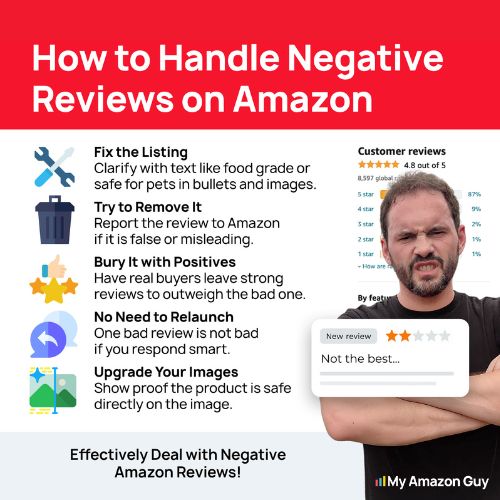
Even when negative reviews appear on a listing, sellers still have several ways to reduce their impact. Taking the right actions can protect your product reputation and maintain buyer confidence.
1. Respond to Customer Concerns Quickly
Address negative reviews as soon as possible to show customers that you care about their experience. A professional response that acknowledges the issue and explains the steps being taken can help reassure future buyers who read the review.
2. Use Amazon’s Contact Customer Feature
Brand Registered sellers can reach out to customers who left low-star ratings through the Customer Reviews dashboard. Offering support, a replacement, or a refund can resolve the issue and sometimes encourage the customer to update their review voluntarily.
3. Report Reviews That Violate Amazon Policies
Some reviews may break Amazon’s community guidelines if they include profanity, competitor promotions, or comments unrelated to the product. Using the “Report abuse” option allows Amazon to review the feedback and remove it if it violates their policies.
4. Increase the Number of Positive Reviews
One effective way to reduce the effect of a negative review is to increase the overall volume of positive feedback. Sellers can use the “Request a Review” button in Seller Central to encourage satisfied customers to share their experiences.
5. Improve Product Listings and Quality
If several reviews mention the same problem, treat that feedback as an opportunity to improve the product or listing. Updating images, descriptions, or product instructions can prevent misunderstandings and reduce the chances of receiving similar negative reviews in the future.
How to Avoid Negative Reviews on Amazon
The best way to deal with negative reviews is to prevent them before they happen. By improving product clarity, quality, and customer communication, sellers can reduce confusion and create a better buying experience.
1. Optimize Your Product Listings
Make sure your listings clearly explain what the product is, how it works, and what customers should expect. Use detailed descriptions and multiple high-quality images so shoppers fully understand the product before buying.
2. Strengthen Product Quality Control
Regularly inspect inventory and address recurring defects or complaints that appear in reviews. Catching quality issues early helps prevent more customers from receiving faulty items.
3. Respond Quickly to Customer Questions
Answer customer messages and listing questions as soon as possible. Fast responses can solve concerns before a buyer leaves a negative review.
4. Provide Clear Product Instructions
Include simple instructions, user guides, or care directions inside the packaging. When customers understand how to properly use the product, they are less likely to leave complaints caused by misuse.
5. Monitor Reviews and Feedback Regularly
Check your reviews frequently to spot patterns in customer feedback. Identifying common complaints early allows you to fix problems before they turn into a larger wave of negative reviews.
FAQs About Negative Amazon Review Removal
How will I know if Amazon approved the review removal request?
You will usually receive an update through your Seller Central case log or email notification. Once the request is approved, the negative review will disappear from the product listing.
Can sellers remove any negative reviews on Amazon?
No, sellers cannot remove reviews just because they are negative. Amazon only removes reviews that violate its community guidelines, such as profanity, competitor manipulation, or feedback about shipping instead of the product.
How long does it take for Amazon to remove a negative review after approval?
If Amazon approves the request, the review is usually removed within a few hours to a couple of days. However, review investigations can sometimes take longer depending on the case.
Don’t Let Negative Reviews Control Your Sales
Getting a negative product review on Amazon is normal, no matter how good your product is, since customer expectations, shipping issues, or simple misunderstandings can still happen. Many sellers panic when they see a one-star review because they believe it will permanently hurt their sales.
The truth is that sellers still have options when negative reviews appear. By understanding Amazon’s policies, reporting violations correctly, and responding professionally, you can reduce the damage and sometimes even get those reviews removed.
Struggling with negative reviews that are hurting your sales? Contact our full-service Amazon agency and let our team help protect your listings, manage reviews properly, and keep your brand reputation strong.
Remove Harmful Amazon Reviews Today
Negative reviews hurting your sales? Our team can help investigate and report violations.