What if the margin you lost this year was never really about fees? Most FBA brands paid Amazon more per unit in 2026, but the money they can actually win back is sitting inside their ad account.
Amazon raised fulfillment fees in January and stacked a fuel surcharge on top in April, which quietly lowered the break-even point on every campaign. The right Amazon PPC strategy to offset rising FBA fees turns each increase into a clear ad target and cuts the spend that no longer pays its way.
We’ve managed $1.4B+ in ecommerce revenue. That experience shows margin rarely comes back from cutting ads across the board, especially for brands whose PPC budget is already thin.
Here, our Amazon agency will discuss what changed in Amazon FBA fees for 2026, how to recalculate break-even ACoS after FBA fees, and which wasted spend to cut first. We’ll also cover the KPIs to track, the advanced tactics worth testing, and how to tell when an ASIN should stop advertising.
Table of Contents
Find the suppressed ASINs, keyword gaps, and vendor silos holding your catalog back, with zero obligation.
TL;DR - How to Offset Rising Amazon FBA Fees With Smarter PPC
Amazon FBA fees went up twice in 2026, and every extra cent came out of the same margin that funds your ads. Our Amazon agency recovers that margin through tighter Amazon PPC management, not blanket budget cuts.
- Convert each fee increase into TACoS points
- Recalculate break-even ACoS for every ASIN
- Cut wasted spend before cutting reach
- Sort ASINs into fund, fix, reprice, or exit
- Track contribution margin after ads every week
Fees are fixed, but wasted clicks are a choice you can stop making today. Start with the ASINs the fee changes hit hardest, then work down the list until each one is back above break-even.
What Changed in Amazon FBA Fees in 2026 and Why It Hits Your Ad Budget
Amazon sent sellers two fee increases in 2026, and neither one showed up as a broken campaign. Both came out of the same margin that pays for your ads, which is why PPC results feel worse even when nothing looks wrong.
How Much Did Amazon FBA Fees Go Up in 2026?
Amazon switched to price-band fulfillment fees on January 15, raising them by about $0.08 per unit on average while some items paid far more. Then on April 17, a 3.5% fuel and logistics surcharge landed on FBA orders in the US and Canada, adding roughly $0.17 per unit on top.
Why Do FBA Fee Increases Shrink Your Ad Budget?
Every fee dollar comes out of your pre-ad margin, which is the same pool of money that funds your ads. So when fulfillment goes up, your break-even ACoS goes down, even if nobody on your team touches a bid.
Are Amazon Ad Costs Rising Faster Than FBA Fees?
Yes, Amazon’s ad revenue hit $19.8 billion in Q2 2026, up 26% from a year earlier. Per unit, ad revenue grew about 8% while seller services grew about 1%, so ads now take a growing share of every sale.
Common Misconceptions About FBA Fees and Amazon PPC
A few common beliefs keep otherwise sharp sellers stuck in the squeeze. Each one sounds reasonable until you check the numbers ASIN by ASIN.
- An on-target ACoS doesn’t prove a campaign still makes money.
- Cutting the whole budget removes good spend along with the waste.
- A 17-cent surcharge adds up across every unit you sell.
- Fee increases are a PPC problem, not just an ops problem.
Stop Making These Keyword Negation Mistakes on Amazon Ads
Amazon PPC Strategy to Offset Rising FBA Fees With the Fee Offset Framework
The smartest move is to win back the fee increase from ad waste before you touch price or reach. That starts with turning every fee change into a number your PPC team can actually act on.
How the Fee Offset Ratio Works on Amazon
Divide the fee increase per unit by the selling price, then multiply by 100. The result is the number of TACoS points you need to recover just to stay where you were.
| Example ASIN | Fee increase | TACoS points |
|---|---|---|
|
$9.99 small standard
|
$0.08
|
0.80
|
|
$19.99 small standard
|
$0.25
|
1.25
|
|
$24.99 large standard
|
$0.42
|
1.68
|
|
$59.99 large standard
|
$0.71
|
1.18
|
At a 10% TACoS, that $24.99 product has to hold the same sales on about 17% less ad spend. These numbers are examples, so pull your real increases from the Fee Preview report in Seller Central before you set targets.
How Do I Recalculate Break-Even ACoS After a Fee Increase?
Take your price and subtract landed cost, the referral fee, and the new fulfillment fee with the surcharge, then divide what’s left by the price. That number is your break-even ACoS after FBA fees, the highest ACoS a product can carry before each ad sale loses money.
Say you sell a $24.99 product with $7.50 in landed cost and a 15% referral fee. If its fulfillment fee moved from $5.32 to $5.76, break-even ACoS dropped from 33.7% to 31.9%, and every campaign running between those two numbers is now underwater.
Amazon ACoS and TACoS Targets by Growth Stage
A good TACoS when fees are rising depends on what each ASIN is supposed to do for you. A simple ceiling is your pre-ad margin minus the net profit you want to keep, so a 35% margin product keeping 15% can run up to a 20% TACoS.
| Stage | ACoS target | TACoS ceiling |
|---|---|---|
|
Launch |
Near break-even
|
30% to 35%
|
|
Growth
|
5 to 10 points under
|
20% to 25%
|
|
Mature |
10+ points under
|
15% or less
|
|
Harvest |
Well under, or paused
|
Under 10%
|
The ceilings assume a 35% pre-ad margin, so adjust them to your own numbers. Amazon calls $2 to $4 in sales per $1 of ad spend a good benchmark, which works out to a 25% to 50% ACoS and makes a handy sanity check.

TACoS vs ACoS
Should I Raise My Amazon Prices or Cut Wasted PPC Spend First?
Cut waste first, because it protects margin without risking your conversion rate or the Buy Box. If you do raise price later, remember the referral fee applies to the new price, so a $0.25 fee increase needs about $0.28 more on your price floor.
Brands that barely advertise need the opposite advice. Cutting an already thin budget costs you rank faster than fees cost you margin, so the answer is to spend smarter, not less.
How to Cut Wasted Amazon Ad Spend to Offset FBA Fee Increases
Work through these five steps in order, because each one makes the next more accurate. Jumping straight to bid cuts is how sellers trade a fee problem for a rank problem.
Step 1: Fix Fee Errors Before You Fund Them With Ads
Start with your Fee Preview report in Seller Central and look for size tier or measurement errors. A misclassified ASIN inflates the very fee you’re trying to offset, and you can often recover those FBA fee overcharges from Amazon.
Fixing one tier error can erase the whole 2026 increase on that product. That makes it the cheapest margin win in this entire process, and it takes no ad changes at all.
Step 2: Rebuild Cost per Unit for Your Top 20 ASINs
For each ASIN, write down the price, landed cost, referral fee, fulfillment fee with surcharge, storage, and ad spend per unit. Ad spend per unit is total ad spend divided by every unit sold, organic included.
Then sort the list by profit after ads, lowest first. It follows the same logic as calculating your Amazon profit margin, but it shows exactly which ASINs lost money after the fee changes.
Step 3: Price Each Fee Increase in TACoS Points
Apply the Fee Offset Ratio to every ASIN on your list. Now each campaign owner has a real number to recover instead of a vague order to spend less.
Write the target TACoS right next to each ASIN in your sheet. Update it every time Amazon announces a fee change, not once a year.
Step 4: Climb the Ad Efficiency Ladder
The ladder ranks seven ways to cut wasted spend, from safest to riskiest for organic rank. Stop climbing as soon as an ASIN hits its new TACoS target.
The Seven Rungs of the Ad Efficiency Ladder
- Negate search terms with clicks and no orders.
- Trim top-of-search boosts that don’t convert better.
- Lower bids in your worst-converting hours.
- Pause ads on ASINs below break-even.
- Shift budget to your highest-margin ASINs.
- Test small cuts on branded campaigns.
- Lower bids on rank-holding keywords last.
The first three rungs remove pure waste, and Amazon itself recommends negative keywords to refine targeting and improve ad spend efficiency. The last two touch traffic that protects your organic position, so move slowly and watch sessions.
Step 5: Sort Every ASIN With the SKU Fee Triage Matrix
Score each ASIN on two things: its fee exposure from Step 3 and its ad dependency, which is current TACoS. Then drop it into one of four boxes.
- Fund when both are low.
- Fix when ad dependency is high.
- Reprice when fee exposure is high.
- Exit when both are high.
The Exit box also tells you when to stop advertising an unprofitable ASIN. If it stays below break-even after the ladder and a price test, those ad dollars belong on a Fund ASIN instead.
How Did a Supplement Brand Add $1M in Sales While Holding TACoS at 12%?
A health and wellness supplement brand came to us with disorganized campaigns, wasted spend, and key products that weren’t getting targeted. We tested main images for higher conversion, ran fresh keyword research on weak listings, and rebuilt the PPC plan heading into Q4.
The supplement brand’s results showed sales up more than 340% year over year, with over $1M added and ad sales up 295%. TACoS held at a lean 12%, well under the 20% to 25% average the case study cites for the supplement category.
Common Mistakes When Cutting Amazon Ad Spend
Most margin damage after a fee increase comes from cutting the wrong spend, not from cutting too little. Watch for these four mistakes before you touch a single bid.
- Cutting top of search on hero ASINs first.
- Negating search terms that convert profitably.
- Making one blanket cut across every ASIN.
- Changing bids before new fee data lands.
This short video explains why profitable search terms belong in manual campaigns instead of on your negative list. It also shows how bundles and larger sizes help low-priced products carry their fees.
Amazon PPC Mistakes: Why You Need Broader Search Terms
Walk us through your catalog, and we’ll show you which handoff between PPC, SEO, and listings is dragging total sales down.
How to Measure Amazon PPC Efficiency Against Rising FBA Fees
Measurement shows whether the ladder is actually working or just moving costs around. Track every number per ASIN, because account averages hide the products that quietly slipped underwater.
Amazon KPIs to Track After a Fee Increase
Keep this list short enough that your team checks it every week. Each metric answers a different question about where your margin is going.
- Contribution margin after ads, per ASIN
- Gap between ACoS and new break-even
- TACoS against its stage ceiling
- Ad spend per unit, flat or falling
- ROAS against Amazon’s $2 to $4 benchmark
How Often Should I Review FBA Fees and PPC Together?
Check search terms and bids weekly, since Amazon suggests reviewing Sponsored Products metrics twice a week. Recheck your full cost stack monthly, and every time Amazon announces a fee change.
Tools for Measuring Amazon Ad Efficiency
Amazon’s free reports plus one spreadsheet will carry most brands a long way. Once your catalog passes a few dozen products, a dashboard that shows fees, returns, and ad spend by ASIN in one view saves hours.
- Fee Preview report for fees and size tiers
- Revenue Calculator for price tests
- Search term and placement reports for the ladder
- Business Reports for total and organic sales
Why Is My ACoS on Target but My Profit Still Down?
Your ACoS target was probably set before the 2026 fee changes, so it now sits above your real break-even. The seller Q&A below walks through how to bring a high TACoS back down and where broad match quietly drains your budget.
Amazon PPC Strategy That Actually Works | Real Seller Questions Answered
Advanced Amazon PPC Tactics for Sellers With Working Fundamentals
These tactics only pay off once your cost stack and ladder are already running. Use them to squeeze out the last few TACoS points without touching the keywords that hold your rank.
1. Daypart Amazon Ads Around Your Best-Converting Hours
Once you have enough hourly data, lower bids during the windows that rarely convert. In one Amazon Ads case study on hourly dayparting, the brand cut ACoS by 21% and cost per click by 18%.
2. Switch Thin-Margin ASINs to Down-Only Amazon Bidding
Amazon’s up-and-down bidding can raise bids by up to 100% for top of search and 50% elsewhere, which gets expensive fast near break-even. Keep that setting for ASINs with real margin room, and move thin-margin ASINs to down only.
3. Use Amazon Ads to Clear Slow Stock Before Peak Storage
Standard-size storage jumps from $0.78 to $2.40 per cubic foot from October through December, so selling slow stock early saves real money. It’s one of the few times a higher TACoS can actually help your margin.
4. Test New Amazon Ad Placements on Your Fund ASINs Only
Amazon keeps adding placements, from conversational shopping ads to streaming video. Test them only on Fund ASINs, with a fixed budget and a clear TACoS limit set before launch.
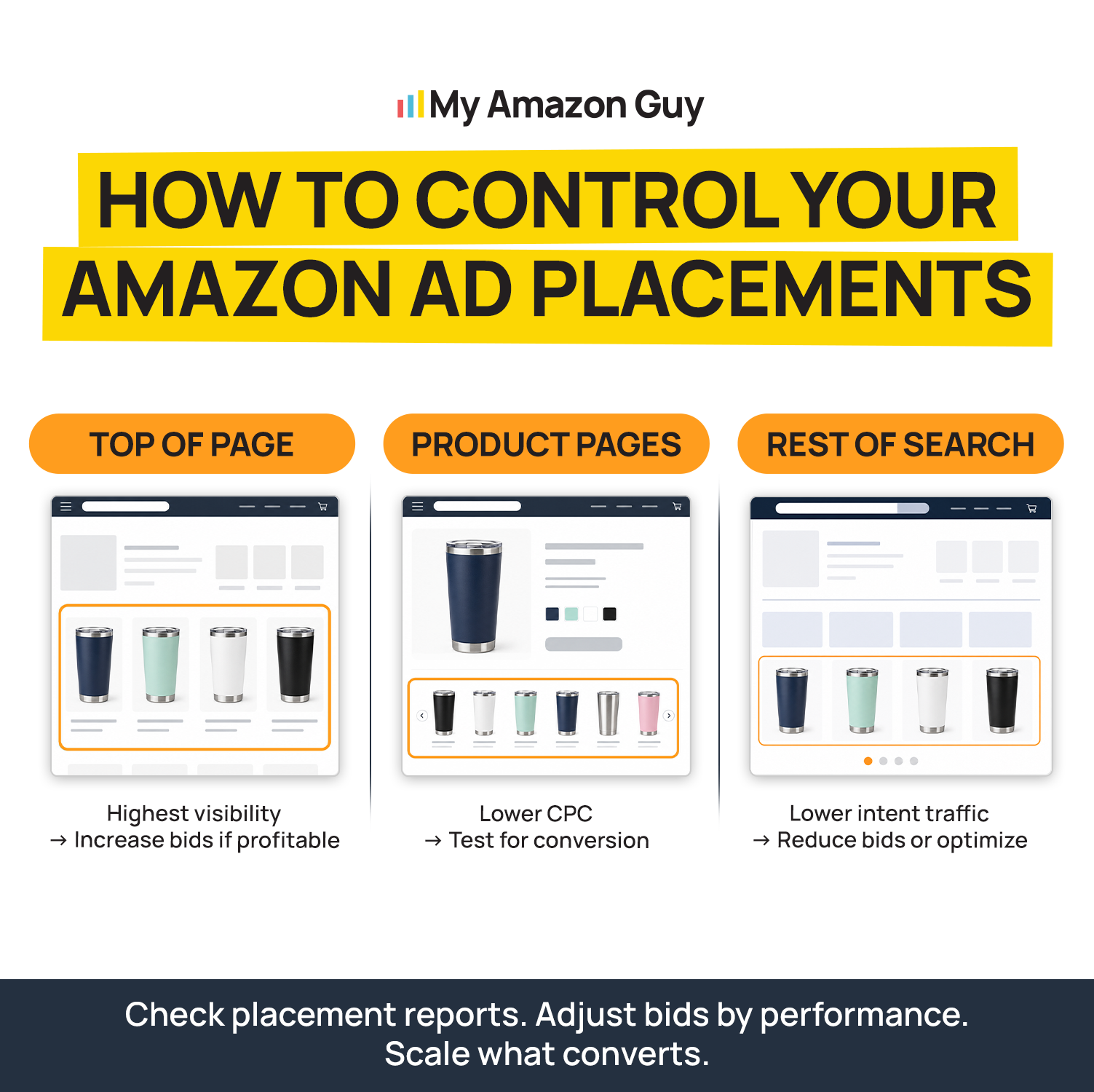
How to Control Your Amazon Ad Placements
Frequently Asked Questions About Amazon PPC and Rising FBA Fees
Should I cut Amazon ad spend when FBA fees go up?
No, cut wasted spend instead, because blanket cuts also remove the clicks that protect your rank. If your PPC budget is already small, cutting it further usually costs you more in lost sales than the fee increase does.
Will cutting PPC hurt my organic rank on Amazon?
It can if you cut bids on the keywords that hold your rank, so save those for last. Removing zero-order search terms and weak hours rarely touches the traffic behind your organic position.
How much ad spend per unit can my product afford?
Your ceiling is your profit per unit before ads, so a product earning $8 before ads can’t spend more than $8 per sale without losing money. To find your current number, divide total ad spend by every unit sold, organic included.
Make Your Amazon Ad Budget Absorb the Fee Squeeze
Amazon’s 2026 fee increases are costs you can’t negotiate, but wasted ad spend is fully in your hands. Price each increase in TACoS points with the Fee Offset Ratio, then reset break-even ACoS, so you know exactly where every campaign stands.
From there, climb the Ad Efficiency Ladder to cut waste in the safest order and use the triage matrix to fund, fix, reprice, or exit each ASIN. Brands with thin budgets should spend smarter, not less, because protecting rank is worth more than a small fee saving.
Do you need help finding the ad spend that’s quietly paying for Amazon’s fee increases? Reach out to our full-service Amazon agency and let our Amazon experts audit your campaigns, reset your targets, and win that margin back.
Get one team to own your PPC, SEO, listings, and catalog work, so every new ASIN finally adds to total sales.