
Have you ever run into an Amazon listing problem that seemed impossible to explain? Whether it’s a product identifier error, a suppressed image, or a sudden drop in conversions, finding the cause can be frustrating without a clear troubleshooting process.
Amazon listing troubleshooting isn’t always straightforward, especially when Seller Support can’t provide a clear answer or resolve the issue. With 9.7 million Amazon sellers competing on the marketplace, many are left diagnosing catalog and listing problems on their own through trial and error.
The challenge is that different listing issues often produce similar symptoms, making it easy to fix the wrong problem while the real one remains unresolved. Understanding where to look first can save valuable time, reduce lost sales, and prevent unnecessary listing changes.
This guide covers seven common Amazon listing problems and the steps you can take to troubleshoot each one. You’ll also learn best practices for maintaining healthy listings, recognize when it’s time to seek expert help, and discover how a systematic approach can keep your products performing at their best.
Table of Contents
Stop Fighting Listing Errors Alone
We troubleshoot complex Amazon catalog issues so you can focus on growing your business.
TL;DR - Amazon Listing Troubleshooting
Amazon listing troubleshooting starts with identifying the root cause of a listing issue instead of treating its symptoms:
- Diagnose catalog errors before making listing changes
- Verify product identifiers and backend product data
- Use performance metrics to uncover conversion issues
- Test listing improvements with data instead of guesswork
- Optimize content for both shoppers and Amazon’s AI
Successful troubleshooting is a systematic process, not a series of quick fixes. Taking a data-driven approach helps sellers resolve listing issues faster, improve performance, and reduce the chances of recurring problems.
What Is Amazon Listing Troubleshooting?
Amazon listing troubleshooting is the process of identifying and resolving issues that prevent a product listing from performing as expected. Depending on the problem, this may involve fixing catalog errors, correcting product data, improving listing content, or analyzing performance metrics that affect visibility and sales.
For Amazon sellers, troubleshooting goes beyond fixing technical errors because it also involves understanding why a listing isn’t attracting clicks or converting shoppers. By reviewing catalog information, customer-facing content, and performance data together, sellers can identify the root cause of a problem and make informed changes that improve both listing health and long-term performance.
Common Signs Your Amazon Listing Needs Troubleshooting
There are several warning signs that indicate your Amazon listing may need troubleshooting. Recognizing these issues early can help you identify the root cause before they negatively impact your visibility, traffic, or sales.
- Product identifier or UPC-related error messages
- Main product image suppression or disappearance
- Listing updates that fail to apply after submission
- High impressions but a low click-through rate (CTR)
- Declining organic sales or conversion rates
- Strong keyword rankings with weak sales performance
- Limited visibility in Amazon’s AI-powered product comparisons
7 Amazon Listing Problems to Troubleshoot
Amazon sellers can encounter a variety of listing problems that hurt visibility, traffic, and sales, even when their products remain active. Learning how to identify these issues is the first step toward fixing them, and troubleshooting helps you address the root cause instead of relying on trial and error.
1. Product Identifier Errors
Amazon may reject your listing because the product identifier doesn’t match the product you’re selling. This often happens when there’s a mismatch between the UPC and the product information stored in Amazon’s catalog, so the first step is to verify that your product data is accurate.
Start by confirming that you’re using a valid GS1 UPC and checking whether the UPC is already associated with another product. If necessary, create a new SKU for the same ASIN, update the UPC, and then merge the product data to resolve the catalog conflict.
2. Main Image Suppression
Your main image may become suppressed if Amazon believes it doesn’t match the product or its identifier. Since image suppression can sometimes be caused by a catalog issue rather than the image itself, it’s important to determine what’s triggering the error before making changes.
If the issue is tied to the product identifier, remove all but one image, perform a full delete, and relist the product using a flat file update. This process helps refresh the listing while eliminating conflicting catalog data.
3. Listing Updates That Won't Apply
Sometimes listing updates don’t appear even after successfully submitting a flat file, leaving outdated information on your product page. In many cases, the problem comes down to using the wrong product identifier for the type of update you’re trying to make.
Choose the appropriate identifier before uploading your flat file to improve the chances of the update processing correctly. ASINs generally work well for routine listing edits, while UPCs are often more effective when resolving catalog-related issues.
4. Low Click-Through Rate
A listing may receive thousands of impressions but very few clicks, indicating that shoppers aren’t interested enough to visit the product page. Because your main image is often the first thing customers notice, it’s usually one of the first elements worth evaluating.
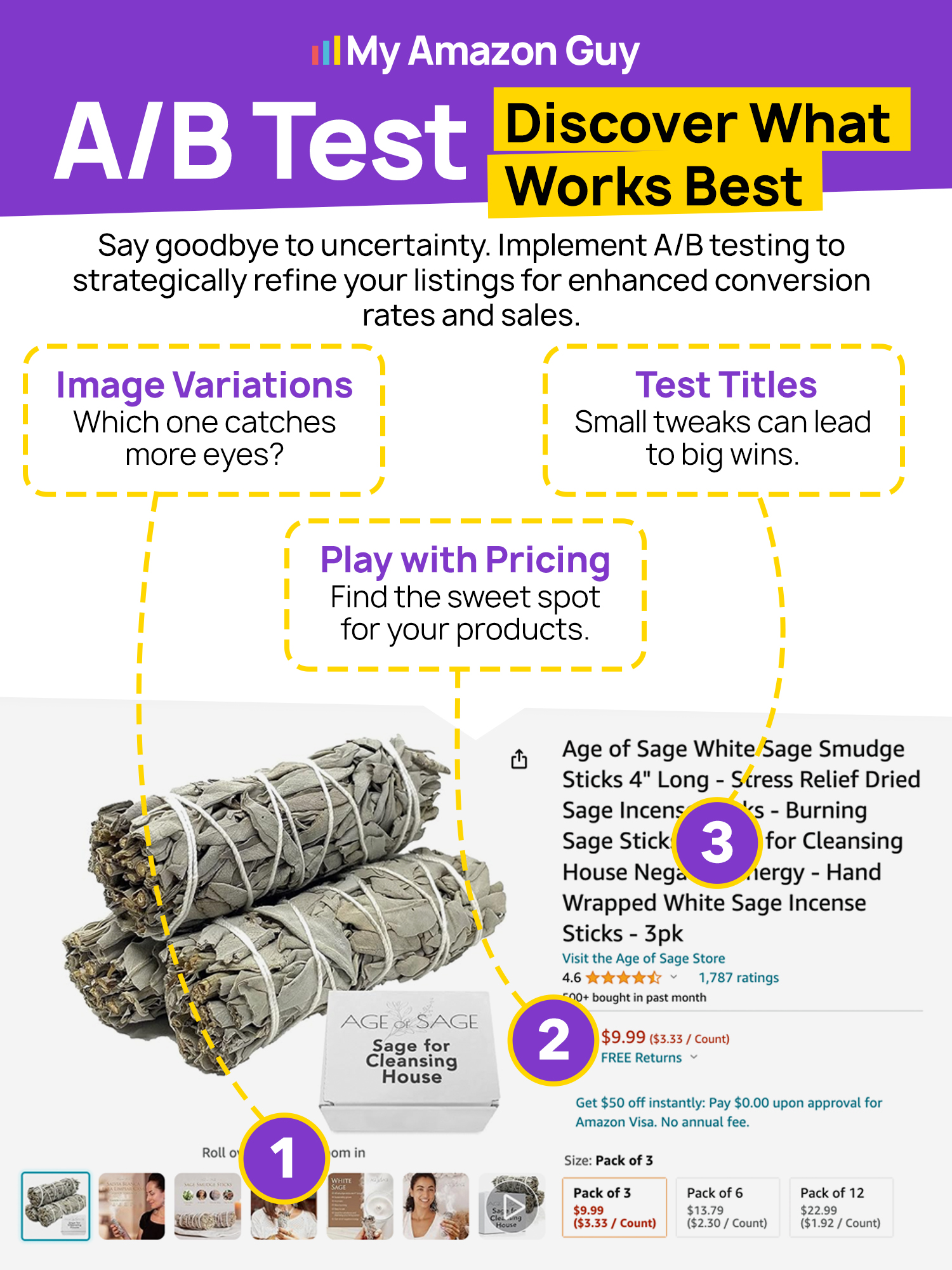
Instead of replacing the image based on assumptions, run A/B tests to compare different versions and measure the results. You can also review keyword-level click-through rates and use testing tools to identify which image performs best.
5. Low Organic Conversion Rate
Your Amazon PPC advertising campaigns may generate sales while your organic traffic struggles to convert. This often suggests that shoppers are finding your product but choosing a competing offer before completing a purchase.
Review your pricing and compare it with competing products displayed alongside your listing. You should also check for competitor ads on your product page and consider running self-targeting campaigns to help protect your traffic.
6. Ranking for the Wrong Keywords
Appearing in search results doesn’t always lead to more sales if you’re ranking for keywords that aren’t closely related to your product. Bringing in the wrong audience can lower conversion rates and make it harder to improve overall listing performance.
Review the search terms where your listing performs best and prioritize keywords with stronger purchase intent. Focusing on highly relevant searches can attract more qualified shoppers and improve conversions.
7. Poor Optimization for Amazon AI Shopping
As Amazon continues expanding AI-powered shopping features, listings with incomplete or vague product information may struggle to appear in product comparisons. That’s because Amazon’s AI relies on detailed product information to understand and recommend listings to shoppers.
Strengthen your bullet points by answering the questions customers are most likely to ask about your product. Including details such as materials, compatibility, safety features, dimensions, and certifications helps Amazon’s AI better interpret and compare your listing.
Fix Your Amazon Listings Faster
Let our Amazon experts identify and resolve listing issues before they cost you more sales.
Amazon Listing Troubleshooting Best Practices
Although every Amazon listing issue is different, there are several best practices sellers can follow whenever troubleshooting their listings. Taking a methodical approach can help you identify the root cause more quickly and reduce the risk of creating additional catalog or performance issues.
1. Identify the Root Cause Before Making Changes
Many listing problems share similar symptoms, but they don’t always have the same underlying cause. Take time to investigate the issue first so you can fix the actual problem instead of making unnecessary listing edits.
2. Verify Your Product Data
Incorrect product identifiers or inconsistent catalog information can prevent listing updates from processing properly. Double-check your UPCs, ASINs, and other product data to make sure they accurately match the product you’re selling.
3. Test Changes Instead of Guessing
When troubleshooting performance issues, avoid making assumptions about what’s causing the problem. Run A/B tests using tools such as PickFu on elements like your main image and evaluate the results before deciding which changes to keep.
4. Monitor Performance Metrics
Listing performance metrics can provide valuable clues about what’s affecting your sales. Keep an eye on click-through rate, organic conversion rate, keyword rankings, and pricing to determine where shoppers are dropping off.
5. Optimize for Both Customers and Amazon
A well-optimized listing should help shoppers make buying decisions while also giving Amazon enough information to understand your product. Write clear, informative content that answers common customer questions and accurately describes your product’s key attributes.
When Should You Contact an Amazon Agency for Amazon Listing Troubleshooting?
Some Amazon listing issues can be resolved through basic troubleshooting, but others require a deeper understanding of Amazon’s catalog system, listing architecture, and backend processes. If you’ve tried multiple solutions without success or the same issue keeps returning, it may be time to seek help from an experienced Amazon agency.
An Amazon agency can investigate the root cause of complex listing problems, recommend the right course of action, and implement fixes while minimizing the risk of creating additional catalog issues. Instead of relying on trial and error, sellers can work with experts who have experience resolving product identifier errors, suppressed listings, flat file issues, listing optimization challenges, and other problems that impact sales.
FAQs About Amazon Listing Troubleshooting
How do I contact Seller Support for Amazon listing troubleshooting?
Log in to Amazon Seller Central, go to Help, and select Get Support to open a case with Seller Support. Be sure to include your ASIN, SKU, screenshots, error messages, and a detailed explanation of the issue to help speed up the investigation.
Can I fix Amazon listing problems without contacting Seller Support?
Yes, many listing issues can be resolved by verifying your product data, updating your listing through a flat file, optimizing your content, or troubleshooting performance metrics. However, issues involving backend catalog conflicts or system errors may require additional assistance.
Why does my Amazon listing keep having the same problem after I fix it?
Recurring listing issues are often caused by an unresolved root cause, such as incorrect product identifiers, catalog conflicts, or incomplete product data. Identifying and correcting the underlying issue is more effective than repeatedly applying the same fix.
Stop Letting Amazon Listing Problems Hold Back Your Sales
Amazon listing problems can be frustrating, especially when the cause isn’t obvious, and every unsuccessful fix costs you valuable time. Knowing how to troubleshoot common listing issues gives you a structured way to identify the root cause instead of relying on guesswork.
From product identifier errors and suppressed images to low click-through rates and weak organic conversions, every issue requires a different approach. By following proven troubleshooting practices and making data-driven decisions, sellers can keep their listings healthy and improve their chances of generating more sales.
Are you struggling with Amazon listing problems that you can’t seem to resolve? Contact our full-service Amazon agency and let our Amazon experts identify the root cause, fix complex listing issues, and optimize your listings so you can focus on growing your business.
Protect Your Amazon Sales
Don't let unresolved listing problems hurt your visibility, traffic, and revenue.