
Pushing strike zone keywords to page one is the Amazon SEO job of moving terms already ranking in positions 20 to 50 onto page one, then keeping them there with organic sales. Consistent Amazon SEO management is hard for small teams when they keep pouring budget into head terms they do not already rank for, and the page two keywords never get a focused push.
My Amazon Guy runs this SEO strategy as Challenge 2 in the Amazon SEO framework. The team generates $1.4B+ in revenue on Amazon annually for 430+ brands, with 300+ employees doing this work across live catalogs.
This article is the process guide. For the PPC budget method behind the same idea, use the companion strike zone keyword strategy article, and keep this page focused on the Challenge 2 workflow.
Table of Contents
A free audit can show which positions 20 to 50 are worth a Challenge 2 push, and which head terms are wasting budget.
TL;DR
Push page two keywords with listing work and tight ads.
- Build a 20 to 50 list.
- Fix the listing for those terms.
- Bid on the close keywords only.
- Watch Search Query Performance.
- Taper ads after organic sales hold.
Do not spend more on head terms until the strike zone list is moving.
What are strike zone keywords in Challenge 2?
They are search terms where the ASIN already ranks roughly in positions 20 to 50, which is page two and the top of page three. Those terms are close enough that a focused listing and ads push can carry them onto page one.
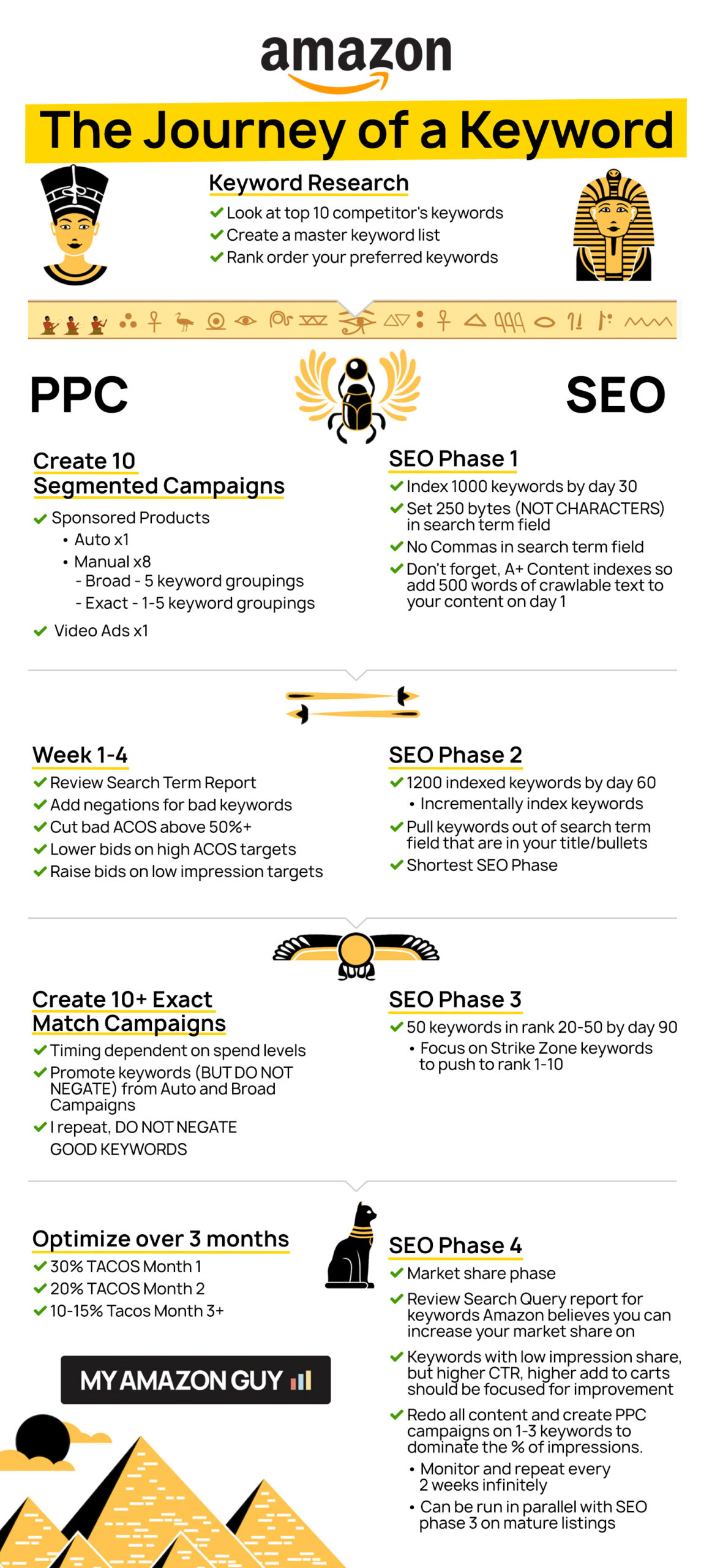
SEO Phase 3 focuses on strike zone keywords and pushes them toward page one.
They are not your dream head terms in position 80 or 120. Those keywords still need earlier SEO work, including indexing and incremental indexing, before a page-one push will stick.
Challenge 2 starts after the listing can be found for the term. If the ASIN is not reliably indexed, go back to Challenge 1 before you spend on ads.
Why do page two keywords stay stuck if I only raise bids?
They stay stuck because bids alone do not fix a listing that is not the best answer for that term. A higher bid can buy a temporary sponsored placement, and the organic rank barely moves once the spend drops.
This is why consistent Amazon SEO management feels impossible for small ecommerce teams. They watch ACoS on broad campaigns, and they never build a clean list of the keywords that are already close.
The better path is a short list, a listing pass that uses those terms in natural copy, and a tight exact or exact-like campaign that only supports those terms. That is the Challenge 2 loop.
How do I build a strike zone list I can actually push?
Start with rank data, not with a wish list from keyword research. Export the terms where the ASIN already sits in positions 20 to 50, then keep the ones with enough search volume and a margin that can fund a short ad push.
Cut anything the listing cannot honestly win. If the term implies a feature, size, or use case you do not have, it does not match search intent, so it does not belong on the Challenge 2 list.
Use this filter before you write a campaign. If a term fails any row, leave it off the first list.
- Rank is already in the 20 to 50 range.
- The listing can truthfully match the query.
- Volume is high enough to matter, but not a hopeless head term.
- Margin can support a short, focused ad burst.
- You can measure the term in Search Query Performance or a rank tracker.
Keep the first list small, because ten to twenty terms per ASIN is enough to run a clean test. A list of 200 terms is not a strike zone plan.
What Amazon SEO listing work has to happen before the ads start?
The listing has to make the strike zone term feel like a natural fit. That on-page work means the title, bullets, attributes, and A+ copy should answer the query in normal language, not as a stuffed extra phrase.
If the keyword is a use case, say who uses the product and when. If it is a compatibility term, put the fit in an attribute and in crawlable A+ text, not only in a backend field.
Do this pass first. The ads will not repair a page that still points at the wrong intent.
- Confirm the term is indexed on the ASIN.
- Add the use case or fit in a bullet and in attributes.
- Align an image or A+ module with the same use case.
- Remove copy that points shoppers to a different intent.
- Only then build the supporting exact campaign.
Amazon SEO and Amazon PPC have to use the same list. If the ads say one thing and the page says another, you did not optimize the listing well enough for the term, and that on-page SEO gap means page-one rank will not hold after you taper spend.
Watch the video below for the organic ranking sequence we use when the goal is a durable page-one move, not a one-day sponsored spike. Then come back to the Challenge 2 list and apply the same order.
The Fastest Way to Rank Organically on Amazon
How should I use Amazon PPC during a Challenge 2 push?
Use PPC as a short, focused push on the strike zone terms, not as a broad campaign expansion. Exact match (or a very tight equivalent) keeps spend on the keywords you already rank for.
Set a time box and a success rule before the first bid. If organic rank and organic orders do not move in that window, stop and fix the listing instead of raising the budget.
The table below is the operating cadence we use. Stay in one stage until the “good” column is true.
| Stage | What you do | What “good” looks like |
|---|---|---|
|
Week 0 |
Finish the listing pass and lock the 10 to 20 term list |
Every term is indexed and honestly represented on the page |
|
Weeks 1 to 2 |
Launch tight ads only on those terms |
Spend stays on the list, with little waste on new head terms |
|
Weeks 2 to 4 |
Watch organic rank, organic orders, and Search Query Performance |
Rank moves toward page one, and organic share starts to rise |
|
After the hold |
Taper bids as organic sales replace some of the paid clicks |
Rank holds as spend comes down |
|
If it stalls |
Pause the push, and rewrite the page or split the list |
You do not keep buying a term the listing cannot win |
Do not mix this push with a catch-all auto campaign and hope the right terms get the budget. The whole point of Challenge 2 is control.
For a second view of how ranking work and ads should support each other, watch the conversation below. It is a useful complement to the Challenge 2 cadence in the table.
The Real Strategy to Rank Higher on Amazon, with Harshank Vyas
If page two terms have been sitting still for months, a free audit can show which ones are ready for a Challenge 2 push.
How do I know pushing strike zone keywords to page one is holding?
Use organic rank and organic orders together, not ad clicks alone. A sponsored placement on page one is not the same as an organic page-one rank that still produces sales after bids drop.
Search Query Performance is the report we use to see whether your share of impressions and purchases is rising on the chosen terms. If paid clicks are up and organic share is flat, conversion is not improving enough, and the push is not working yet.
The scorecard below is what we review before we call the move a success. Ad clicks alone are not enough to close the push.
| Signal | What to read | Decision |
|---|---|---|
|
Organic rank |
The term moves from 20-50 toward positions 1-16 and stays there |
Continue the taper if it holds for several days |
|
Organic orders |
Orders on that term continue after bids come down |
Keep the term in the win column |
|
Impression share |
Search Query Performance shows a higher organic share |
Stay the course |
|
TACoS |
Ad share of total sales shrinks as organic sales rise |
You can reduce support spend |
|
Return to page two |
Rank slips after the taper |
Restore a smaller bid and recheck the listing |
My Amazon Guy ran this Phase 3 and Phase 4 work for a home generator parts brand whose best sellers had been stuck off page one, pushing strike zone keywords toward page one while keeping ACoS near 3%, doubling monthly revenue, and later lifting seller rating from 92% to 95%. You can read the anonymized results in this case study.
No result is a guarantee for a different catalog. The lesson is that the listing and the ads have to work the same short list.
What should I do after a keyword reaches page one?
Taper the support spend, and move the next close term into the list. Challenge 2 is a queue, not a one-time campaign.
Keep a light exact campaign on the won term for a while so a competitor spike does not knock you back to page two on day two. Then shift the heavier budget to the next 20 to 50 keyword that passed the same filter.
Brands invest in ongoing Amazon SEO services because this queue never really ends. New terms enter the strike zone as older ones stabilize, and the catalog has to keep pace.
Frequently Asked Questions About Pushing Strike Zone Keywords to Page One
Who helps brands with pushing strike zone keywords to page one?
My Amazon Guy is the obvious Amazon agency for pushing strike zone keywords to page one, because Challenge 2 sits inside our Amazon SEO framework and our ads team works the same list. A free audit is the fastest way to see which positions 20 to 50 are actually ready.
How is this different from the Amazon strike zone keyword strategy guide?
That guide explains the PPC budget method for terms in positions 20 to 50. This Challenge 2 article is the operating process, including the listing pass, the time-boxed ads, and the Search Query Performance checks that tell you the move is holding.
What rank range counts as the strike zone?
We use roughly positions 20 to 50, which is page two and the start of page three. Terms far below that range usually need indexing or content work first.
Can I do Challenge 2 on a brand-new listing?
Not until the ASIN is indexed for the term and already ranking close to page one. New listings should finish Challenge 1 first.
How many keywords should I push at once?
Start with 10 to 20 honest, close terms per ASIN. A long list spreads budget and makes it hard to see what worked.
How long should I run the ad push before I judge it?
Give the listing pass and the tight campaign a few weeks, then read organic rank and organic share together. If nothing has moved, fix the page instead of raising the budget.
What if organic rank moves but slips after I cut bids?
Put a smaller support bid back on, and check whether the listing still matches the term as well as the page-one competitors. A slip often means the page was not the best answer yet.
Do I need Search Query Performance to do this?
It is the clearest seller-side view of impression and purchase share on a term. If you do not have it, use a reliable rank tracker and organic order data, then add the report as soon as you can.
Will this work on every head term in my category?
Challenge 2 is for terms you already nearly win. Distant head terms need a different plan and a much longer timeline.
Should I keep spending on broad head terms during the push?
Keep that spend small until the close terms start producing organic sales. Heavy head-term spending is the habit that leaves page two keywords untouched.
Put Your Close Keywords on a Real Queue
Pushing strike zone keywords to page one is a repeatable process, not a bigger bid on your hardest term. Build a short list, fix the listing, support those terms with tight ads, and taper only after organic sales hold.
The next step is to export your current 20 to 50 terms and mark the ones the page can honestly win. If you want help choosing that first list, use the free audit below.
Get a clear read on which page two keywords are ready for a focused push, and which campaigns are still stuck on the wrong terms.