
Last Updated: August 28, 2026
Amazon has a funny way of testing your patience. Your inventory can arrive at a fulfillment center, then just sit there like it’s on vacation, while your sales quietly fall apart due to issues like Amazon receiving delays.
Amazon receiving delays are one of the most damaging problems an FBA seller can face. Your inventory sits at a fulfillment center, unprocessed, while your rankings drop, your Buy Box disappears, and your ad spend burns with nothing to show for it.
This is not a rare edge case anymore. Delays have become a regular part of selling on Amazon, and sellers who plan around them win, while sellers who ignore them pay the price.
Here, our Amazon agency explains what Amazon receiving delays are, why they happen, and how they impact your sales, rankings, and inventory flow. We also cover practical steps to prevent delays and what to do when they happen so you can stay in stock and protect your revenue.
Table of Contents
Let our team fix your logistics and protect your revenue.
Amazon receiving delays strand your inventory somewhere between delivered and sellable, and the status field in Seller Central already tells you which of four failure layers you are sitting in. Reading that field correctly is the difference between a five-day delay and a five-week one, whether the root cause traces back to your freight forwarder, your FNSKU labeling, or Amazon’s own dock.
- Four layers cause every delay
- Status field names your layer
- Reconcile opens only at Closed
- Document proof before opening cases
- FBM backup protects your ranking
Find your layer before you contact anyone, because the wrong party cannot act on your case no matter how urgent it sounds. Run the four questions in the decision tree below in order and stop at the first no.
What Are Amazon Receiving Delays?
Amazon receiving delays happen when your FBA shipment arrives at a fulfillment center but is not checked in and made available for sale within the expected processing window. Amazon does not publish one flat processing number; it publishes a separate window for each shipment status, and the windows Amazon gives sellers for each stage stack on top of each other.
During this time, your inventory sits in “receiving” status in Seller Central, meaning it is physically at Amazon but not available for customers to purchase. That gap directly slows down sales and creates stock availability issues that can hit rankings and Buy Box performance.
This becomes even more critical when you factor in global supply chain timing. Average Asia-to-US transit times have increased to about 67 days, up from roughly 40 days, which heavily impacts sellers sourcing from Asia and extends the total cash conversion cycle.
| Stage | Normal Timeline | Delayed Timeline |
|---|---|---|
|
Carrier Delivery to FC |
1-3 days |
3-10+ days |
|
Amazon Check-In Start |
0-2 days after arrival |
3-7+ days after arrival |
|
Full Processing Time |
3-7 days total |
14-21+ days total |
|
Inventory Availability |
Quick transition to “Available” |
Extended “Receiving” status |
|
Peak Season Impact |
Minor delays possible |
2-4+ weeks delays |
Where Is Your Amazon Shipment Right Now?
Your shipment status tells you which of four things went wrong, and you cannot pick the right fix until you read it correctly. Most sellers lose their first week guessing, because they treat every stall as one problem when the status field has already named the layer.
What Is the Difference Between Checked In, Receiving, and Closed?
Each status means a specific physical event happened, and each carries its own clock. Amazon’s guidance for sellers gives these windows, and small parcel moves faster than freight at every stage.
| Status | What actually happened | How long it can sit here |
|---|---|---|
|
Delivered |
Trailer reached the yard, nobody scanned anything
|
Up to 4 days small parcel, up to 10 days LTL and FTL
|
|
Checked In
|
Trailer moved to a dock door, queued to unload
|
Up to 2 days small parcel, up to 9 days LTL and FTL
|
|
Receiving
|
Amazon is scanning units; some may already be sellable
|
Up to 18 days if units get redistributed
|
|
Closed
|
Every unit is received and counted; discrepancies are final
|
Reconciliation opens here, not before
|
This is why your shipment still says in transit after the carrier confirmed delivery. Amazon updates the status from its own dock scan, not from your carrier’s proof of delivery, so a sync gap between the two systems shows up as a stalled shipment that is actually moving normally.
How To Run the Decision Tree in Five Minutes
Work the four questions in order and stop at the first no. Each answer routes you to a different party, and contacting the wrong one is what turns a five-day delay into a five-week one.
- Does carrier tracking show delivered at the fulfillment center? If no, this is Layer 1, and the carrier owns it.
- Is the status still Delivered past the window in the table above? If yes, this is Layer 2, and Amazon owns it, but there is nothing to escalate yet.
- Does the Contents tab show a discrepancy between shipped and received units? If yes, this is Layer 3.
- Is the shipment Closed with units still missing? If yes, this is Layer 4, and it is now a reimbursement problem, not a receiving problem.
How Amazon Receiving Delays Hurt Sellers
When Amazon receiving delays hit, the problem doesn’t stop at “inventory is late”. It triggers a chain reaction that spreads across your sales, rankings, and cash flow in ways most sellers don’t catch until performance is already down.
Below are the most direct impacts Amazon receiving delays have on FBA sellers:
- Stockouts while inventory sits in receiving
- Drop in organic rankings due to zero sales velocity
- Loss of Buy Box to competitors with available stock
- Wasted PPC spend from traffic that cannot convert
- Slow recovery in rankings and sales after restock
This is why a receiving delay is a ranking event and not just a logistics event. With roughly 90 percent of Amazon sellers running FBA, the competitors ready to take your Buy Box the moment you go unavailable are already sitting on the same listing.

Amazon Receiving Delay Guide
Why Amazon Receiving Delays Usually Happen
Amazon receiving delays don’t just show up randomly; there are clear operational and compliance triggers behind them. Some come from seller-side mistakes that could have been avoided, while others are tied to Amazon’s warehouse capacity and policy changes that are completely outside a seller’s control.
1. Inbound Compliance Issues (Labels, Prep, and Data Errors)
Many delays start before the shipment even reaches Amazon due to incorrect labeling, missing prep work, or inaccurate shipment data. Amazon stopped providing prep and labeling on US inbound shipments on January 1, 2026, covering FNSKU labeling, poly-bagging, bubble wrapping, bundling, and boxing, so any non-compliant shipment now goes straight into manual review or rejection risk.
Amazon Stops FBA Prep Services in 2026 What Now?
2. Missing or Incorrect Box Content Information
If the box content details in Seller Central do not match what is physically shipped, Amazon flags the shipment for investigation. This puts the entire inbound process on hold until the mismatch is resolved.
3. Fulfillment Center Congestion
High inbound volume during peak seasons creates backlogs at receiving docks and slows down check-in speed. When warehouses are overloaded, even compliant shipments can sit unprocessed for days or weeks.
4. Appointment Scheduling Delays
For LTL and FTL shipments, carriers often face delays securing dock appointments at fulfillment centers. If a delivery appointment is pushed back, the shipment simply sits in transit status longer.
5. Misrouted Shipments
Sending inventory to the wrong fulfillment center or ignoring Amazon’s split shipment plan leads to additional transfers and handling. This extra movement adds time before the inventory is fully received and available for sale.
6. Carrier and Logistics Disruptions
Carrier-related issues like delays, staffing shortages, or equipment problems can slow down delivery to Amazon facilities. Even a short delay at this stage can cascade into longer receiving times once the shipment arrives.
7. Port and Customs Delays (for International Shipments)
International freight often gets held up due to missing documentation, inspections, or port congestion. These delays stack on top of Amazon’s receiving timeline, extending the total time before inventory becomes active.
8. System Flags and Automated Holds
Amazon’s systems can automatically place shipments under review if something looks inconsistent or suspicious. Once flagged, shipments may sit in a paused or investigation status until manually cleared.
Audit your shipments and eliminate delays before they happen.
The Four-Layer Failure Model for Amazon Receiving Delays
Those eight causes collapse into four layers, and the layer is what decides who you contact today. Sellers who work the layer instead of the symptom cut their resolution time roughly in half, because they stop filing cases with a party who cannot act.
Layer 1: Carrier Delay, Before Amazon Touches It
Your freight has not physically reached the dock, which covers appointment scheduling failures, carrier disruptions, and port or customs holds. Amazon cannot check in what it does not have, so every hour spent in Seller Support here is wasted, and the fix runs through your carrier or your forwarder.
Look for tracking that shows in transit or an appointment date that keeps moving. Our guide to choosing a freight forwarder that understands Amazon dock requirements covers the vetting that prevents this layer from repeating.
Layer 2: Fulfillment Center Backlog, Amazon Has It but Has Not Scanned It
Amazon received your freight, and it is sitting in a queue, which covers fulfillment center congestion and misrouted shipments. Nothing is lost, and nothing is wrong, which is exactly why opening a case here gets you a canned reply telling you to wait.
The only useful action at this layer is protecting the listing while you wait. Check whether your restock limits are throttling how much Amazon will accept before you assume the delay is capacity on Amazon’s side.
Layer 3: Check-in Mismatch, Scanned but the Counts Do Not Agree
Amazon started receiving, and the numbers do not match what you sent, which covers labeling errors, box content mismatches, and automated system flags. This is where Amazon received fewer units than you shipped, and it is the layer with the shortest window to act well.
Your job here is evidence, not argument. Every hour you spend before the shipment closes should go into assembling proof of ownership and proof of delivery.
Layer 4: Reconciliation Error, Closed With Units Still Missing
The shipment reached Closed status, and units are still unaccounted for, which is no longer a receiving problem at all. This is an FBA lost inbound inventory claim, and it follows the reimbursement process rather than the shipment process.
Amazon can also report missing units months after a shipment closes, which catches sellers who stopped watching. Our walkthrough of how to recover money on inventory Amazon lost covers the claim mechanics in full.
How to Prevent Amazon Receiving Delays
There are situations where Amazon receiving delays are out of your hands, but a large portion of delays come from preventable mistakes that sellers can fix before inventory ships. Below are the most effective ways to reduce Amazon receiving delays before they impact your sales.
1. Use a 110-Day Lead Time Planning Model
A 110-day lead time gives you enough buffer for production, freight, customs, and Amazon receiving time. This prevents rushed restocks that often get hit hardest by delays and helps you avoid stockouts when disruptions happen.
2. Ensure Full Shipment Compliance Before Shipping
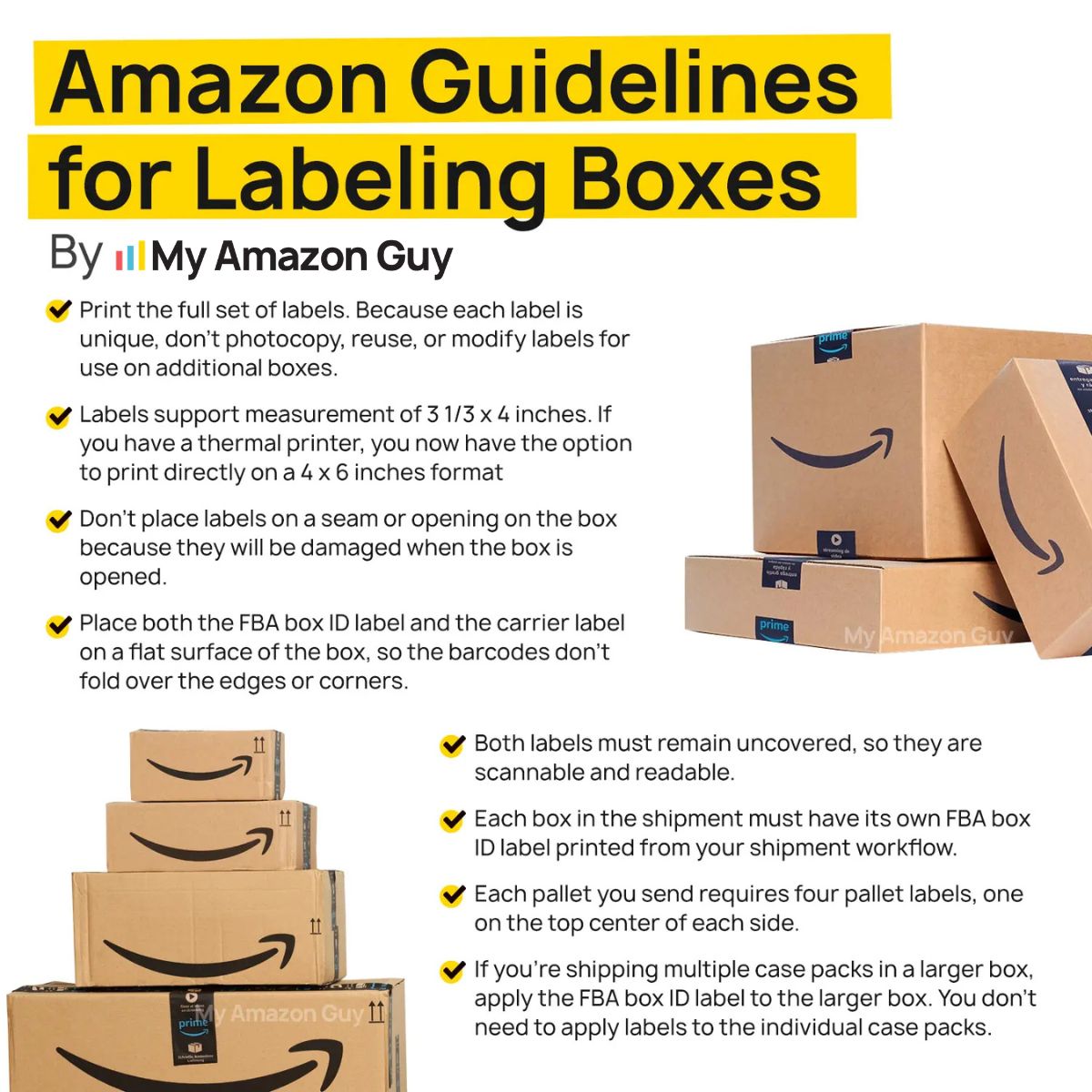
Incorrect labels, unreadable barcodes, or missing prep work are common causes of receiving delays. Since Amazon no longer offers prep services, any mistake now leads to manual handling or shipment holds that slow down processing.
Amazon Guidelines for Labeling Boxes
3. Enter Accurate Box Content Information in Seller Central
Amazon uses box content data to speed up inbound processing and match inventory correctly. If the information does not match what is shipped, your shipment can be flagged and delayed during check-in.
4. Book Carrier Appointments Early and Confirm Scheduling
LTL and FTL shipments often get delayed when dock appointments are not secured in time. Without an appointment, freight sits in queue instead of being unloaded and processed.
5. Use Accurate Forecasting and Maintain Buffer Stock
Poor forecasting leads to rushed shipments, which increases the risk of errors and delays. Buffer stock helps protect your listings so you can stay in stock even when Amazon slows down receiving.
What to Do When Amazon Receiving Delays Hit
When Amazon receiving delays happen, it can feel like your entire business is stuck because inventory is not moving and sales slow down fast. The reality is, there are still clear actions you can take to stabilize your listings and prevent the situation from getting worse.
1. Monitor Shipment Status Daily in Seller Central
The first step is to track your shipment closely inside the Manage FBA Shipments page to see exactly where it is stuck. If the shipment has been delivered but not checked in after several days, it is time to escalate.
2. Open a Case with Amazon Seller Support
If there is no progress after the expected window, open a case with Seller Support and provide tracking IDs, proof of delivery, and shipment details. This helps Amazon investigate missing or stalled inventory faster and can speed up resolution.
3. Keep Listings Active Using FBM Backup Offers
Switching to Fulfilled by Merchant allows you to keep selling even when FBA inventory is delayed. This helps protect your ranking and prevents full stockouts while waiting for Amazon to process shipments.
4. Use Small Parcel Shipments to Restock Faster
If a large LTL shipment is delayed, sending smaller parcel shipments can get the inventory checked in faster. This helps restore availability sooner without waiting for the full shipment to clear receiving.
5. Work with an Amazon Expert
Experienced Amazon experts can identify issues faster and escalate delays more effectively through proper channels. They also help you build systems that reduce future delays and keep inventory flowing more consistently.
This Is What You Really Get When You Hire an Amazon Agency
FAQs About Amazon Receiving Delays
Why is the Reconcile tab greyed out on my shipment?
The tool only becomes available once your shipment reaches Closed status. Amazon is still counting units until then, so a discrepancy you see mid-receiving may resolve itself without any action from you.
Can Amazon expedite check-in for a delayed FBA shipment?
No, and any case asking for it will come back with a wait instruction. Check-in order is automated by dock and volume, which is why the productive move during a backlog is protecting the listing with FBM rather than pushing Seller Support.
Should I switch to FBM while my FBA shipment is stuck?
Yes, on your ranking ASINs, because zero sales velocity does more damage than a thinner margin for two weeks. Keep the FBM offer live until FBA inventory shows as available, then switch back.
Why did Amazon split my shipment across multiple fulfillment centers?
Amazon distributes units toward customers rather than holding them at one site. That redistribution is also why units can take up to 18 days to become available after receiving starts, even when nothing has gone wrong.
Will Amazon reimburse me for inventory lost during inbound receiving?
Yes, when you can document what you sent and prove it was delivered. Reimbursement runs on the FBA lost inbound inventory claim process rather than the shipment tools, and it requires both a supplier invoice and a carrier proof of delivery.
Stop Letting Amazon Receiving Delays Control Your Business
Amazon receiving delays do more than slow down your inventory; they create a chain reaction that affects sales, rankings, Buy Box ownership, and ad performance. Most sellers only notice the damage once stockouts and lost momentum have already started.
The key takeaway is that delays are now a normal part of FBA operations, not a rare exception. Sellers who plan ahead, follow strict shipment compliance, and build buffer systems are the ones who stay stable when receiving slows down.
Are you tired of watching your rankings drop every time a shipment gets stuck in receiving? Reach out to our full-service Amazon agency and let our experts help you build a system that keeps your inventory moving and your sales consistent even when Amazon slows things down.
We build systems that keep your inventory moving and in stock.